











































If your office still runs the Avaya AWH55+ or AWH75N wireless headset — Avaya's own branded wireless system for the 9600 series phones — this FAQ covers the setup and configuration questions that come up most. Both are long discontinued, but plenty are still in service, and the installation and mute details below apply exactly as they did when new.
Key takeaways
- The Avaya AWH55+ and AWH75N are Avaya's own branded wireless headsets with EHS built in — no lifter needed.
- AWH55+ is 900MHz with a top-mounted mute button; AWH75N is 1.9GHz DECT with mute on the minus-volume button.
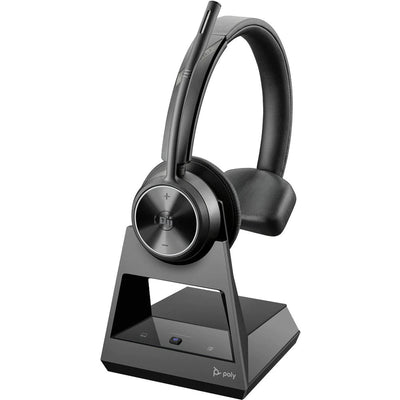
- Both are discontinued. The current equivalent is the Poly CS540 with the APV-63 EHS bundle for Avaya phones.
- The base dial should be set to position 1 at the 3 o'clock position, and the ABCD switch to B.
- On a console (e.g. 302D), remote answer/end doesn't work — you get hands-free audio, but calls are handled like standard incoming calls.
AWH55+ vs AWH75N: what's the difference?
| Avaya AWH55+ | Avaya AWH75N | |
|---|---|---|
| Frequency | 900 MHz | 1.9 GHz DECT |
| Wearing style | Over-the-head or around-the-ear | Lightweight, executive in-ear style |
| Fit | Rests on top of the ear | Sits slightly more in the ear |
| Mute button | Top button on headset | Minus (–) volume button |
| Talk time | Slightly longer per charge | Shorter, but full-day usable with a mid-day top-up |
| Range | Up to 300 ft | Up to 300 ft |
Both offer noise cancellation, mute capability, and comparable sound quality — the real differences are wearing style and frequency. Since both have EHS built in, neither needs the manual lifter a standard third-party wireless headset would require.
The Avaya AWH55+ and AWH75N have EHS integrated directly into the headset system, so calls can be answered and ended remotely without any separate cable or accessory. Most modern third-party wireless headsets (Poly, Jabra) need a separate EHS cable added to get the same function — the Avaya-branded units simply had it built in from the factory.[/definition>How to mute the AWH55+ or AWH75N
Hold the mute button down for 5 seconds — you'll hear 3 beeps, which continue while the call is on hold or muted. To take it off mute, hold the same button down for 5 seconds again. On the AWH55+, that button is on top of the headset; on the AWH75N, it's the minus-volume button.
Base settings for the 9600 series
Two settings on the base matter for correct operation with a 9600-series phone:
- The round dial on the left side of the base should have the #1 pointed to the 3 o'clock position.
- The A-B-C-D switch underneath the base should be set to B.
On the right side of the base, a switch marked – and = controls answer behavior: at the – position, you don't get a dial tone (or answer the call) until you press the headset button; at =, lifting the headset off the base answers the call automatically. We recommend keeping it at –, so picking up the headset for another reason doesn't accidentally answer a call.
Installing the AWH55+ or AWH75N on a 9600-series phone
- Plug the AC adapter into an outlet; the other end connects under the standing base of the headset.
- In the small bag included with the headset, find the short cord with the black square box carrying a white "96XX" tag.
- Plug that black cord into the back of the phone's headset port — not the MOD port, which sits just above it.
- Plug the standing base's attached headset cord into the black cord you just connected to the phone.
- Find the thin cord labeled "ring detector" in the bag. Remove the adhesive backing on the small circular sensor and place it under the handset, centered on the speaker area, then plug the other end under the standing base.
- Charge the headset for at least 3 hours before first use.
Using the AWH55+ or AWH75N on a console
Both headsets work on a console — the AWH55+ is the recommended choice. On a 302D console, no additional parts are needed; for other console models, the exact cord required varies. One important limitation: a console setup does not support remote answering or ending of calls. You still get hands-free audio, but an incoming call is handled like a standard call — the current call goes on hold and the new one is answered normally, without the headset's remote controls.
These headsets are discontinued — what to buy now
Both the AWH55+ and AWH75N have been discontinued. If yours has finally failed, or you're setting up a new 9600-series desk, the modern path is a current wireless headset paired with the correct EHS cable for Avaya phones. The Poly CS540 with the Avaya EHS (APV-63) bundle provides the same built-in-style remote answering the AWH line offered, on current and legacy 9600-series phones alike. For the full current Avaya compatibility picture — including newer J100-series phones — see our Avaya wireless headsets guide.
What is the difference between the Avaya AWH55+ and AWH75N?
The AWH55+ operates on 900MHz with an over-the-head or around-the-ear wearing style and a top-mounted mute button. The AWH75N operates on 1.9GHz DECT with a lighter, more executive in-ear style, and mute is the minus-volume button. Both offer up to 300 feet of range and built-in electronic hook switch for remote answering.
Are the Avaya AWH55+ and AWH75N still available?
No, both are discontinued. The current equivalent for Avaya 9600-series and newer phones is the Poly CS540 paired with the Avaya EHS (APV-63) bundle, which provides the same remote call-answering function that the AWH line offered natively.
How do I mute an Avaya AWH55+ or AWH75N wireless headset?
Hold the mute button down for 5 seconds until you hear 3 beeps, which continue while the call is muted or on hold. Hold the same button for 5 seconds again to unmute. On the AWH55+, the mute button is on top of the headset; on the AWH75N, it's the minus-volume button.
Can I use an Avaya wireless headset with a console?
Yes, but with a limitation. Both the AWH55+ (the recommended model) and AWH75N work on a console, but remote answering and ending of calls is not supported in this configuration — you get hands-free audio only, and incoming calls are handled as standard calls rather than through the headset's remote controls.
If your AWH55+ or AWH75N is still working, the settings and installation steps above will keep it running smoothly. When it finally needs replacing, the Poly CS540 with the Avaya EHS bundle picks up exactly where it left off — and works on current Avaya phones too. Call our team at 877-999-3838 if you need help matching your exact phone model.

Comments (0)