


Poly EncorePro HW520 Binaural Headset with DA85 Adapter
Poly EncorePro HW520 Binaural Headset with DA85 Adapter
 Same Day Shipping
 30 Days Money Back Guarantee
★
30 Days Money Back Guarantee
★
Non-Returnable Items (Manufacturer Policy)
Please note that the following items cannot be returned due to manufacturer policies:
- Accessories & Replacement Parts – such as ear cushions, headbands, and similar components.
- Batteries – including batteries for headsets and adapters.
- Video Solutions – all video devices are non-returnable, including products such as Panacast 50 and Teams Room Systems.
- Custom or Specialized Items – including SHR headsets, CA22 PTT, Jabra GSA PTT headsets, and ClearOne conference systems.
We recommend confirming compatibility and requirements before placing your order. If you need help choosing the right product, our team will be happy to assist.
- Accessories & Replacement Parts – such as ear cushions, headbands, and similar components.
 No Sales Tax (Except Selected States)


Buying more than 1? contact us for a quote.
Couldn't load pickup availability
Description
Description
Built for the Eight-Hour Shift
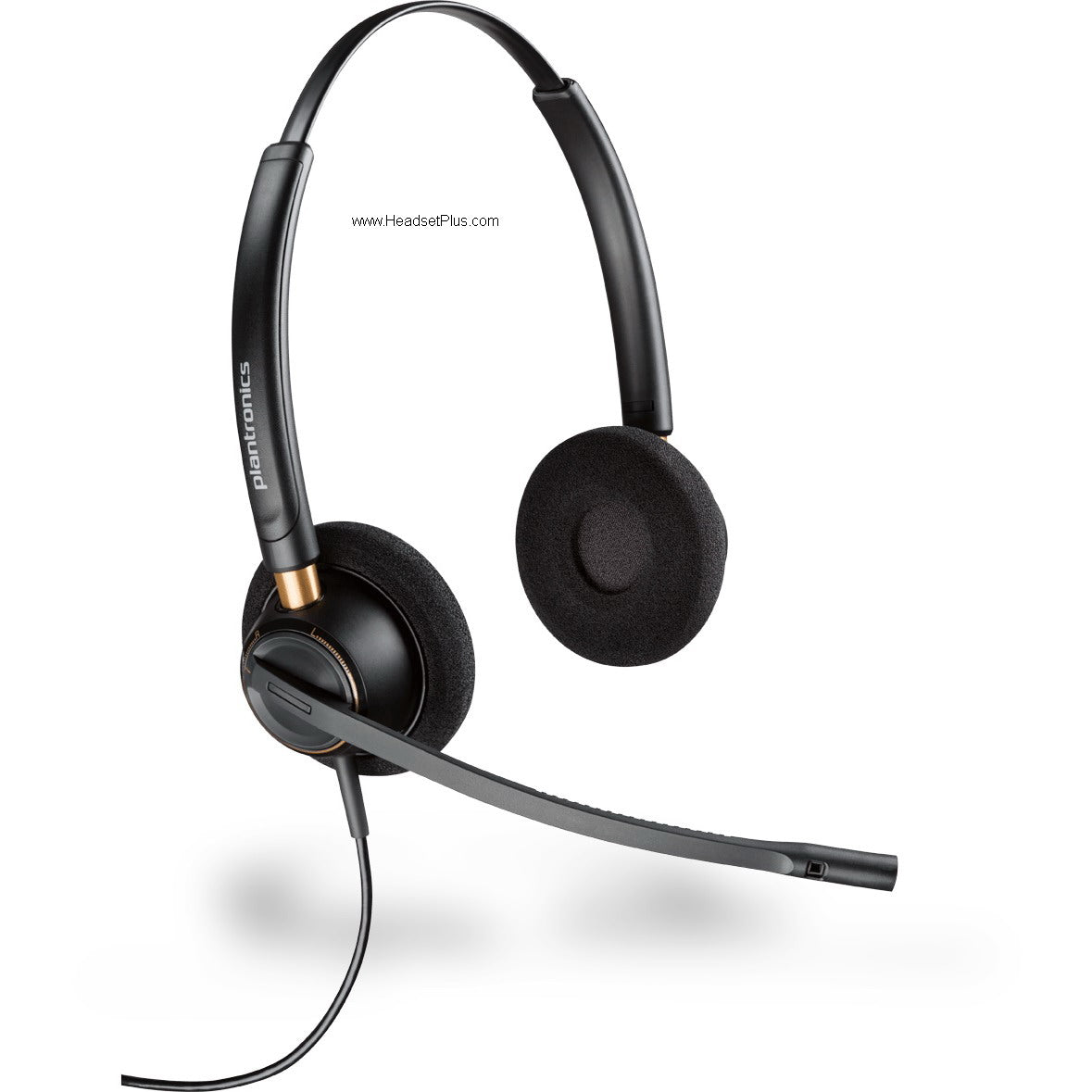
Picture the headset on your head from the first call of the morning to the last one before you log off — that's the day the Plantronics EncorePro HW520 was built for. It's a wired, dual-ear office headset made for people who are on calls all day: contact centers, help desks, telesales, customer service. Both ears covered to keep you in the conversation, a noise-cancelling mic so the caller hears you and not the sixty other agents in the room, and a build light enough to forget by mid-morning.
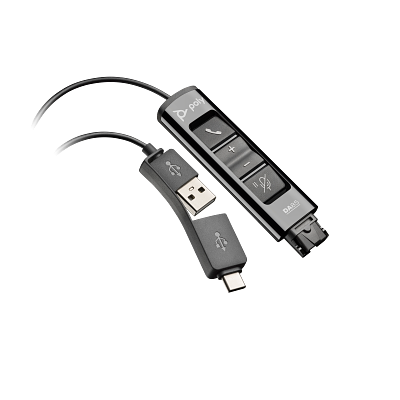
This listing pairs the EncorePro HW520 with the Poly DA85 USB adapter, so it plugs straight into your computer and works the moment it's connected — no separate cable to source, no guessing about compatibility. One box, ready for the desk.
What you're getting in this EncorePro HW520 bundle
Two parts, each doing a specific job.
- [icon:headset-stereo] EncorePro HW520 headset. The binaural (both-ear) headset itself, ending in a Quick Disconnect (QD) plug. Both ears covered means more focus and less of the room bleeding into your calls.
- [icon:usb-c] Poly DA85 USB adapter. The piece that turns the QD plug into a computer connection — with both USB-A and USB-C built in, and inline buttons for answer/end, mute, and volume right on the cord.
Microphone and call clarity on the EncorePro HW520
The noise cancelling here is in the microphone, working for the person on the other end of the call. The flexible boom sits near your mouth and the noise-cancelling element cuts the background — the agent two seats over, the floor chatter, the AC — out of what you transmit, so your caller hears your voice cleanly instead of the whole room behind it.
The detail that keeps that quality consistent: visual and tactile positioning guides on the boom. You get a physical cue for exactly where the mic should sit, so every agent places it the same correct distance from their mouth — and a new hire on day one sounds as clear as the veteran next to them. On a team, that's the difference between consistent call quality and a dozen people guessing.
[callout type="honest"]One thing to set straight: this is a noise-cancelling microphone, not active noise cancellation for your own ears. There's no electronic ANC. What quiets the room for you is the binaural design — soft cushions over both ears physically muffle the floor. It works well for an open office, but it's passive isolation from the earcups, not the electronic kind you'd find on consumer travel headphones.[/callout]Both ears in, fewer words missed
The binaural design covers both ears, and on a noisy call floor that's the difference between catching an account number the first time and asking the customer to repeat it. With both ears in the conversation and the room dampened on both sides, you stay locked on the caller through back-to-back calls — fewer missed words, fewer callbacks, less of the fatigue that comes from straining to hear over a busy floor.
Wideband audio, and hearing protection that meets OSHA
Wideband audio up to 6,800 Hz carries more of the voice than a standard phone connection — voices sound fuller and more natural, which matters less for one call and a lot over a hundred, because your ears aren't working as hard to decode thin, tinny audio all day.
[card title="SoundGuard — the spec that protects your ears"]SoundGuard caps sudden audio spikes at 118 dBA, so a feedback screech or a line fault can't blast your ear at full volume. Beyond comfort, it helps the headset meet OSHA and Noise at Work sound-exposure limits — which is a real compliance checkbox for a contact center running dozens of agents on calls all day, not just a nice-to-have.
[/card]Light all day, built to survive the floor
At just 74 grams, the EncorePro HW520 sits light enough to stop noticing partway through the morning — the headache that cheaper headsets hand you by hour three never shows up. But light doesn't mean fragile. It's laser-welded with metal joints at the stress points, the spots where everyday headsets crack first, so it survives the knocks, drops, and constant adjusting of a busy call floor. For an operations manager, that's fewer replacements and less downtime across the team.
[callout type="honest"]A practical note for the wearer: take ten seconds on your first day to set the boom using the positioning guide and adjust the headband once. Set it right and you forget it's there. Skip that and a slightly-off mic is the usual reason a caller asks you to repeat yourself — it's almost always placement, not the headset.[/callout]What the EncorePro HW520 works with
With the included DA85 adapter, the EncorePro HW520 connects to any Windows or Mac computer — USB-A or USB-C, your pick, both are built into the adapter. It's compatible with the major UC platforms, so it works with the softphone your team already runs. The inline controls on the DA85 handle call answer and end, mute, and volume without reaching for the screen mid-call.
What you're buying is consistency across a full shift and across a whole team — every agent clear to the caller, every headset placed right, every pair of ears protected, and a build that doesn't quit halfway through the year. For a floor where the headset is the single most-used tool an agent owns, that's where the value lives.
- Poly EncorePro HW520 binaural headset (Quick Disconnect)
- Poly DA85 USB adapter (USB-A and USB-C, with inline call/mute/volume controls)
- Quick start guide
- Warranty and warning leaflet
| Specification | Detail |
|---|---|
| Style | Binaural (dual-ear), over-the-head, wired |
| Weight | 74 g (headset) |
| Construction | Laser-welded with metal joints; soft foam ear cushions |
| Microphone | Flexible noise-cancelling boom, unidirectional; visual and tactile positioning guides |
| Microphone bandwidth | 150 Hz – 6,800 Hz |
| Speaker | 30 mm; 150 Hz – 6,800 Hz |
| Audio | Wideband audio up to 6,800 Hz |
| Hearing protection | SoundGuard — acoustic limiting above 118 dBA; meets OSHA / Noise at Work standards |
| Headset connector | Quick Disconnect (QD) — compatible with Poly QD cables, amplifiers, and USB adapters |
| Included adapter | Poly DA85 — USB-A and USB-C; inline answer/end, mute, and volume controls |
| Platform compatibility | UC platform compatible |
| Operating systems | Windows, macOS |
| Color | Black |
| Warranty | 1-year Poly warranty |
Software. The EncorePro HW520 is compatible with the major unified-communications platforms, so it works with the softphone your team already runs. Poly Lens software can be used to manage settings and apply updates across deployed devices.
Hardware. The headset terminates in a universal Quick Disconnect (QD) connector, compatible with all Poly QD cables, amplifiers, and USB audio processors. The included Poly DA85 adapter connects it to a computer over USB-A or USB-C, with inline controls for call answer/end, mute, and volume. The QD also lets the same headset move to a desk-phone amplifier or alternate adapter later without replacing the headset.
Platforms. Works with Windows and macOS computers through the DA85 adapter, and across leading UC platforms. The QD connector keeps it compatible with existing Poly desk-phone and call-center infrastructure.
Manufacture Information
Manufacture Information
Extra Info
Extra Info

Partnered With The Best.


Most Popular Questions!
Got questions about Headsetplus? Find all the answers you need in our Frequently Asked Questions section!
-
Is technical support provided after purchase?
Yes! We provide lifetime technical support for all purchases. Our expert team is dedicated to ensuring your headset works perfectly with your system for years to come.
-
What is the warranty period for headsets purchased from Headsetplus?
Every item we sell is backed by a full 1-year manufacturer’s warranty. We stand behind the quality of our products to ensure your success.
-
Do you sell refurbished or used headsets?
No. We are Authorized Partners for brands like Poly, Jabra, and Yealink, and we guarantee that every product is 100% brand-new and factory-sealed.
-
How can I check if a headset is compatible with my device?
You can use the compatibility guides on our website or call us directly. We specialize in matching the right headset to your specific phone system.