Poly Plantronics Blackwire 3320 Stereo USB Headset – Teams Certified
Product Back Ordered.
The Blackwire 3320 puts Teams on both ears
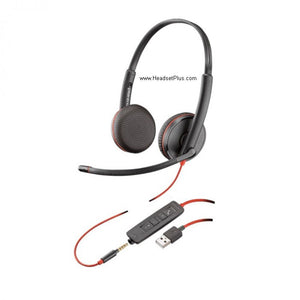
If your whole workday runs through Microsoft Teams, two things make a headset better at it: a button that answers and joins meetings without hunting for the window, and both ears covered so the open office doesn't bleed into every call. The Poly Blackwire 3320 Microsoft Teams Certified headset is built around both. It's the stereo 3300-series headset with a dedicated Teams button on the cord.
This is the Teams-certified version of the Blackwire 3320 — the same both-ears headset that blocks the room and plays media properly, with Teams integration added. It plugs into any Windows or Mac computer over USB, in your choice of USB-A or USB-C.
What Teams certification actually adds
The Blackwire 3320 works with Microsoft Teams whether or not it's certified — the certification isn't what makes Teams run. What the certified version adds is a dedicated Teams button on the inline controls: one press brings the Teams app to the front, joins or answers a meeting, and checks notifications, plus tested audio tuning and formal certification. It's a daily convenience, not a compatibility unlock.
Both ears, and the media it buys you
The Teams button is the headline, but the stereo design is why the 3320 is comfortable to live in all day. Covering both ears gives passive isolation — the cushions block a fair amount of room noise, though it's not active noise cancellation electronically erasing the office. And because it's true stereo with a multimedia EQ mode, the same headset that carried your Teams calls plays music and video properly between them.
Certified for the call, stereo for the rest
A mono Teams headset handles the meeting and stops there. The stereo Blackwire 3320 does the meeting on a certified one-press button, then stays on for focus work, music, or a video without swapping to earbuds. Dynamic EQ tunes the sound for voice on a call and fills it out for media off one — so it's genuinely the headset that stays on your head from the first Teams call to the last.Build the exact Blackwire 3320 you need
Both versions are Microsoft Teams certified with the dedicated Teams button. The only choice is which USB plug fits your computer.
- USB-A, Microsoft Teams (8X220AA). The standard USB-A plug for most desktops and older laptops, with the Teams button. The everyday Teams-office pick.
- USB-C, Microsoft Teams (76J19AA). The USB-C plug for newer laptops, MacBooks, and USB-C devices, with the same Teams button and certification. Pick this if your computer uses USB-C.
Teams 3320-M or the mono Teams headset?
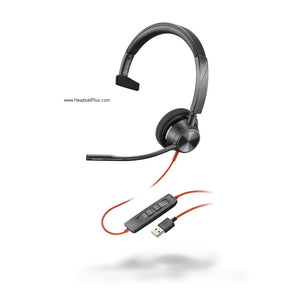
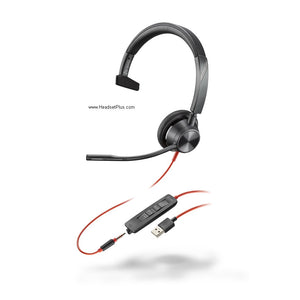
Both carry the same dedicated Teams button — the difference is one ear or two. The stereo 3320 covers both ears to block the open office and play media; the mono 3310 leaves one ear open so you stay aware of colleagues.
Both ears covered plus the Teams button. Blocks the room, sharpens focus, plays media. For open offices and concentration-heavy Teams work.
One ear open plus the Teams button. Keeps you aware of colleagues. For collaborative floors where you need to hear the room too.
The Blackwire 3320 Microsoft Teams Certified headset is the one for a workday built on Teams and focus — the meeting a button-press away, the open office turned down across both ears, and real stereo for everything between calls. Pick your USB plug, and it's plug-and-play, backed by HeadsetPlus's lifetime support.
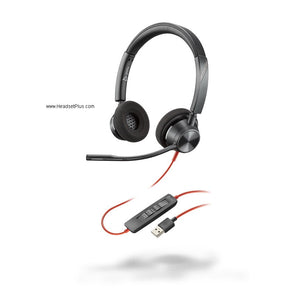
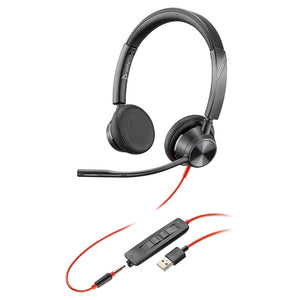
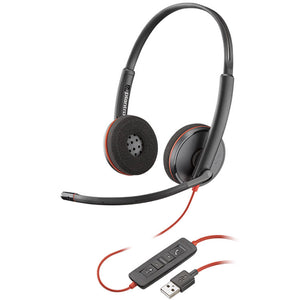
- Poly Blackwire 3320 stereo USB headset with attached cable and inline controls
- Dedicated Microsoft Teams button on the inline module
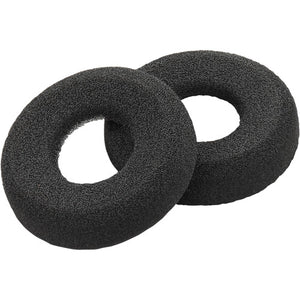
- Soft foam ear cushions (fitted, both ears)
- Quick start guide
The inline controls handle answer/end, volume, mute, and the one-press Teams button. This is the USB-only stereo model — for a Teams stereo headset that also connects to phones over 3.5mm, see the Blackwire 3325.
| Type | Stereo (both-ear), over-the-head, on-ear |
|---|---|
| Series | Blackwire 3300 Series |
| Certification | Microsoft Teams certified, with dedicated Teams button (also works with all other major softphones) |
| Connection | USB-A or USB-C, attached cable; plug-and-play on Windows and Mac — no amplifier or dongle |
| Controls | Inline answer/end, volume, mute, and one-press Microsoft Teams button |
| Microphone | Flexible noise-canceling boom; rotates 180° for a custom fit |
| Audio | PC wideband voice plus hi-fi stereo for multimedia; Dynamic EQ auto-switches between voice and media |
| Noise handling | Passive isolation from covering both ears (not active noise cancellation); noise-canceling microphone for outgoing voice |
| Hearing protection | SoundGuard acoustic limiting above 118 dBA |
| Hearing aid compatibility | Telecoil Hearing Aid Compatible (HAC) |
| Comfort | Padded headband; soft foam ear cushions on both ears |
| Weight | Approx. 96 g (headset); around 130 g including inline control |
| Software | Poly Lens / Plantronics Hub (Windows and Mac) |
| Part numbers | USB-A: 8X220AA (old 214012-101 / 214012-01); USB-C: 76J19AA (old 214013-101) |
| Warranty | 2-year manufacturer warranty, plus HeadsetPlus lifetime technical support |
Software. The Blackwire 3320 is Microsoft Teams certified, with a dedicated Teams button, and also works with every other major softphone and UC platform — Zoom, Webex, Avaya, and Cisco among them — on both Windows and Mac. Poly Lens (Plantronics Hub) manages settings and firmware. Its true stereo and multimedia EQ mode also handle music and video well between calls.
Hardware. The headset connects over USB-A or USB-C, depending on the version, and is plug-and-play — no amplifier, dongle, or extra cable. It has no 3.5mm jack, so it doesn't connect to a phone that way; for a Teams stereo headset with 3.5mm mobile connectivity, the Blackwire 3325 is the option.
Platforms. The Blackwire 3320 Microsoft Teams Certified headset suits Teams-first offices, open-plan and concentration-heavy roles where blocking the room matters, and large VoIP deployments that want one certified headset for calls and media alike.
FAQ
Frequently Asked Questions
Yes. This version of the Blackwire 3320 is Microsoft Teams certified and includes a dedicated Teams button on the inline controls — one press brings Teams to the front, joins or answers meetings, and checks notifications. It also works with every other major softphone, so Teams certification is an addition, not a limitation.
Both work with Microsoft Teams. The Teams-certified Blackwire 3320 adds a dedicated Teams button and Poly's tested Teams audio profile; the UC version works with Teams too but without the one-press button. Choose the certified version if your team lives in Teams and wants the button, or the UC version to save a little.
Not active noise cancellation. The Blackwire 3320's stereo design gives passive isolation — both ear cushions block some ambient sound — and its microphone is noise-canceling for your outgoing voice. There's no ANC electronically erasing room noise, so it won't silence a loud environment the way ANC headphones do.
Match it to your computer's port. Choose the USB-A version for most desktops and older laptops, and the USB-C version for newer laptops, MacBooks, and USB-C devices. Both are Microsoft Teams certified with the same button, audio, and compatibility.
Yes. Because the Blackwire 3320 is true stereo with a multimedia EQ mode, it plays music and video properly between calls, unlike a mono headset. It's a work headset rather than audiophile gear, but it holds its own on media — a real advantage of the stereo model on top of the Teams button.
Goes With It
You May Also Like