

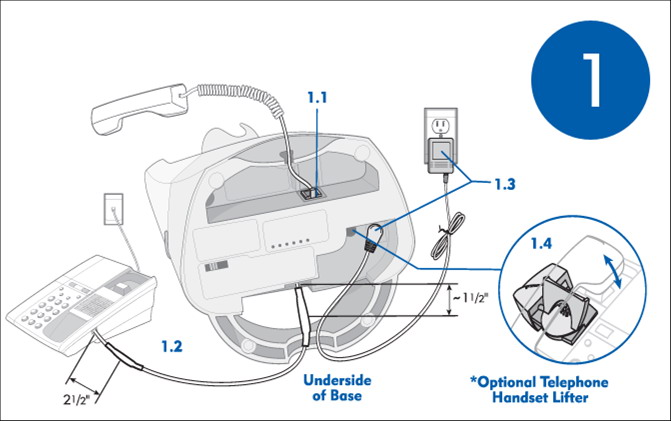
How do I install the Plantronics CS70/CS70N wireless headset? (see picture below)
- Locate the 2 ports on the bottom of the Plantronics CS70N/CS70 charging base. One has an icon of a “full telephone” and the other has an icon of a “hand receiver.”
- Unplug the hand receiver from the base of your existing telephone and plug it into the “hand receiver” port on the CS70/CS70N base unit.
- Then take the short cable that came with the CS70/CS70N and plug it into the “full telephone” port on the base of the CS70/CS70N.
- Plug the other end of the short cord into the hand receiver port of your telephone (where the hand receiver just was).
- Make sure the AC Power is plugged into the wall, and then you can adjust the configuration settings.
Also see our Plantronics CS70 interactive setup guide
I hear an echo/side tone on my Plantronics CS70 wireless headset. What should I do?
Echo is usually caused by the transmit (speak) level on the unit being set too high. First, try lowering the volume of the telephone. If you still hear an echo, adjust the volume of the headset itself. The master transmit controls of the headset are the ABCD switch settings on the bottom of the base. A is the lowest and D is the highest setting. You can fine tune this setting with the plus (+) and minus (-) buttons on the back of the charging base. If this doesn’t fix the echo, try moving the configuration dial on the left side of the charging base. The recommended setting for most phones is 1.
My handset lifter moves when I remove the CS70 wireless headset from the base. Why?
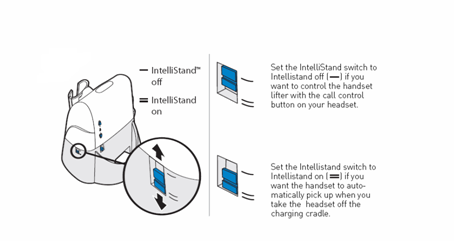
The Intellistand feature may be activated. There is a switch on the right hand side of the base which is your the IntelliStand feature.
If you are using the HL10 handset lifer you can enable the IntelliStand feature to senses when the headset has been removed or placed into the base unit which automatically activates the Handset Lifter and enabling headset/handset mode to answer or end the call.
How can I answer a call remotely (away from the phone) with a headset?
You will first need to purchase or already have a Plantronics CS70 or CS70N wireless. In addition you will need to purchase the * Plantronics HL10 Handset Lifter accessory. This will allow you to remotely pick up the hand receiver for incoming calls.
*The HL10 lifter only lifts the handset. If your phone requires you to press a button to receive a call, you will still have to do so. However if you phone did not require this before installation you may have it installed incorrectly. Make sure the wireless unit (not the lifter) is connected via a “handset port” on the phone and not a “headset port”.
However, depending on the shape of the phone, an HL1 may be needed instead of the HL10. If the phone has a curved edge on the left, you will need an HL1. The HL10 needs a flat edge for placement. You may also need an HL1 if the phone is set at an extreme angle. Give us a call 877-999-3838. An agent can help you find the correct lifter.
If you experience acoustic or power problems with Plantronics CS70 or Plantronics CS70N, try a system reset:
1. Check the switch on the right side of the charging base. Set it to “-” and not “=.”
2. Take the headset out of the charging base.
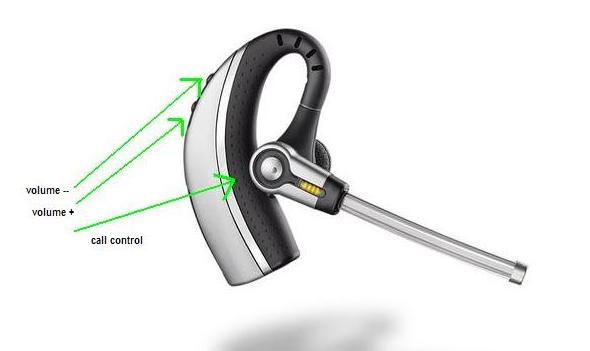
3. Simultaneously press & hold the call control button & the volume + and – buttons for 5 seconds.
(All of these buttons are on the headset.)
4. When the yellow light on the headset blinks, release all buttons.
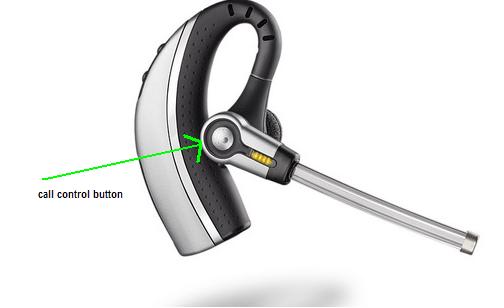
5. Press and hold the call control button (only) again.
The yellow light will blink a second time.
6. Release the call control button.
7. Unplug the AC power from the bottom of the charging base for five seconds.
8. Plug the AC power back in to the charging base.
The headset and the base unit are supplied subscribed to each other.
If you wish to use a replacement headset you must re-subscribe as follows:
If you wish to use the same Plantronics CS70/CS70N wireless headset system on the same telephone on a multi-shift environment (multiple users), you can purchase additional CS70 headsets and use the Re-Subscribe (Multi-Pair) procedure below:
1. Check the switch on the right side of the charging base. Set it to “-” and not “=.”
2. Take the headset out of the charging base.
3. Press the + button on the back of the base until the red light on the front of the base flashes.
4. Return the headset to the charging cradle.
5. Press and hold the + button on the headset until a yellow light appears on the headset.
6. Pairing is complete when the headsets yellow light goes out and the charging base red light is solid.



