

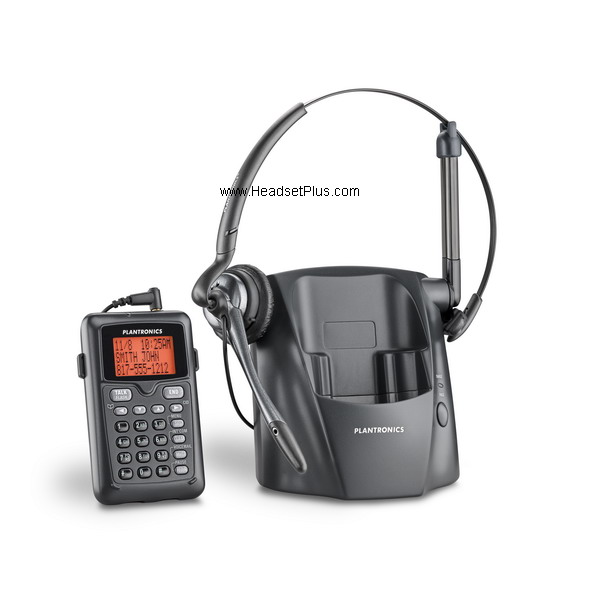
Q. Can I use another Plantronics headset with the CT14?
You can use any Plantronics corded headset + the 2.5mm adapter with the CT14, which can be plugged into the port on the CT14 dial pad. However, some of the special features on different types of headsets might not work with CT14.
Q. What are the Plantronics CT14 multi-unit features and how do I set it up?
Though the CT14 only comes with one dial pad and one charging base, you can actually register up to six dial pads to each base. If you purchase more than one CT14 unit, and have several dial pads registered to the same base, users can actually intercom with the other dial pads or even have a 3-way conference with another dial pad and an outside caller.
Registering multiple dial pads (handsets) to the same charging base:
- Make sure dial pad batteries are fully charged.
- Disconnect the AC adapter on the base you want to register your dial pad to. Then press and hold PAGE while reconnecting the adapter. Keep holding PAGE until CHARGE indicator starts to blink.
- On the dial pad, press MENU/SEL. Select the Register Base menu. “Handset Registering” will appear in the display. After step 2, you have thirty seconds to complete this step 3 before the system returns to standby
- If “Registration failed” appears on the dial pad screen, please try these steps again.
Note: The handset will stay connected to the new base until you select a different base (see below).
One dial pad can also be registered (connected) to up to 4 different charging bases. You can set the dial pad to automatically search for a new base if the base it’s currently connected to is unavailable or out of range. You can also manually select which base you want the handset to connect to.
Manually selecting the base you want the dial pad to connect to:
- Press MENU/SEL while the phone is standby; select the Handset Setup menu, and the Select Base submenu.
- Move the cursor to select the base you want to connect to, or choose “Auto” to have the dial pad automatically search for and select the base nearest you.
- Press MENU/SEL again. “Searching” will appear in the display.
- The dial pad will return to the standby mode when the base is found. “Searching” will continue if this base is not found. You can repeat the above searching procedure or return to the original base.
Note: your call will be dropped if you change bases during a call.
Q. How does the CT14 intercom feature work?
You need to have at least two CT14 units registered to the same charging base and within the reception range (up to 300 feet). Only two dial pads at a time can be on an intercom call, but while two dial pads are in the intercom mode, the rest of dial pads registered the same base will still be able to make and answer outgoing/incoming phone calls.
Q. Can I make an intercom paging to more than one dial pad?
When you press INT’COM/CLEAR on your dial pad, you can choose to intercom with any one of the dial pads (handsets) registered to the same base or even intercom/page all the dial pads. However, only two dial pads are allowed to intercom each other at the same time, so only the dial pad that answers the intercom/page first would be able to intercom with you.
Q. While two units are in the middle of an intercom conversation, what happens to calls coming in from outside callers?
During an intercom conversation, a background ringing will be heard by both parties when an incoming call is received. Either of the dial pads can answer this phone call by pressing TALK/FLASH. If there are other dial pads registered to (and in range of) the same base, any of them can also answer this phone call (this will not affect the on-going intercom conversation).
Q. How does the 3-way conferencing feature work in CT14?
With two CT14 units registered to the same base, when an outside call comes in and is answered by one of the dial pads, a second CT14 dial pad will be able to join this call by pressing TALK/FLASH. This starts a 3-way conference. This non-traditional 3-way conferencing does not require any subscription to that service from a phone service provider. The user with the second unit can easily leave the conference by pressing END.
Q. Can a 3rd or 4th user join a 3-way conference if there are already two users on the line with the incoming call?
Unfortunately, the 3-way conferencing feature is limited to 2 dial pads and one outside line. “Line in Use” appears in the displays of the rest of dial pads registered to the same base. Though the other dial pads can intercom each other during this time, they will not be able to answer or make outside calls.
Q. Can I transfer the incoming phone call to another dial pad registered to the same base without dropping the call?
You can transfer a call from one dial pad to another as long as they are currently connected to the base:
- Press INT’COM/CLEAR during a call.
- Press Up or Down arrow to select the dial pad (you can also select All to page all dial pads) you would like to transfer the call to, then pressMENU/SEL. The call will be automatically put on hold and you will hear a paging tone sound. To cancel the transfer, press TALK/FLASH.
- The selected dial pad(s) will ring and show which dial pad is paging — and under that will display “Line on Hold”.
- When another dial pad answers the transferred call, you will be disconnected from the call. You can re-join the call while it is active by pressing TALK/FLASH. This call would then become a 3-way conference (“Conf” will be displayed on the screen).
Q. Can I keep my phone conversation private even though there are multiple units connected to the same base?
When you are on a phone call and you do not want other users to interrupt or join your conversation, you can set your dial pad to “Privacy Mode” and other users can’t join your call or intercom with you. While you are on a call, press MENU/SEL. Then select Call Privacy. “Privacy mode on” appears in the display for two seconds; the privacy icon (the letter “P”) appears and remains in the display until this feature is turned off.
Q. Does Plantronics CT14 support Caller ID and/or Call waiting?
Plantronics CT14 supports both Caller ID and Call waiting provided the user subscribes to those services from their phone service provider.



