


Plantronics APC-42 CS500/Savi EHS Cable Cisco Phones *DISCONTINUED*
Plantronics APC-42 CS500/Savi EHS Cable Cisco Phones *DISCONTINUED*
 Same Day Shipping
 30 Days Money Back Guarantee
★
30 Days Money Back Guarantee
★
Non-Returnable Items (Manufacturer Policy)
Please note that the following items cannot be returned due to manufacturer policies:
- Accessories & Replacement Parts – such as ear cushions, headbands, and similar components.
- Batteries – including batteries for headsets and adapters.
- Video Solutions – all video devices are non-returnable, including products such as Panacast 50 and Teams Room Systems.
- Custom or Specialized Items – including SHR headsets, CA22 PTT, Jabra GSA PTT headsets, and ClearOne conference systems.
We recommend confirming compatibility and requirements before placing your order. If you need help choosing the right product, our team will be happy to assist.
- Accessories & Replacement Parts – such as ear cushions, headbands, and similar components.
 No Sales Tax (Except Selected States)


Buying more than 1? contact us for a quote.
Couldn't load pickup availability
Description
Description
*Discontinued* Replaced by Plantronics APC-43
This is the Plantronics CS500 and Savi series APC-42 (replaces APC-41) Electronic Hookswitch (EHS) cable for Cisco IP Phones - communicates electronically with the phone, eliminating the need for old mechanical HL10 lifter. the APC-42 is only compatible with these Plantronics wireless headset models:
Plantronics CS540, CS510, CS520 , Plantronics Savi WO100, Plantronics Savi WO200, Plantronics Savi WO300 Plantronics Savi WO350 , Plantronics Savi W740, Plantronics Savi W710 , Plantronics Savi W720 , Plantronics Savi W730 , Plantronics Savi W745, Plantronics Legend CS
APC-42 is exactly the same as previous APC-41, except it's now compatible with Cisco 6945
This EHS adapter only works with the following Cisco IP phones:
Cisco 6945, 7821, 7841, 7861, 7942G, 7945G, 7962G, 7965G, 7975G, 8811, 8841, 8851, 8961, 8961, 9951, 9971
Cisco IP 8961 9951 9971, you need the APU-72 instead
If you have Cisco 8941, 8945, 8945G use Plantronics APC-82 instead
Also See Savi EHS user's guide or Cisco IP Phone compatibility and setup guide and our Cisco Phone Hookswitch reference guide for more detail information
Note: Do not order this part if you don't have the listed Cisco phone models
Cisco phone software requirements
- The Cisco server must be running Cisco CallManager System Version 4.1(3)SR5x or higher. Verify by logging onto the Callmanager with a browser. Press the detail button on the main page to display the SW version.
- The Cisco phone must be running firmware 8.3(3)x or higher. To locate the firmware version, press the Settings button on the phone (the checkbox icon). Select “Model information”. The firmware revision is listed under “Load File.”
Cisco phone setup
- The phone must be set for “Wireless Headset Hookswitch Control” = Enabled
- Press the settings button on the phone (Checkbox Icon). Select “Device Configuration” >> Select “Media Configuration”
- If “Wireless Headset Hookswitch Control” is “Disabled”, follow the instructions below
Enabling Cisco wireless headset EHS hookswitch control:
Access the Cisco server administrator with a browser. Select Device>Phone through the drop down menus. Click "Find" with no selection criteria to obtain a list of all phones
Open the desired phone. Scroll down to "Wireless Headset Hookswitch Control" Set to "Enabled" Click "Apply". Wait for the dialog box to appear, then reset the phone by clicking the reset button.
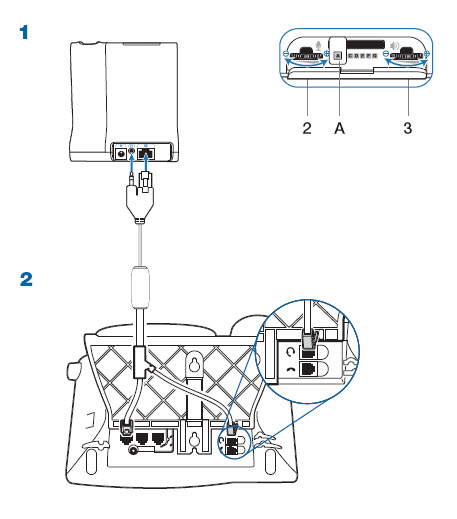
*Discontinued*, replaced by the new Plantronics APC-43
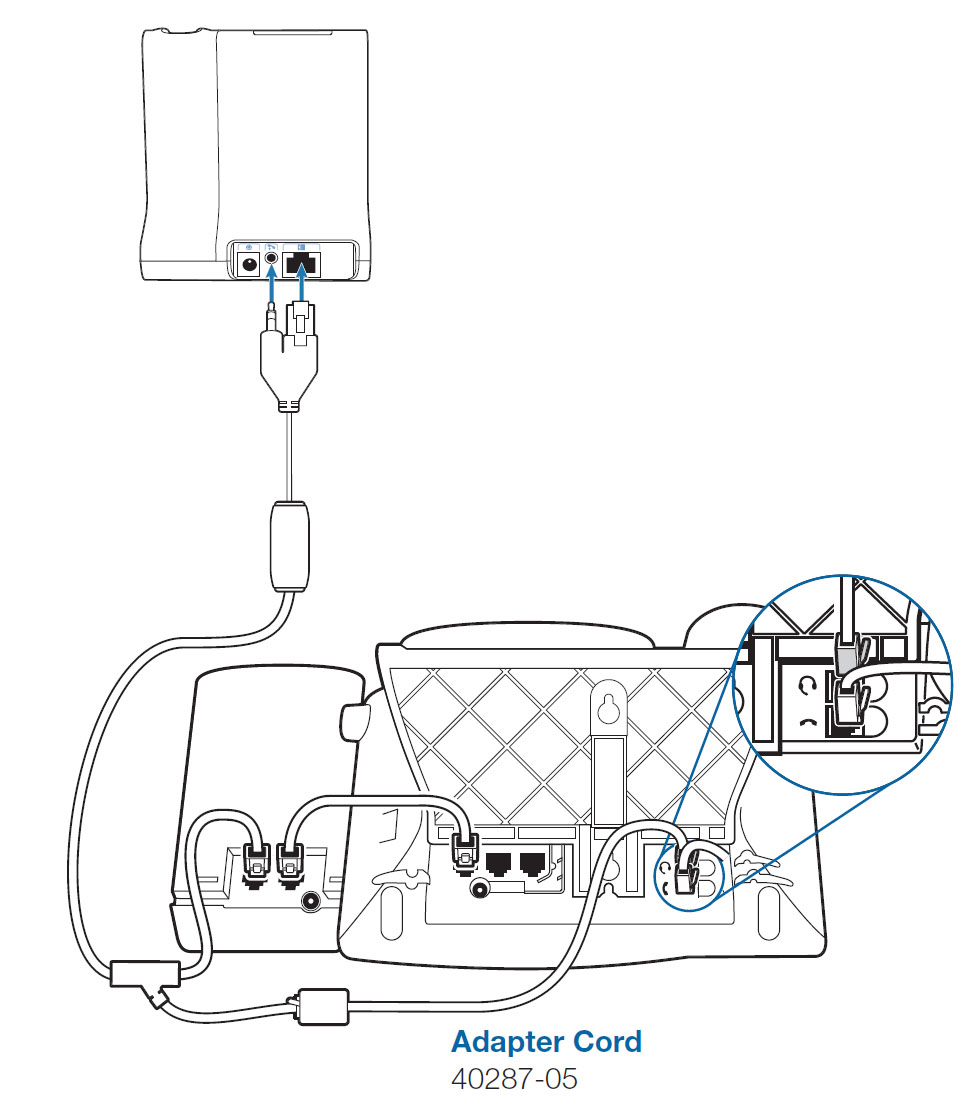
If your Cisco phone is equipped with the Cisco 7914, 7915, 7916 expansion module:
- Plug the expansion module into the telephone AUX connector.
- Connect the APC-42 into the expansion module.
- Use 85638-01 (formerly 40287-05) adapter to extend the APC-42 audio input to reach the headset jack on the phone. See below:
Manufacture Information
Manufacture Information
Extra Info
Extra Info

Partnered With The Best.


Most Popular Questions!
Got questions about Headsetplus? Find all the answers you need in our Frequently Asked Questions section!
-
Is technical support provided after purchase?
Yes! We provide lifetime technical support for all purchases. Our expert team is dedicated to ensuring your headset works perfectly with your system for years to come.
-
What is the warranty period for headsets purchased from Headsetplus?
Every item we sell is backed by a full 1-year manufacturer’s warranty. We stand behind the quality of our products to ensure your success.
-
Do you sell refurbished or used headsets?
No. We are Authorized Partners for brands like Poly, Jabra, and Yealink, and we guarantee that every product is 100% brand-new and factory-sealed.
-
How can I check if a headset is compatible with my device?
You can use the compatibility guides on our website or call us directly. We specialize in matching the right headset to your specific phone system.