

What is a Wireless Headset Lifter?
An automatic handset lifter is a electronic device that gives you the ability to answer your telephone call away from your phone. You will first need to purchase or already have a Plantronics or Jabra/GN Netcom wireless headset. In addition you will need to purchase the Plantronics HL10 or Jabra GN1000 lifter accessory. This will allow you to remotely pick up the hand receiver for incoming calls. The lifter only lifts the handset. If your phone requires you to press a button to receive a call, you will still have to do so. However if you phone did not require this before installation you may have it installed incorrectly. Make sure the wireless unit (not the lifter) is connected via a handset port on the phone and not a headset port.
Is the handset lifter necessary if I use a cordless or wireless headset?
Plantronics & GN Netcom Handset Lifters are optional accessory for the cordless and wireless headsets. Wireless & Cordless Headsets work independently without the lifter; however, the Lifter offers you the advantage of answering and ending calls remotely away from your desk. If the lifter is installed, you do not need to raise or lower your handset yourself (manually) Please see the headset compatibility guide for compatibility information on all GN Netcom or Plantronics headsets.
How do I install the Plantronics HL10 lifter?
The handset lifter accessory will plug into the accessory port on the bottom of the cordless or wireless headset base unit. This accessory port may be covered with a rubber cap at time of purchase. If so, simply remove the cap.
For the Plantronics HL10:
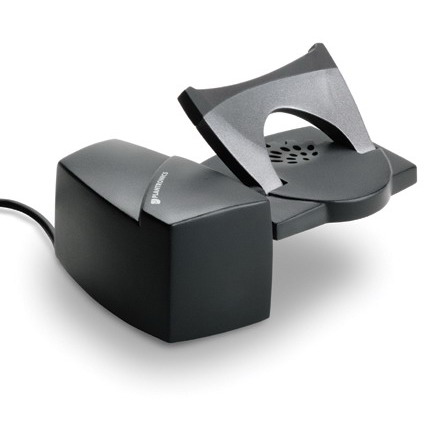
The lifter rests beneath the telephone handset and against the side of the telephone. It can be attached with double sided adhesive strips (included). Before attaching the adhesive, please be sure that the lifter is properly aligned. To check alignment, simply press the talk button on your headset to raise and lower the handset, and be sure that the handset is lifted completely off of your phone’s “hang-up” button. When the lifter is properly installed, the adhesive strips can be used to mount the lifter permanently to your telephone.
Please note that the Plantronics HL10 only lifter includes a height adjustment switch. This switch is located on the back of the lifter.
I don’t hear a notification tone in my headset with my lifter?
Remote ring detection provides a low tone * triple beep in your wireless headset when you receive an incoming call. This feature requires a handset lifter accessory, such as the HL10. If you do have a handset lifter but do not hear the remote ring detection, please check the following:
- Check the placement of the lifter. – Make sure the handset lifter positioned directly over the phone’s speaker.
- Try adjusting the phone’s ringer volume. If the phone’s ringer is too quiet, it may not trigger the ring detection built into the lifter. Try turning up the ringer volume of your phone.
- Check the ring tone of the phone. – If your phone’s ring tone provides short beeps or plays music, the lifter’s microphone may not detect it. Try switching your ring tone to a traditional ring or long beep.
- Does the phone have different rings? – For example internal calls vs external calls vs transferred calls. Does the phone ring the same for each type of these calls. If so try changing so all calls use the same tone.
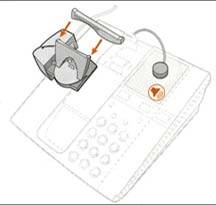
- Attach the optional “external ring detector” cable. This cable plugs into the lifter and provides a small, black microphone. It is included in the plastic bag of lifter accessories. Mount the microphone near your telephone’s speaker. Click here for more details.
- There are 2 versions of the Lifter accessory – HL10 and HL1. The HL1 is a larger older version of the liter with a more sensitive rind detector. Some phones will require the older version of the lifter.
- Please view the On Line Compatibility Guide to see if the older version (HL1) will be required for your phone.
*Please note the volume of notification beep in the headset cannot be altered, it will always be a low tone triple beep .
My lifter takes several seconds to lift up the hand receiver. How can I make this faster?
Try the following:
- Wait until you hear a beep in the headset before you press the call control button on the headset. If you press the button before you hear the beep, you can cause a delay.
- Reset the wireless headset. Go to the bottom of this page for reset instructions
The Lifter Accessory does not answer the call when I press the button on the headset. A. The lifter accessory only physically lifts the handset. If your phone requires you to press a button to receive a call, you will still have to do so. However, if you phone did not require this before installation, you may have it installed incorrectly. Make sure the wireless headset (not the lifter) is connected via a handset port on the phone and not the headset port.
My handset lifter moves when I remove the headset from the base. Why?
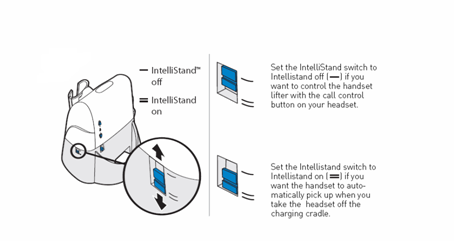
The Intellistand feature may be activated. There is a switch on the right hand side of the base which is your the IntelliStand feature. If you are using the HL10 handset lifer you can enable the IntelliStand feature to senses when the headset has been removed or placed into the base unit which automatically activates the Handset Lifter and enabling headset/handset mode to answer or end the call.
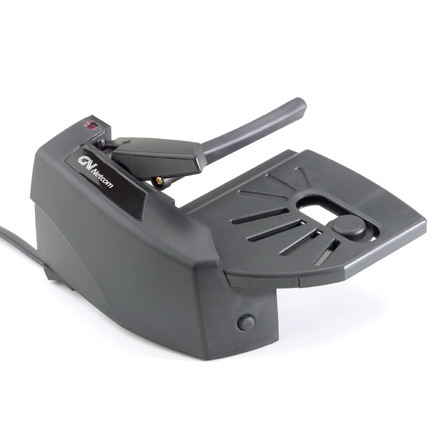
For the Jabra/GN1000
What should I do if the Remote Handset Lifter is not lifting the handset?
• Check the cable connection between the Lifter and the base of your wireless headset system. • Make sure there is power to the wireless system.
What should I do if I can’t hear the dial tone?
• The Lifting Arm height. may need to be slightly higher. Move the Height Control toward the “+” to raise the arm higher. • If the Remote Handset Lifter is installed on a key system telephone (where you have to push a button to connect to a line), the “Auto Line Selector” feature of your phone system must be reprogrammed. Refer to the instructions that came with your phone system.
What should I do if I hear a signal in my headset, but no call comes through?
• The Ring Sensor may be picking up electronic “noise.” Move your telephone and/or wireless system away from electronic equipment, such as a computer monitor, fluorescent desk lamp, etc. • Lower the Ring Sensor’s sensitivity, by turning the adjustment knob counterclockwise. What should I do if calls are coming in, but I don’t hear a signal in my headset or from my beltpack? • Make sure the Ring Sensor On/Off Button is on. If the red Ring Sensitivity LED is flashing, the Ring Sensor is off. Press the button on the front of the Lifter to reactivate. • Make sure the Ring Sensor is located over the telephone’s speaker. • Adjust the Ring Sensor’s sensitivity. While the phone is ringing, turn the Ring Sensitivity Knob until the Ring Sensor LED lights. Stop turning as soon as LED lights for best performance.
What should I do if my Online Indicator doesn’t light when I’m on a call?
• Adjust the Ring Sensor’s sensitivity. While on a call, turn the Ring Sensitivity Knob clockwise (only slightly) until the light comes on. How do I stop my Headset/Beltpack from signaling I have a call when I use my telephone’s speakerphone? • Turn the Ring Sensor off (the LED will flash rapidly when off). Turn it back on when you’ve finished your speakerphone call.



