

Plantronics Plantronics headsets  
  Top » Catalog » FAQDesk Information My Account  |  Cart Contents  |  Checkout   
Categories
CORDED HEADSETS

WIRELESS HEADSETS

DIRECT CONNECT HEADSETS

HEADSET AMPLIFIERS

HEADSET PARTS/ACCESSORY

CELL PHONE HEADSETS

COMPUTER HEADSETS

CONFERENCE PHONES

WIRELESS CONFERENCE PHONE

CORDLESS PHONE HEADSETS

OFFICE TELEPHONES

CORDED HEADSET FAQ

WIRELESS HEADSET FAQ

CONFERENCE PHONE FAQ

ARTICLES
Specials more
Jabra Pro 9460 Duo + GN1000 Wireless Headset Bundle
$529.95
$359.95
Latest products more
Plantronics APS-11 Savi/CS500 Hookswitch Cable Aastra/Siemens
$79.95
Latest FAQs
- Plantronics CS540 Wireless Headset FAQ
- Jabra Pro 920, 930 Wireless Headset FAQ
- How to pair and use Plantronics W740 with your cell Phone
- Plantronics Savi W740 FAQ
- Plantronics Voyager Pro UC B230/B230-M (v2) FAQ
- Plantronics Savi Office Headsets for a multi-user conference c
- Plantronics headsets and Apple Macintosh FAQ
- Jabra PC Suite Software
- Wireless Headset for Cisco IP Phones
- Plantronics CS351N, CS361N, WO300, WO350 Battery Replacement
Latest News
- Why use a Plantronics CS55H
- Plantronics Headset Control Software (PURE)
- Using Plantronics CS50/CS55 for maximum number of users
- VoIP Headset for the Home Office
- Using a Headset with MagicJack
We proudly accept
FAQ Information. HEADING_TITLE
- Plantronics CS351N, CS361N, WO300, WO350 Battery Replacement   Date: Monday March 07, 2011
FAQ Summary:
Plantronics CS351, CS351N, CS361, CS361N, Plantronics Savi WO300 & WO350 Battery replacement Instructions

FAQ Content:


Plantronics CS351N, CS361N, Plantronics Savi WO300 & WO350 Battery replacement Instructions

First, you will need to purchase Plantronics CS351, CS361, WO300, WO350 Replacement Battery from our website.  This part# 64399-03 includes the battery removal tool.


1)  Use fingernail to lift off and flip open battery door
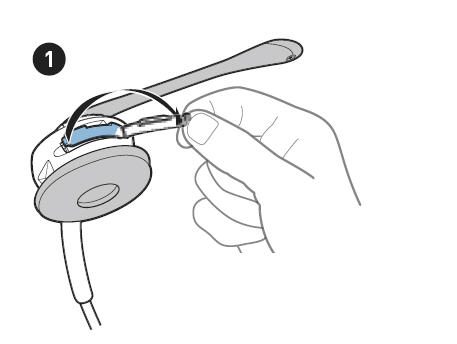


Plantronics CS351N


2)  Use the tool supplied with the battery kit to hook battery wires and pull toward open battery door until battery moves out from behind post.
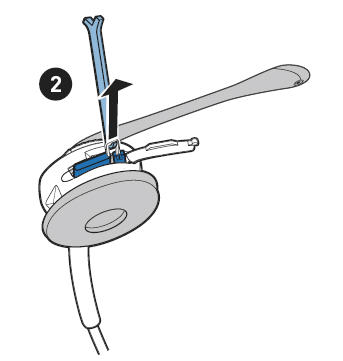


Plantronics CS361N

3)  Once the old battery is removed, gently disconnect battery connector. do not pull hard.
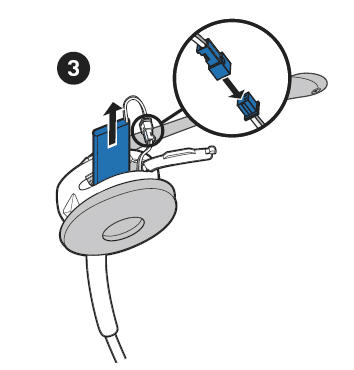


Plantronics Savi Office

4) Close the battery door so that it is flush with headset.
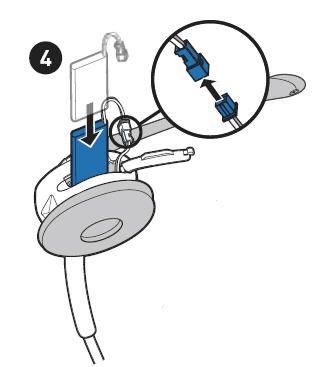


Plantronics WO350


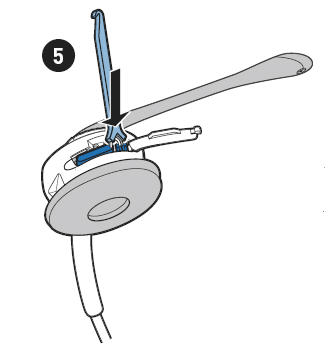
5) Using the “Y” end of the tool, press the battery backwards and away from battery door until the left corner of the battery tucks under the post in the battery compartment. Tuck all of the battery wires and connectors into the battery compartment.


Plantronics WO300


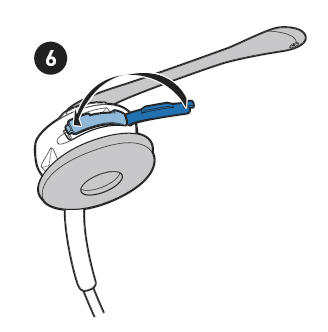
6) Close the battery door so that it is flush with headset.


Plantronics Savi Office


FAQ Statistics:
Viewed:4018
Continue
Shopping Cart more
0 items
Search
 
Information
Contact Us
Shipping
Returns & Policies
Site Map
Headset Compatibility
Privacy Notice
Latest Headset News
User Reviews more
Plantronics CS50 Replacement Headset
We built an office in our house and set up two desks with CS ..
5 of 5 Stars!
Best Sellers
Plantronics S12 telephone headset convertible system
01. Plantronics S12 telephone headset convertible system
Plantronics CS50 CS55 Replacement Battery
02. Plantronics CS50 CS55 Replacement Battery
Plantronics CS55+HL10 Wireless Headset Lifter Combo *Discontinue
03. Plantronics CS55+HL10 Wireless Headset Lifter Combo *Discontinue
Plantronics CS50 + HL10 Wireless Headset Lifter Combo Package
04. Plantronics CS50 + HL10 Wireless Headset Lifter Combo Package
Plantronics CS50 Wireless Headset System
05. Plantronics CS50 Wireless Headset System


Related links and products: Headset Plus is a leader supplier of Plantronics | wireless headset | cordless headsets | Plantronics CS50 | EnGenius Cordless Phone | Cisco Headset | Plantronics CS55 | GN Netcom | Direct Connect Headsets | Polycom Soundstation | wireless conference phones | Polycom Soundstation 2 | USB Headset | Plantronics W740 | Plantronics M22 vista | links

Phone System Forum | Find Telephone Installers in your area



