

What is Bluetooth Wireless Connectivity?
Bluetooth is a very simple type of wireless networking that can allow up to eight devices to be connected together in a mini-network.
It is very short range in operation, and so is considered to be for ‘personal’ networking. With a range typically under 30ft, this allows enough distance to perhaps communicate across your office, but not any further. This short range is also its major security feature – anyone wishing to eavesdrop on your Bluetooth communications would not only need special equipment but would also need to be quite close to you.
It is a moderately slow type of networking, but it can transfer data sufficiently fast enough for most typical applications.
Bluetooth is hoped to be a very low cost type of networking, and, as it becomes more widespread, the cost of adding Bluetooth to devices should drop down to perhaps no more than an extra $5-10 on the selling price.
Bluetooth is designed to be compatible across a range of very different operating systems and devices, including things that you would not normally think of as being ‘computer’ type items – for example, some types of headset. Bluetooth networking can enable the headset to connect with other devices such as your smart phone, your tablet, your desktop or laptop computer, even your step counter or smart watch (wearable).
Looking for these types of Bluetooth Headsets
A Bluetooth enabled headset would mean that you can leave your cell phone in your pocket or briefcase, but still receive incoming phone calls. If your cell phone supports voice recognition for dialing out, such as Siri or Google Assistant, you can even place calls as well as receive them, while never needing to reach for your phone, another feature now these days is the capability to hear your voicemails or text messages, depending on your smart phone’s features. The safety benefits of this, if you’re driving, are obvious. This allows you to have a more private conversation while on public transportation for example or been able to keep in a call while working out at the gym, to mention a few.
Looking for this type of Bluetooth Wireless Headsets?
It is probably better from a health point of view to have a very low powered headset close to your head than it is to have a phone that might be generating 100 or even 300 times as much radio energy close to your head.
Bluetooth can also help different devices to communicate with each other. For example, you might have a phone, a tablet, and a computer. If all three devices have built Bluetooth capabilities, then (with the appropriate software on each device) you can share information between all three devices quickly and conveniently, such as contact information, pictures, small videos, emails and depending on your devices you can start a phone conversation on one and continue on the next one.
Bluetooth is not a magical solution giving universal connectivity between devices. Each device also needs to have the appropriate software as well as the basic Bluetooth communication capability, and so sometimes the promise and theory of what could be possible is not fully matched by the reality. As there are different factors that can affect the connectivity between all devices as they have different versions and classes.
Back on 1999, Bluetooth was introduced with its versions 1.0 and 1.0B, which at the beginning weren’t the best ones as they were a new technology still on diapers. However, this caught the attention of more people and for the same reason new and improved versions that will be noted next.
For best compatibility on 2001 the new version 1.1 was launched, with this the new improvements where focused on reliability and interoperability. As with any new technology there were their flaws as well which were known as backwards compatibility at 100%. Devices looked on the outside the same, however the internal components changed thanks to its built and new materials used as improvement.
By 2003 we got introduced to the version 1.2, which was offered now widely on many devices and making it more reachable to the masses. This new version is considered BT 1.2 Basic Data Rate, and one of the most intriguing advances was the inclusion if the Adaptive frequency hopping, or known as AFH. This new technology helped to avoid interference with Wi-Fi networks or another wireless devices on the same frequency. Thanks to the new improvements now the pairing process was faster and seamless integration between devices.
The following year 2004, Bluetooth introduced its version 2.0, also known as the 2.0+EDR. Enhanced Data Rate allows the new devices to have a higher rate that passes from 1 to 3 Mbps. Thanks to this new improvement the interference among devices got an improvement as the frequency of these got lower than with the previous version. Lower consumption of energy can be found on this version now.
After 3 year of success with the 2.0+EDR version on 2007 the new 2.1 version gets introduced and this one now its called Secure Simple Pairing (SSP). This new version offers a higher security than before and faster and easier pairing to devices. Encryption was made mandatory for Bluetooth devices, giving this end users a piece of mind when pairing.
On 2009 Bluetooth 3.1 + HS (High Speed) got its way in and the mayor improvement here is on the connection via Bluetooth but transmitted data over Wi-Fi networks. This is an interesting achievement as previously Bluetooth was trying to avoid interference with Wi-Fi networks, and now it uses it as a skateboard for faster and easier transfer of data. Bigger transfers are not available, allowing users to send bigger files as pictures and longer videos.
2010 was the year Bluetooth Low Energy was introduced on the version 4, the same name keeps everything simple. Doing the same that the previous version, requiring less energy to function and thanks to this less overheating on handhelds for example.
2013 was the year that the Bluetooth 4.1 version reached to masses, this new version offers a better co-existence with LTE frequencies from cell phones as their higher speeds require better and faster processing. 4.1 maintains the connection with devices with less manual intervention. This allows the devices to “remember” another devices after one time paired and then distanced without having to go thru all the process of pairing again. Thanks to this new innovation Bluetooth enable devices now can remember up to 8 different devices at a time.
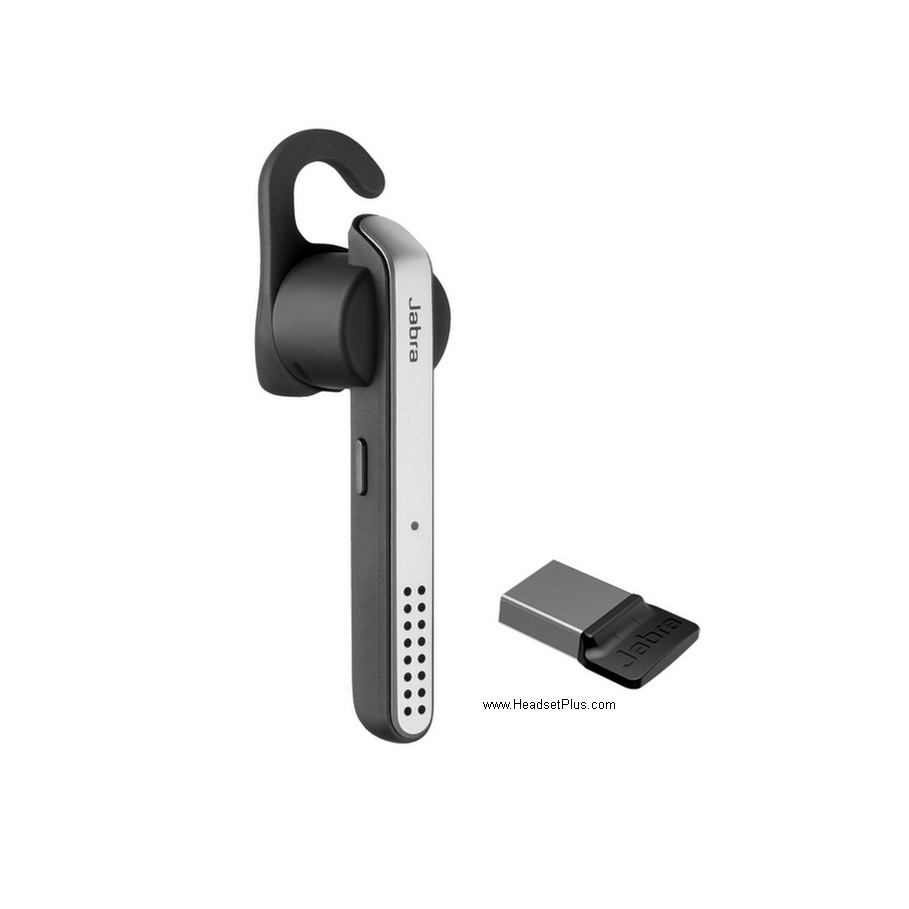 The best example for this kind of headset on this version, would be the Jabra Stealth UC USB headset, which allows to have up to 8 paired devices and they will be remembered by the headset, so no more need to re pair as it would only be needed to put the headset closer to the Bluetooth enable device.
Bluetooth 4.2 was the last one of the version 4 and was launched on 2014. Taking what had been improved over the years and versions, there is no difference here as now this version supports bigger transfer packets up to X10 more using less energy than before.
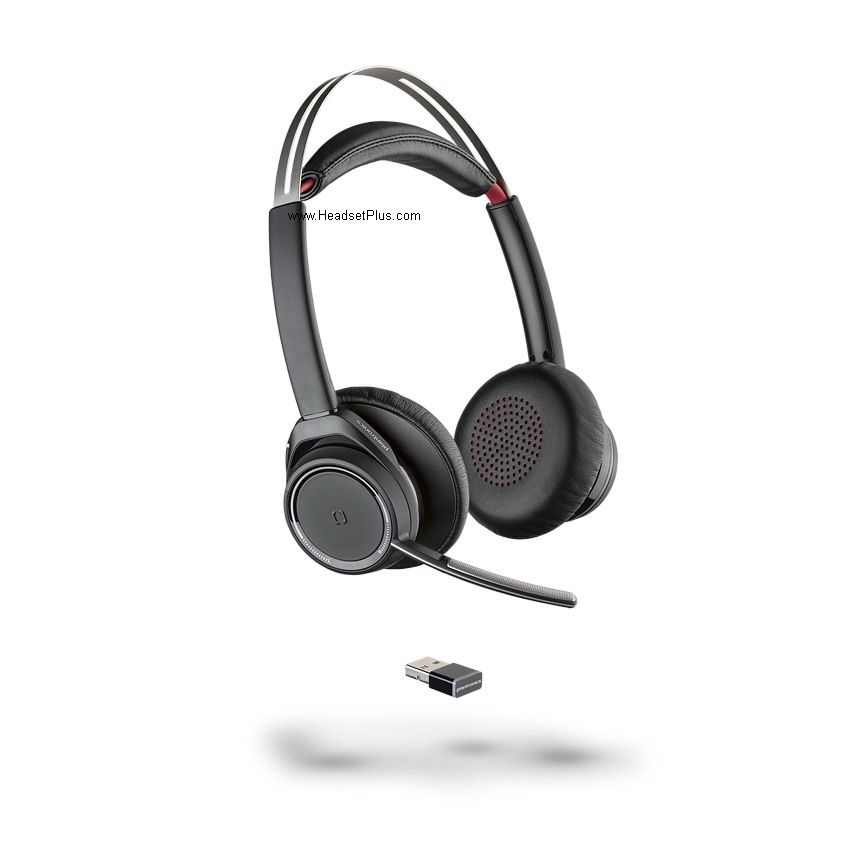 Best example for this class would be the Plantronics Focus UC headset when paired to the computer with the included dongle, as the range would be of up to 100 feet, and if another device such as a smart phone has the built in Class 1, will turn the headset into a further range headset.
2016 was the year that Bluetooth Version 5 and with this in mind the main purpose was to increase the outdoor transmission range to up to 200 meters, this being a huge improvement from the previous 50 meters. The newest smart phones on the market from Samsung and Apple as the Galaxy S8 and the iPhone 8 and the top model X were the first ones with this technology built in, considered BT5.
For more Version 5 explanations and examples click HERE.
Bluetooth has been slow to become accepted in the market, but now is starting to become increasingly prevalent. Prices are falling and increasing numbers of devices are offering Bluetooth connectivity. Over one million Bluetooth devices are now being sold every week (although mainly outside the US).
More information on Bluetooth can be found on the official Bluetooth website.
Bluetooth Range
Bluetooth has three different defined ranges, based on their output power ratings.
Class 1 devices are the most powerful. These can have up to 100 mW of power, and a regular antenna will give them a range of about 40 m – 100 m (130 – 330 ft).
Class 2 devices are lower power, with up to 2.5 mW of power. A regular antenna will give them a range of about 15 m – 30 m (50 – 100 ft).
Class 3 devices use even less power, with up to 1 mW of power. A regular antenna will give them a range of about 5 m – 10 m (16 – 33 ft).
Most Bluetooth devices will be Class 2 or Class 3.
Greatest range is not necessary the best. Bluetooth has never been intended for anything other than very short range communication.
With Bluetooth, short range is actually a benefit for two reasons. Firstly, it reduces the chance of interference between your Bluetooth devices and those belonging to other people nearby. This is a very basic type of security measure.
Secondly, lower power means longer battery life. Most Bluetooth applications get their power from a battery, and anything that can be done to lengthen the life of the battery is obviously important.
More powerful Bluetooth devices can run into (and/or cause) problems due to swamping too many other Bluetooth devices with their signals and exceeding the eight device per network limit.
Devices that Use Bluetooth
A limited, but growing number of devices use Bluetooth at present. Devices that are starting to have Bluetooth connectivity built in include:
- Digital cameras and camcorders
- Printers
- Scanners
- Smart Phones
- Tablets
- Laptops
- Desktops
- Keyboards and Mice
- Headsets
- In-car hands free kits
- GPS navigation receivers
- Home appliances (microwaves, washers, driers, refrigerators)
In addition, there are available Bluetooth devices that allows to have this connectivity using a Bluetooth dongle. In order to support this feature, the device that is going to get the dongle needs to support its connection (For example, game consoles).
Looking for these types of Bluetooth adaptors here at Headset Plus
Bluetooth and the Internet
Bluetooth can be used to connect between a device that has internet connectivity and another device that does not, for example, you might use Bluetooth to connect from your PDA to your laptop, and then your laptop might use Wi-Fi to connect to a Wi-Fi router and from there you would be connected to the internet.
Sometimes when buying a PDA you may find yourself with an apparent ‘either//or’ choice – either buy a device with Bluetooth; or a device with Wi-Fi capability. In such a case, it would seem at first glance that if you want to connect to the internet – especially while traveling out of your office, Wi-Fi would be a better choice.
However, this is not quite such a clear choice. Wi-Fi ‘hotspots’ are few and far between. A much better approach might be to get Bluetooth on your PDA and also on your cellphone and use Bluetooth to connect to your cellphone and then connect through your cellphone and out to the internet from there. I use T-Mobile’s GPRS service – they offer unlimited connect time and unlimited bandwidth usage for only $20/month extra on top of my regular cellphone service (and GPRS connection time does not count against my monthly minutes – it truly is unlimited for only $20/month).
In my opinion, this is the perfect solution. GPRS coverage is much more widespread than Wi-Fi coverage, and while it is not fast, it is adequate for simple mail sending/receiving, instant messaging, and occasional web browsing such as you’re likely to do on a PDA. Although I also have Wi-Fi in my laptop, these days I never use it, and indeed if I’m sitting in a Starbucks with my laptop, I’ll be connecting to the internet not through the Wi-Fi in Starbucks, but via Bluetooth and my cellphone’s GPRS!
Which is better – Bluetooth or Wi-Fi
Wi-Fi is primarily used as an alternate to traditional cable based networks. It has a longer range than Bluetooth, and supports faster data transfer speeds, and so it might seem better than Bluetooth.
But, in reality, Bluetooth and Wi-Fi have different purposes. Bluetooth is intended for limited data transfer between many different types of devices, Wi-Fi is more focused on faster data transfer between computers on a network.
One of the distinctive elements of Bluetooth is that is uses very much less power than Wi-Fi. Class 3 devices (such as are in PDAs, phones, headsets, etc.) transmit a very low power signal (1 mW) and only transmit intermittently when in standby mode, saving even more power. Wi-Fi, on the other hand, consumes a great deal of power, and so for any type of portable battery operated device, Bluetooth will allow for substantially more battery life than would Wi-Fi.
If you’re simply wanting to swap data between different devices in your office and elsewhere on a casual and occasional basis, then – assuming that the software and Bluetooth hardware is available – Bluetooth is probably a better choice for you. If you need more range, and higher bandwidth; perhaps if you want to connect computers into your office LAN, then Wi-Fi is a better choice for you.
What is the difference between Bluetooth and Wireless headsets?
This is one of the most common questions around and the main difference between them will be HERE.
Bluejacking
Bluejacking is a moderately harmless ‘fun’ type trick that some people have discovered. It involves sending messages from your Bluetooth device to other people close to you with Bluetooth devices, and surprising the recipient in the process.
The easiest way to Bluejack is to create a new phonebook contact, with the message you want to send in the name field. Then, in a busy place with lots of people (so that there is a chance that someone might have a Bluetooth enabled phone or PDA), choose the option to send your new contact via Bluetooth. Your phone or PDA will then search for all Bluetooth devices in range, and present you with a list. Choose whichever device you wish from the list and send it. The recipient will get a message asking if they wish to accept your contact, and showing the text you entered as the contact’s name (eg something like ‘Bad weather today isn’t it’ or whatever else you wish to say). If you’re planning to enjoy Bluejacking (or Toothing, below) you’ll probably want to get your eye in to guessing how far away 10 m/33 ft is so as to know how many people and devices might be within range.
Toothing
Harmless Bluejacking didn’t take long to evolve into a more goal oriented social activity, now known as ‘toothing’, whereby people communicate to other Bluetooth equipped people around them, trying to arrange casual and immediate trysts.
Summary
Bluetooth promises to be a low cost, convenient, and simple way of enabling your various computer devices to talk to each other and to their peripherals. The reality has yet to match the promise, but Bluetooth is becoming more widespread and functional every day. Bluetooth is almost certainly in your future.
Bluetooth is not a competitor to Wi-Fi. It offers different functionality for different purposes.



