

















































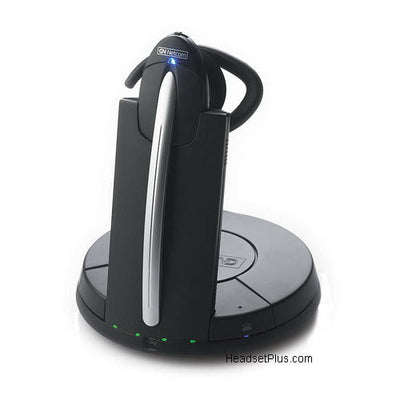
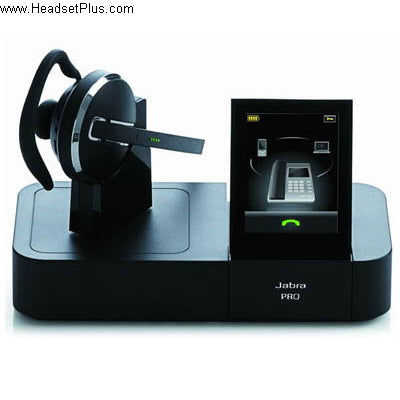
The GN Netcom 9120 and Jabra GN9125 were long-standing office wireless headsets, and if you're still running one, the detailed setup, troubleshooting, and maintenance answers below all still apply. Both are discontinued now, but here's everything you need to keep yours running — plus the current replacement if you're ready to upgrade.
Key takeaways
- The GN 9120/9125 are discontinued; the current equivalent is the Jabra Engage 65 SE.
- Support conference mode with a second headset, remote answering via the GN1000 RHL lifter, and either-ear wearing styles.
- Operate on 2.4 GHz, generally robust in WiFi environments if the base is kept spaced from routers and access points.
- The battery is user-replaceable, and a new master headset can be registered to the base if the original is lost or damaged.
- Boom arm type affects how much background noise your caller hears — Soundtube (standard mic), Flex (noise-cancelling), or Midi (noise-filtering).
Boom arm types: Soundtube, Flex, and Midi
Beyond wearing style, the 9120/9125 came in different boom arm types, and the difference is about what your caller hears, not what you hear:
- Soundtube boom: a standard microphone, similar to your telephone handset's — some background noise around you will reach your caller. Suited to offices and lower-noise environments.
- Flex boom: a noise-cancelling microphone that dramatically limits background noise reaching your caller.
- Midi boom: a noise-filtering microphone — a middle ground, though not as effective as the Flex boom's true noise cancelling.
General use
Using your telephone handset alongside the headset: whenever the headset sits in the base unit, the telephone handset works normally. Remove the headset from the base and the wireless link activates.
Wearing style: the headset works on either ear, switching easily between over-the-ear (earhook) and over-the-head (headband) styles — consult the user guide for the exact steps.
Remote answering away from your desk: requires a GN1000 RHL Remote Handset Lifter, sold separately. See our full GN1000 lifter setup and FAQ.
Cleaning: clean the headset and base the same way you'd clean a phone handset — a cleaning tissue is sufficient. Ear cushions can also be replaced.
WiFi compatibility and interference
The 9120/9125 operates on the 2.4 GHz band, the same band used by WiFi. This is a well-established, robust band with a large number of available channels and Frequency Hopping Spread Spectrum (FHSS), which lets multiple devices operate with minimal interference. To keep performance optimal:
- Avoid placing the headset base immediately adjacent to a WiFi access point or router.
- Deploy multiple units incrementally rather than all at once, so you can identify when an environment approaches its interference threshold — clicks and pops in the audio are the sign you've reached it.
Myth
If my GN 9120 is causing WiFi interference, the headset is defective.Reality
Not necessarily. Wireless performance depends heavily on the environment — structural factors (walls, fire doors, elevator shafts), other electronics (transformers, servers, poorly grounded fluorescent lights), and other wireless devices can all contribute. If you're seeing interference, try physically separating the WiFi transmitters (including laptop cards and access points) from the headset base as far as possible, shortening your roaming distance by 5-10 feet, or — if running multiple units — decommissioning them all and re-establishing one at a time to find your environment's actual saturation point.Buzzing sound on the headset
If your phone isn't fully immune to the radio transmission between the headset and base, you may hear a buzzing sound. Move the base at least 12 inches away from the phone to resolve it. If you have a European version, switching the headset to Low Power mode is an alternative fix.
Replacing the battery
The included battery provides years of use, but when it's time to replace it:
- Remove the wearing style attachment.
- In the headset receiver, where the battery sits, press down the plastic tab securing it and pull the battery out.
- Insert the new battery, matching the + on the battery to the + marked in the battery slot.
- Re-attach the wearing style.
Resetting to factory defaults
Removing the battery, or unplugging the power adapter for at least a few seconds, returns all customized headset settings to factory defaults.
Registering a new master headset
If the original headset is lost or damaged, you can register a replacement as the new master:
- Charge the new headset for at least 3 hours.
- Unplug the power adapter for a couple of seconds.
- Place the new master headset into the base unit.
- Plug the power adapter back in.
- All lights flash for about 4 seconds, then only the battery indicator stays lit.
- The new headset is ready for use.
You can also connect an entirely new GN 9120 headset to an existing base by resetting the system — remove the DC plug momentarily, and the base will match to the new headset.
Using conference mode
The 9120/9125 supports adding a second headset to an active call:
- Lift your master headset out of the base and initiate or answer a call.
- During the call, place a second headset into the base and leave it there until all base lights stop flashing and only the battery and link indicators remain lit.
- Remove the second headset from the base. A beep sounds in the master headset — you have 15 seconds to accept the second headset into the conference by pressing the call button on the master headset.
- The second headset leaves the conference by briefly pressing its call button, or by placing it briefly back in the base.
- The conference ends when the master headset is placed back in the base, or its call button is pressed briefly.
These headsets are discontinued — what to use now
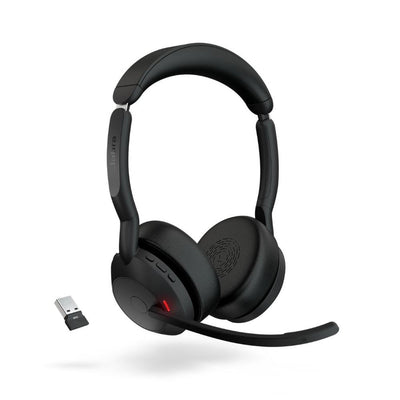
The GN Netcom 9120 and Jabra GN9125 are both discontinued. The current equivalent is the Jabra Engage 65 SE, offering improved range, battery life, and support for significantly more headsets per location, while connecting to both a desk phone and computer simultaneously.
Is the GN Netcom 9120 or Jabra GN9125 still available?
No, both are discontinued. The current equivalent is the Jabra Engage 65 SE, which offers improved range, battery life, and headset density while connecting to both a desk phone and computer.
Will my GN 9120 interfere with my WiFi network?
It can, since both operate on the 2.4 GHz band, but the band is generally robust with multiple channels and frequency-hopping to minimize interference. Keeping the headset base away from WiFi access points, and deploying multiple units incrementally, helps identify and avoid your environment's interference threshold.
How do I register a new headset to my GN 9120 base?
Charge the new headset for at least 3 hours, unplug the power adapter for a couple of seconds, place the new headset in the base, then plug the power back in. All lights flash for about 4 seconds, then only the battery indicator stays lit — the headset is ready to use.
Can I use two GN 9120 headsets on the same call?
Yes, using conference mode. Start a call on the master headset, place a second headset in the base during the call, remove it once the lights settle, and accept it into the conference within 15 seconds by pressing the call button on the master headset.
What's the difference between the Soundtube, Flex, and Midi boom arms?
They differ in how much background noise reaches your caller. Soundtube uses a standard microphone similar to a phone handset; Flex uses a true noise-cancelling microphone for the least background noise; Midi uses noise filtering, a middle ground that's less effective than Flex.
If your GN 9120 or GN9125 is still running, everything above should keep it working reliably. When it finally needs replacing, the Jabra Engage 65 SE picks up where it left off with meaningfully better range, battery, and density. Call our team at 877-999-3838 with any questions.
Comments (0)