











































Which VoIP headsets are most compatible with IP phones?
The most compatible VoIP headsets with IP phones are corded models ending in an RJ9 plug, because every mainstream IP phone from Cisco, Avaya, Poly, Yealink, Mitel and Grandstream carries a headset port with the amplifier already built in. Plug one in and it works, with no adapter, no configuration and no need to match the headset brand to the phone brand. Compatibility only becomes complicated when you go wireless and want to answer calls away from the desk, because that needs an electronic hook switch cable, and those are specific to your phone brand and usually to the exact model range. So the honest answer has two halves, and the second is the one that costs people money: the headset is almost never the compatibility problem, and the small cable beside it almost always is.
What actually decides compatibility
- Corded RJ9 headsets fit essentially every modern IP phone with no adapter.
- Modern IP phones have the amplifier built into the headset port, so the old separate amplifier is obsolete.
- Wireless is where compatibility gets specific, and the EHS cable is the specific part.
- EHS cables are matched to a phone brand and often a model range, not sold as one universal part.
- Check the phone model before the headset. It decides everything downstream.
People usually arrive at this question having found the opposite of what they expected. The headset options look interchangeable, and then the accessory list turns out to be where all the model numbers live.
Why IP phones made headsets easier, not harder
Modern IP phones took over a job that used to need a separate box, which is why headset buying got simpler rather than more complicated.
An analog desk phone had no headset port worth the name, so a corded headset needed an amplifier sitting between the two to raise the signal and give you volume and mute controls. IP phones build that amplifier into the headset jack. A corded headset with an RJ9 plug now goes straight into the port on the side of the phone and works immediately, which removed both a purchase and the most common wiring mistake in the category.
RJ9: The four-pin modular connector on the headset port of a desk phone, sometimes written RJ22. It is the standard corded headset connector across essentially every IP phone brand.
The compatibility table most people actually need
What you need depends on two things only: whether the headset is corded or wireless, and whether you want to answer calls while away from the desk.
| What you want | What you need | How brand-specific is it |
|---|---|---|
| Corded, answer at the phone | An RJ9 headset | Not at all, in practice |
| Wireless, answer at the phone | A wireless headset with a base | Barely, if it has an RJ9 base |
| Wireless, answer away from the desk | An EHS cable as well | Very. Brand and often model |
| Wireless, no EHS available | A mechanical handset lifter | Not at all. It works on anything |
That last row is the fallback worth knowing about. A handset lifter is a small motorized arm that physically raises the handset when you press the button on your headset. It is unglamorous and it works with any phone that has a handset, which makes it the answer when no EHS cable exists for your model.
Where compatibility actually goes wrong
It goes wrong at the EHS cable, and it goes wrong because people assume one cable covers a brand.
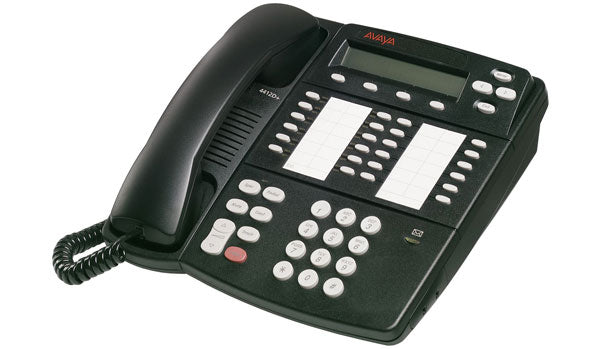
Electronic hook switch cables let a wireless headset tell the phone to pick up and hang up, which is the entire reason to buy a wireless headset for a desk phone: without it you walk back to the phone to press answer, and the wireless has bought you nothing. Poly's own range makes the point plainly. Each of its EHS adapters is unique to a specific telephone and wireless product combination, so the cable that works with an Avaya J179 is not the one that works with a Cisco 8841, and the cable that works with your colleague's Savi may not work with your Voyager.
This is why hard to find compatible voip headsets is a search people actually make. The headset is findable. The pairing of headset, cable and exact phone model is what takes the time, and it is worth resolving before you order rather than after.
You do not need to match the headset brand to the phone brand
A Jabra headset works on a Cisco phone, a Poly headset works on a Yealink, and nothing about the corded connection cares who made either end.
Where brand does decide something is the accessory. An EHS cable is sold by whoever made the headset, matched to whoever made the phone, so a Poly wireless headset on an Avaya phone needs a Poly cable for Avaya rather than an Avaya part. That is why the cable is the thing to confirm and the headset is not.
One headset for the phone and the computer
If you take calls on both an IP phone and a computer, buy one wireless base that connects to both rather than two headsets.
Wireless bases in this category commonly carry an RJ9 socket for the desk phone and a USB lead for the computer at the same time, so the headset stays on your head and a button on the base chooses which device it is talking to. That single purchase replaces the arrangement most people end up with by accident, which is a corded headset plugged into the phone and a second pair of headphones for the computer, neither of which they like.
Check one thing before assuming it works: whether the base switches automatically when a call arrives, or whether you press the button yourself. Both are common, and the difference is only noticeable after a few days of missing calls on whichever device the base was not pointed at.
Plantronics, Poly and Jabra on IP phones
The two ranges people ask about most behave the same way, and differ in what their EHS cables are called rather than in what they do.
A Plantronics voip wireless headset from the Savi or Voyager Office families uses a Poly EHS cable matched to the phone brand: an APV series part for Avaya, a different one for Cisco, another for Polycom. A Jabra voip headset from the Engage range uses Jabra's own equivalent, and Jabra also sells a mechanical lifter for phones with no electronic option. A Polycom voip phone headset is the same story from the phone's side rather than the headset's, since a Poly VVX takes any RJ9 corded headset and needs the matching cable only once you go wireless.
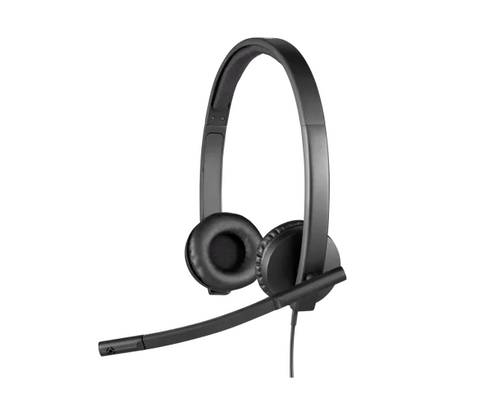
On the corded side the decision is smaller than it looks. Both makers sell a durable single-ear and double-ear model with a noise-cancelling boom, both terminate in RJ9 or in a quick-disconnect plug with an RJ9 tail, and the meaningful difference is the earpiece rather than the electronics. Quick-disconnect is worth choosing deliberately: it lets you stand up and walk away without unplugging the phone, and it means a damaged headset can be replaced without re-running the cable.
If you would rather start from a filtered list than from a phone manual, our range of certified voip headset options covers both the corded and wireless sides.
The settings on the phone that undo all of this
A correctly matched headset and cable can still behave as though nothing is compatible, and the cause is usually a setting rather than the hardware.
Most IP phones have a headset mode that has to be switched on before the headset port carries audio at all, and several have a separate EHS or hook switch setting that has to be told which protocol the cable uses. On some Yealink and Poly firmware that second setting defaults to the wrong option, so remote answering fails while everything else works, which reads exactly like an incompatible cable. Before concluding the parts do not match, look in the phone's menu for headset and hook switch entries and confirm both are set for the equipment in front of you.
What to confirm before you order
Confirm the phone's exact model number, because everything else follows from it and nothing else can be confirmed without it.
The model is printed on the base of the phone or shown in its settings menu, and a range name is not enough: Avaya's J139 and J179 are the same family and do not always take the same accessories. With the model in hand, the corded question answers itself, and the wireless question becomes a single lookup of which cable that model needs. If your phone came from a cloud provider rather than an IT department, the provider usually publishes its own certified device list, which is how our ringcentral compatible headsets range is put together.
Do all headsets work with all IP phones?
Corded headsets very nearly do. An RJ9 corded headset fits the headset port on essentially every mainstream IP phone, because those phones have the amplifier built in. Wireless headsets are where it stops being universal: the headset itself will pair with its own base, but answering calls away from the desk needs an EHS cable matched to your phone.
Do I still need a headset amplifier for a VoIP phone?
No. Amplifiers were needed for analog phones, which had no proper headset port. IP phones build that circuitry into the headset jack, so a corded headset plugs straight in. If you are looking at an amplifier for a modern IP phone, you are almost certainly looking at the wrong accessory.
What is an EHS cable and do I need one?
An EHS cable is an electronic hook switch cable, which lets a wireless headset answer and end calls on a desk phone remotely. You need one only if you want to take calls away from the desk. EHS cables are matched to a specific phone brand and often a specific model range, so it is the part to confirm before ordering rather than after.
What if there is no EHS cable for my phone?
Use a mechanical handset lifter instead. A lifter is a small powered arm that raises the handset when you press answer on the headset, and because it works physically rather than electronically it fits any phone with a handset. It is less tidy than an EHS cable and it solves the same problem.
Comments (0)