Plantronics Plantronics headsets  
  Top » Catalog » FAQDesk Information My Account  |  Cart Contents  |  Checkout   
Categories
CORDED HEADSETS

WIRELESS HEADSETS

HEADSET AMPLIFIERS

HEADSET PARTS/ACCESSORY

CELL PHONE HEADSETS

COMPUTER HEADSETS

CONFERENCE PHONES

CORDLESS PHONE HEADSETS

OFFICE TELEPHONES

CORDED HEADSET FAQ

WIRELESS HEADSET FAQ

CONFERENCE PHONE FAQ
Specials more
GN Netcom 9350 Wireless Headset System + GN 1000 Lifter combo
$359.95
$319.95
Latest products more
Plantronics PA8 Polaris Headset Amplifier
$89.95
Manufactures
Latest FAQs
- Polycom IP Phone & Plantronics Headset Compatibility
- Plantronics Calisto Pro Wireless Headset Phone FAQ
- Plantronics SupraPlus Wideband Headsets FAQ
- Wireless Headsets for Avaya Telephones
- Polycom Soundstation 2W Troubleshooting & FAQ
- Common wireless headset Questions and Answers
- Common Misconceptions of Wireless Headsets
- Plantronics Bluetooth Headset MultiPoint Technology
- What is Jabra Bluetooth Mutliuse Wireless Headset?
- GN Netcom Computer Headset and Microsoft Windows Vista
- Why my computer headset mute not working?
- Headsets for Radio Dispatch, Emergency or Air traffic control
- Cisco IP Phone Headset Compatibility Guide
- Polycom Soundstation2 Cell Phone use & Caller ID
- GN Netcom/Jabra Warranty Informations
Latest News
- Polycom Soundstation 2 Conference Phone
- GN Netcom 9120 Wireless Headset Information
- Cell Phone Headsets. It’s the law in most states while driving
- Plantronics CS55 Wireless Headset System
- Plantronics CS50 Wireless Headset Information
- Jabra Bluetooth Headsets – history, review, benefits
- How to Pick the Right Telephone Headset for your office
- Polycom: Company history and conference phone information
- Why we all should all use Plantronics Headset in the office
- Benefits of using a Wireless Headset at work
- Wireless Headset Battery Memory Loss
- New Hands Free Law Driving Law Taking Affect
- Avaya Headsets for Avaya one-X 9600 Series IP Phones
- Plantronics Bluetooth QuickPair Technology
- Plantronics Headsets Section 508 Information
We proudly accept
FAQ Information. HEADING_TITLE
- ClearOne Max FAQ   Date: Friday May 05, 2006
FAQ Summary:
ClearOne Max EX Frequently Ask Questions (FAQ)

FAQ Content:


ClearOne
Max EX Frequently Ask Questions (FAQ)


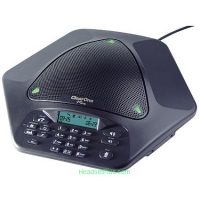
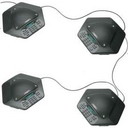
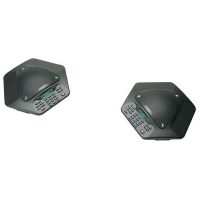
How many ClearOne Max EX phones can be linked? Up to four (4) ClearOne Conference Phones can be linked to create an expanded system.


What differentiates ClearOne Max EX from other expandable conferencing phones?
ClearOne Max EX conference telephone is unique in its expansion capabilities — you expand it by connecting additional phone units, not just microphones (as is the case with competing conferencing phones). This creates an even distribution of microphones, loudspeakers and controls for better sound quality and user access.


For what size of room is ClearOne Max EX most appropriate? Because of the unique expansion capabilities of ClearOne Max EX, it is ideal for a wide variety of applications and room sizes. As a single unit, it is ideal for small conference rooms for up to 8 people. Link additional units (up to four) and it is perfect for medium conference rooms, large boardrooms or training rooms for up to 40 people.


How do I make calls to more than one party? ClearOne Max phones operate like any other telephone when calling out to multiple parties. If you subscribe to three-way calling as part of your telephone service, you can make a three-way call using the flash/hook key on the ClearOne Max phone. You may also use a conference calling service, and may preprogram the phone number to your favorite conferencing service provider into the ClearOne Max phone.


What tools do I need to install ClearOne Max phones? You don’t need any tools to install ClearOne Max. Simply plug in the power supply/base unit and run the provided telephone line from the power supply/base unit to a standard analog telephone jack and place the phone on a table or desk. (In the case of ClearOne Max Wireless, make sure the battery is plugged in and fully charged prior to first use).


ClearOne Max Wireless Conference Phone Questions


What ClearOne Max wireless communication standard does ClearOne Max Wireless use? ClearOne Max Wireless conference phone uses either the Digital Enhanced Cordless Telecommunications (DECT) or Worldwide Digital Cordless Telecommunications (WDCT) standard, depending on the country the phone will be sold into. The DECT standard broadcasts at a 1.880 to 1.9 gigahertz (GHz) frequency using Time Division Multiple Access (TDMA) to allow up to 120 available channels. Audio is transmitted at 32 kbps using the G.726 ADPCM coding ITU standard.


The WDCT standard is the North American equivalent of DECT with one exception: WDCT broadcasts on the 2.4 GHz frequency with 75 channels available. The ClearOne Max Wireless uses digital spread spectrum and pseudo-random channel hopping to jump between the 75 channels in the 2.4 GHz range to provide security for audio calls. As the ClearOne Max Wireless is broadcasting it will detect interference from other devices transmitting on the same frequency and will then attempt to skip that channel to avoid the interference.


Will ClearOne Max Wireless interfere with my wireless LAN?  No. Using frequency hopping prevents ClearOne Max phones from interfering with wireless local area networks (LANs). Typically, 802.11 wireless LANs use direct sequence transmission, which means they use a constant brand of frequencies. If the ClearOne Max phone tries to transmit on one of the frequencies being used by the wireless LAN, it will detect the LAN and avoid that channel if possible. If ClearOne Max uses the same frequency, audio quality will not be affected and conversations will not be interrupted. It is possible that the LAN may slow down for 100 milliseconds. However, since LANs are packet-based, the interference from ClearOne Max will not be noticeable.


Is ClearOne Max Wireless secure? Yes. ClearOne Max Wireless is designed with digital spread spectrum technology — one of the most reliable wireless technologies available — to ensure calls are private and secure. Spread spectrum technology has been used for more than 50 years by the military because it has a low probability of signal interception and interference. (See the ClearOne Max Wireless Security brief for additional information.)


Can ClearOne Max Wireless be used in a different room from where its base station is located? Yes. ClearOne Max can be used in any room within 150 feet of its base station.


Can more than one ClearOne Max Wireless be used in the same area? Yes. The ClearOne Max pod and base unit will automatically adjust the frequency-switching pattern when interference (another device transmitting on the same frequency) is detected on the channel. This eliminates the possibility of interference when using multiple ClearOne Max Wireless units are used in close proximity. Up to 15 ClearOne Max phones may be used in the same vicinity with no discernable interference between phones, provided the base units and pods are not placed within six inches of other base units and pods.


How do I find the ClearOne Max Wireless if it is misplaced? The base unit has a paging button, which will cause the pod to beep.


Is the ClearOne Max Wireless expandable? No. It is designed for use in executive/small offices or small conference rooms seating up to eight participants. For larger rooms, use the ClearOne Max EX.


How long will the battery last? The battery will provide 8 hours of talk time or 2 days of standby time before it needs to be recharged.


What happens if the battery begins to run out during a call? The phone provides several alerts when the battery’s power begins to run low, including a numeric counter showing the amount of talk time left on the battery’s current charge, a battery icon that flashes when the battery requires charging, and an audible tone that sounds periodically as the batter life runs down. If the battery runs low during a call simply plug in the power supply and continue your conference while you recharge the ClearOne Max.


How many times can I charge the battery before it stops taking charges? The battery can be recharged 500-1000 times, which gives it a life of approximately two years.


If I unplug the base unit, the battery loses its charge very quickly. Why does this happen? If the pod (phone unit) cannot locate the base, it switches to high power mode to search for it. This will drain the battery very quickly. To prevent this, keep the base unit plugged in at all times. The pod will go into a low power mode when not in use during a call.


What if my ClearOne Max Wireless is not charged when I need it? Plug in the power supply and charge the phone while you conference.


FAQ Statistics:
Viewed:6845
Continue
Shopping Cart more
0 items
Quick Find
 
Information
Shipping
Returns & Policies
Contact Us
Site Map
Privacy Notice
Links
Directory
Latest Headset News
Reviews more
Plantronics Calisto Pro Wireless Headset Telephone
The desktop set up was very clean and functional. It wasn’t ..
5 of 5 Stars!
Best Sellers
Plantronics S12 telephone headset convertible system
01. Plantronics S12 telephone headset convertible system
Plantronics CS50 + HL10 Wireless Headset Lifter Combo Package
02. Plantronics CS50 + HL10 Wireless Headset Lifter Combo Package
Plantronics CS50 Wireless Headset System
03. Plantronics CS50 Wireless Headset System
Plantronics CS55 + HL10 Wireless Headset Lifter Combo Package
04. Plantronics CS55 + HL10 Wireless Headset Lifter Combo Package
Plantronics S11 Telephone Headset System
05. Plantronics S11 Telephone Headset System
Plantronics CS50 CS55 Replacement Battery
06. Plantronics CS50 CS55 Replacement Battery
Plantronics CS55 Wireless Headset
07. Plantronics CS55 Wireless Headset
Plantronics HL10 Lifter
08. Plantronics HL10 Lifter
Tell A Friend
 
Tell someone you know about this product.


Related links and products:Headset Plus is a leader supplier of Plantronics | cordless headsets | Plantronics CS50 | Plantronics 510S | Plantronic Headsets | Cisco Headset | Plantronics CS55 | Plantronics S12 |Plantronics CS351| gn netcom 9120 | Plantronics CS70 |GN Netcom 9330 | GN Netcom 9350 | wireless conference phone | Polycom Soundstation 2 | Polycom Soundstation 2W | USB Headset | Plantronics M12 Vista | ClearOne Conference Phone | computer headset | GN Netcom Headsets | Plantronics M22 vista | Plantronics CS361 | Plantronics CS361N

Phone System Forum | Find Telephone Installers in your area