

Confused on which headset and cable to order for your Avaya Phone?
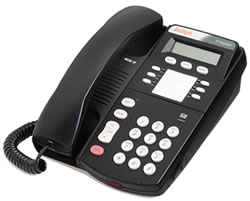
For a complete and updated list of corded and wireless headsets for your Avaya Phone, go to our Direct Connect Headset section.
(If you’re looking for a wireless headset. See our Plantronics wireless headsets for Avaya Phones section)
You will first pick from one of the Plantronics H-Series headsets section. Then pick the correct cable below depending on the model phone you have.
For Avaya 46xx series, 56xx series, 24xx series, 54xx series, 6416D+M, 6424D+M, and QE4610 phones (for example, Avaya IP 2410, 2420, 4610, 4620, 4621, 4622, 4625,4630, 5410, 5420, 5610 and 5620): Use the Plantronics HIC cable
For Avaya 96xx series, 1608, 1616 phones (For example, Avaya IP 9620, 9630, 9640, 9650, 1608 and 1616): Use the Plantronics HIS cable
For Avaya 46xx IP phones (4606, 4612, 4624): Use the Plantronics HIC-10 Cable
For AT&T, Lucent, Avaya “Merlin Magix” Models 4424LD+, 4424D+,4412D+, 4406D+: Use the Plantronics HIC cable
For Avaya Call Master I, II, III, IV phones: Use the Plantronics P10 Plug Prong Amplifier for H-Series Headsets. If you want a wireless headset solution, Use any Plantronics Wireless Headset + Plantronics PJ-327 Wireless Headset 2-Prong Adapter
For Avaya Call Master V and VI phones: Use the Plantronics 26716-01 (same as Avaya part# 407721034), Wireless headsets are NOT compatible with these phones.
For Avaya/Lucent/AT&T Partner MLS 12, 12D, 18, 18D, 34, 34D (sometimes also listed as Euro Style 18D, MLS 34D, etc.) phones Go HERE for more information.
Once you pick the headset and cable (both end of quick disconnects) – then you can simply plug the modular RJ9 jack  directly to your Avaya phone’s “headset” jack.
For a complete list of corded and wireless headsets for your Avaya Phone, go to our Direct Connect Headset section.
Still confused? Call us at 877-999-3838. HeeadsetPlus.com can help you pick out the right headset.



