











































Finding a wireless headset for an Avaya phone is trickier than for most desk phones, because Avaya's lineup spans decades — from the newest J100 series back to Partner, Definity, and Call Master consoles — and each family connects a little differently. The headset is the easy part. What actually decides whether you can answer calls from across the room is the EHS cable, and it's specific to your exact Avaya model. Here's the full map.
Key takeaways
- A wireless headset works with most Avaya phones; remote answering needs an EHS cable matched to your phone family.
- Poly uses the APV-63 (J100/1600/9600) or APV-66 (2420/4600/5600); Jabra uses Link 33/35 or Link 19.
- The basic Avaya J129 has no headset port and a magnetic hookswitch, so it can't use a lifter.
- Current picks: Poly CS540, Jabra Engage 65 SE (which replaced the discontinued Pro 920), EPOS Impact D10 II.
- If a sidecar occupies the phone's EU24 port, use the APV-63 EHS cable instead.
How Avaya wireless compatibility works
Two questions decide everything: does your Avaya phone have a headset port, and does it support EHS for remote answering. Most modern Avaya phones answer yes to both — the exceptions are the basic and older models covered further down.
EHS (Electronic Hook Switch) cable: A cable that lets a wireless headset's base electronically answer and end calls on the desk phone, so you can pick up from across the room without touching the phone. On Avaya phones the correct EHS cable depends on the phone family, and without it a wireless headset works for audio but can't answer calls remotely — you'd need a mechanical handset lifter instead.
Myth
All Avaya phones connect to a wireless headset the same way.Reality
They don't, and getting it wrong means no remote answer. Avaya phones split into groups that each need a different EHS cable, and the basic Avaya J129 is a special case entirely — it has no dedicated headset port and uses a magnetic hookswitch, so it can't use a mechanical lifter at all. On a J129 you use a wireless headset and handle the receiver manually. For every other model, matching the exact EHS cable to your phone family is the step that makes remote answering work.The EHS cable by Avaya phone family
Find your Avaya phone below to see which EHS cable enables remote answering, for Poly and Jabra wireless headsets:
| Avaya phone family | Poly EHS cable | Jabra EHS cable |
|---|---|---|
| J139, J159, J169, J179, J189 | APV-63 | Link 33 / Link 35 |
| 1600 series (1608, 1616) | APV-63 | Link 33 / Link 35 |
| 9600 series (9608, 9611, 9621, 9641) | APV-63 | Link 33 / Link 35 |
| Select 1400 / 6400 series | APV-63 | Link 33 / Link 35 |
| 2420, 4600, 5420, 5600 series | APV-66 (EU24 port) | Link 19 |
| J129 (basic) | None — no headset port | None — no headset port |
The 2420/4600/5600 group is the one to watch: those phones connect through the EU24 accessory port on the back, which needs the Poly APV-66 or Jabra Link 19 rather than the standard cable. These older phones also need their latest firmware for EHS to work. Because the cable is model-specific and easy to get wrong, this is the step worth confirming before ordering — our Avaya bundles pair the headset and the right cable together, or call and we'll match it.
Wireless headsets for Avaya phones
With the EHS cable sorted, here are the current wireless headsets that pair with it, by brand. HeadsetPlus sells these as Avaya-certified bundles that already include the correct EHS cable.
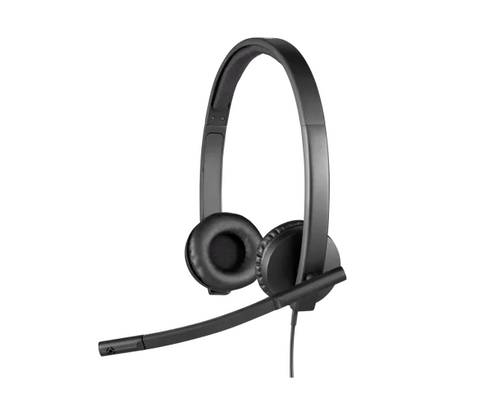
- Poly CS540 — the most popular office wireless headset, light and convertible. The CS540 + Avaya EHS (APV-63) bundle ships ready for remote answer on J100, 1600, and 9600 phones.
- Jabra Engage 65 SE — the Engage 65 SE + Avaya EHS bundle is the current replacement for the discontinued Jabra Pro 920, with up to 490 ft range, 13 hours of talk time, and far higher headset density for busy floors.
- Poly Savi series — for a DECT headset with more range or stereo/ANC, the Savi 8420 and 7310 come in Avaya EHS bundles.
- EPOS Impact D10 II — a strong alternative with up to 500 ft range, 12-hour talk time, fast charging, and a convertible wearing style; the stereo Impact D30 covers both ears.
The full range, with the matching EHS cables, is on the Avaya wireless headsets collection. If you use a corded headset instead, Avaya phones pair with a Poly EncorePro or Jabra Biz using an HIS or HIC bottom cable — our guide to identifying QD cables explains which.
Older Avaya systems: Partner, Definity, Merlin, and Call Master
Legacy Avaya systems handle wireless headsets differently, mostly because they predate built-in EHS:
- Partner phones (12, 12D, 18, 18D, 34, 34D): the old Plantronics AWH-54 with built-in EHS is discontinued, so the current solution is a wireless headset plus a mechanical lifter — the CS540 with an HL10 lifter, or a Jabra or EPOS headset with its matching lifter (GN1000 RHL or HSL10 II).
- Definity phones: if the phone has an EU24 port, the headset connects directly there with no lifter needed; some models connect through the handset port instead. The CS540 is the standard pick.
- Merlin phones: most have no headset port, so you connect the wireless base and pick up the handset manually. A lifter can raise the handset, but Merlin's ringing doesn't trigger the headset's incoming-call alert, so you'll only get remote answer if you're close enough to hear the phone ring.
- Call Master I–IV consoles: use any Poly wireless headset plus the Plantronics PJ-327 2-prong adapter. Call Master V and VI work with wireless headsets but not remote answer — you press a dedicated key on the console to take the call.
The sidecar catch
One gotcha catches larger deployments: Avaya phones with many programmable keys often have a sidecar (button expansion module) attached, and that sidecar takes over the EU24 port on the back of the phone — the same port some EHS cables use. When a sidecar is present, use the APV-63 EHS cable, which enables remote answer without needing the occupied EU24 port. If you're unsure whether your setup has this conflict, it's worth a quick call before ordering.
What wireless headset works with an Avaya phone?
Most Avaya phones work with wireless headsets like the Poly CS540, Jabra Engage 65 SE, or EPOS Impact D10 II, connected through the phone's headset port. To answer calls remotely, you also need an EHS cable matched to your Avaya phone family. HeadsetPlus sells these as Avaya-certified bundles that include the correct EHS cable for your model.
Which EHS cable do I need for my Avaya phone?
For Avaya J139/J169/J179/J189, 1600, and 9600 series phones, use the Poly APV-63 or Jabra Link 33/35. For 2420, 4600, and 5600 series phones, use the Poly APV-66 or Jabra Link 19, which connect through the EU24 port. The basic J129 has no headset port, so it uses a wireless headset without any EHS cable or lifter.
Does the Avaya J129 work with a wireless headset?
The Avaya J129 has no dedicated headset port and uses a magnetic hookswitch, so it can't use a mechanical lifter. You can still use a wireless headset like the Poly CS540, but you'll handle the receiver manually to open the line rather than answering remotely. For full remote answer, a phone with a headset port and EHS support is needed.
What replaced the Jabra Pro 920 for Avaya phones?
The Jabra Pro 920 has been discontinued, and the Jabra Engage 65 SE is its direct replacement for Avaya phones. It offers up to 490 feet of range, 13 hours of talk time, and supports far more headsets in one office. HeadsetPlus sells it as an Avaya EHS bundle with the correct remote-answer cable included.
Why won't my wireless headset answer calls remotely on my Avaya phone with a sidecar?
A sidecar (button expansion module) takes over the EU24 port on the back of the Avaya phone, which some EHS cables rely on. When a sidecar is attached, use the Poly APV-63 EHS cable instead, since it enables remote answering without needing the occupied EU24 port. Confirm your phone and sidecar model to get the right cable.
Avaya compatibility comes down to two moves: identify your phone family, and match the EHS cable to it — APV-63 or Jabra Link 33/35 for the J100/1600/9600 phones, APV-66 or Link 19 for the 2420/4600/5600 group. Get the cable right and any current wireless headset gives you the run of the office. Browse the Avaya-ready bundles on the Avaya wireless headsets collection, or call our team at 877-999-3838 with your exact Avaya model and we'll match the whole setup.
Comments (0)