











































The Yealink WH63 E2 makes a simple pitch: a genuine professional wireless headset, one of the lightest on the market at 19 grams, for well under half the price of the DECT flagships. After testing it, the pitch mostly holds — with a few honest caveats worth knowing before you buy.
Here's our hands-on review: what the WH63 E2 does well, where it compromises, and how it stacks up against its pricier hybrid sibling, the WH64.
Key takeaways
- Ultra-light at 19 grams, with four wearing styles including a comfortable eartip-only option for glasses wearers.
- DECT range up to 607 ft and up to 8 hours of talk time — a real jump over the original WH63.
- Connects to a desk phone and computer at once; switches with a tap on the base. No Bluetooth.
- Dual-microphone Acoustic Shield noise cancellation and a built-in busylight.
- The main compromise: a sealed battery with no user-replaceable spare.
What is the Yealink WH63 E2?
The WH63 E2 is Yealink's lightweight, entry-level convertible DECT headset, built for professionals who split their day between a VoIP desk phone and a computer softphone. It's the current version of the original WH63, and the "E2" refresh is a genuine upgrade rather than a cosmetic one — the range jumped from 394 to 607 feet, talk time rose from 7 to 8 hours, and the base moved to USB-C.
Myth
The WH63 E2 can connect to my cell phone like other multi-device headsets.Reality
It can't. The WH63 E2 is DECT-only — it connects to a desk phone and a computer, but has no Bluetooth, so it won't pair with a smartphone. If you need one headset that also handles mobile calls and travels with you, that's the hybrid WH64, which adds Bluetooth to the same design. Choosing between them comes down entirely to whether you need the cell-phone connection.Yealink WH63 E2 specs at a glance
| Feature | Yealink WH63 E2 |
|---|---|
| Wireless | DECT (no Bluetooth) |
| Range | Up to 607 ft (185 m) line of sight |
| Talk time | Up to 8 hours (71 hr standby) |
| Weight | 19 grams |
| Microphones | 2-mic Acoustic Shield noise cancellation |
| Wearing styles | Eartip, earhook, headband, optional neckband |
| Connectivity | Desk phone + computer (USB-C), simultaneous |
| Variants | UC or Microsoft Teams |
Four wearing styles — the standout feature
The WH63 E2's best trick is flexibility on the head: it converts between four wearing styles — over-the-head with the headband, over-the-ear with the earhook, eartip-only, or behind-the-neck with an optional neckband. The eartip-only option is the one worth calling out. It holds the headset in place through normal office movement without any hook, which makes it genuinely comfortable for eyeglass wearers who find earhooks fight with their frames — a small design win competitors often miss.
Whether one ear suits you or you'd want a dual-ear model for noisier rooms is a separate question we cover in monaural vs binaural headsets; the WH63 E2 is a single-ear headset.
How the WH63 E2 performed in testing
In use, the WH63 E2 is a pleasure — the earhook is more flexible and comfortable than most rivals', and the swappable gel caps ship in a hard case rather than a flimsy sleeve, a nice touch at this price. The answer/end control is easy to find by feel, and the mute key sits on the back of the headset in red.
Two details stood out on the bench. The volume is a touch-slide control rather than a physical button — slide toward + or − — which looks elegant but takes a little acclimatization. And the out-of-range voice prompt is genuinely useful: step too far from the base and the headset says "out of range" at a discreet interval, then confirms when you're back in range. For anyone in a home office stepping away for a minute, it removes the guesswork about whether you're still connected. The dual-mic Acoustic Shield handled background noise well, and the enhanced speaker gives it clear, full audio for calls and media alike.
Connecting the WH63 E2 to a computer and desk phone
Setup is straightforward. For a computer, connect the base with the USB-C cable — if you only use a softphone, that single cable both powers the base and charges the headset, so you can leave the power adapter in the box and keep the desk tidy. Configure the rest through the free Yealink USB Connect software (Windows and Mac), which handles firmware updates, ringtone selection, busylight, range, and mute-reminder settings.
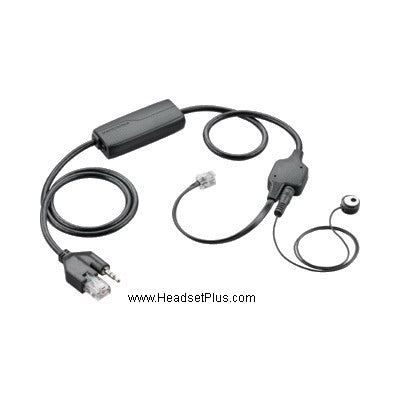
For a VoIP desk phone, you'll need the matching EHS adapter for remote answering: the EHS60 for Cisco, Poly, and Avaya phones, the EHS61 for Mitel and Unify, or the EHS62 for other third-party phones. This is worth confirming before you order, since it depends on your exact phone — our guide to EHS hookswitch cables explains how remote answering works, and if your phone has no EHS support, call and we'll find the right route.
The good and the not-so-good
Pros
What we likedCons
What could be betterOn the plus side: strong value against the competition, an ultra-light and comfortable all-day design, the eartip-only style that stays put without a hook, straightforward computer setup, a well-packed accessory kit, dual desk-phone-and-computer connectivity with UC support, clear visual alerts on the base, and a 2-year warranty.
The honest downsides: the touch-slide volume takes getting used to; the base's USB port and cable management are fiddly for larger hands; EHS compatibility is limited to certain desk phone models; there's no analog telephone interface or mechanical lifter for phones without EHS; and — the big one — the headset is sealed with no user-replaceable or spare battery, so there's no hot-swap for a marathon call.
Yealink WH63 E2 vs WH64: which should you buy?
The WH63 E2 and the WH64 are the same idea at two levels. The deciding factor is Bluetooth: the WH63 E2 is DECT-only for a desk phone and computer, while the WH64 adds a Bluetooth radio in the headset so it also handles your mobile phone and travels with you.
| WH63 E2 | WH64 | |
|---|---|---|
| Connectivity | DECT: desk phone + PC | Hybrid DECT + Bluetooth: desk phone + PC + mobile |
| Range | Up to 607 ft (DECT) | 492 ft DECT / 164 ft Bluetooth |
| Talk time | Up to 8 hours | Up to 32 hours |
| Best for | Desk phone + computer only | Adding a mobile phone and mobility |
If you only work a desk phone and a computer, the WH63 E2 is the better value — you're not paying for a Bluetooth radio you won't use. If you need your cell phone in the mix or want to walk the building on a mobile call, step up to the WH64 hybrid. Both sit alongside the DECT flagships on the wireless headsets collection.
What is the Yealink WH63 E2 and how is it different from the WH63?
The Yealink WH63 E2 is the current version of the WH63, an ultra-light 19-gram DECT wireless headset for a desk phone and computer. The E2 refresh improved the original's specs, raising the range from 394 to 607 feet, talk time from 7 to 8 hours, and moving the base to USB-C. The original WH63 has been discontinued.
Does the Yealink WH63 E2 connect to a cell phone?
No. The Yealink WH63 E2 is a DECT-only headset, connecting to a desk phone and a computer but not to a mobile phone, since it has no Bluetooth. If you need one headset that also pairs with a smartphone and can travel with you, the Yealink WH64 adds Bluetooth to the same design.
How do I connect the Yealink WH63 E2 to my desk phone?
The WH63 E2 connects to a VoIP desk phone through an EHS adapter for remote answering — the EHS60 for Cisco, Poly, and Avaya phones, the EHS61 for Mitel and Unify, or the EHS62 for other third-party phones. To the computer it connects over USB-C. Because EHS support depends on your exact phone model, confirm compatibility before ordering.
What is the range and battery life of the Yealink WH63 E2?
The Yealink WH63 E2 offers up to 607 feet (185 m) of DECT range and up to 8 hours of talk time, with 71 hours of standby, on a single charge. Real-world range is shorter than the line-of-sight figure once walls and office equipment are factored in. The battery is sealed, so there's no hot-swappable spare for continuous use.
Is the Yealink WH63 E2 good for glasses wearers?
Yes. The WH63 E2 includes an eartip-only wearing style that holds the headset in place through normal movement without an earhook, which many eyeglass wearers find more comfortable since it avoids the hook competing with their frames. It's one of four wearing styles, alongside earhook, headband, and an optional neckband.
The WH63 E2 isn't trying to be the most feature-packed headset on the shelf — it's trying to be the light, comfortable, well-priced one that just works for desk-phone-and-computer calling, and it succeeds. The sealed battery is the one real trade-off to weigh. If that fits your day, it's excellent value; if you need mobile calls too, the WH64 is the step up. See both on the wireless headsets collection, or call our specialists to confirm it works with your desk phone.

Comments (0)