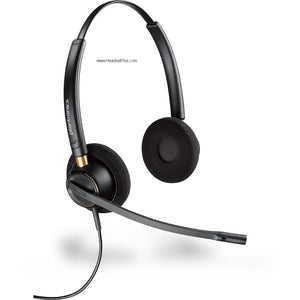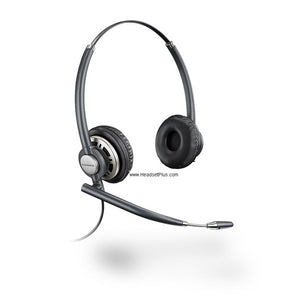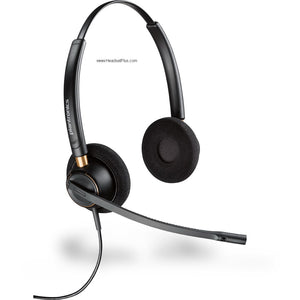













































Plantronics SMH 1783 Dual-Ear Headset for Visually Impaired & Dictation
The Plantronics SMH 1783 listens in two places
A blind telephone operator can't drop a caller every time they need to check the screen — the call and the screen reader have to run at the same time, in the same head, without colliding. The Plantronics SMH 1783 headset was built to solve exactly that.
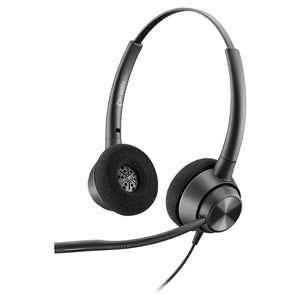
It's a dual-ear headset wired so each earpiece listens to its own audio source. Phone call in one ear, computer or dictation in the other — two streams, kept apart, each adjusted on its own. That single design serves two very different people: someone navigating a PC by screen reader while taking calls, and a transcriptionist who needs dictation in one ear and a live line in the other.
Build the exact SMH 1783 setup you need
Two decisions: the microphone style, and how the second ear reaches your computer.
Microphone
- Voice tube (SMH 1783-11). A hollow tube boom with no electronics — pick it for a quiet home office or a private room where there's little noise to cancel in the first place.
- Noise-canceling (SMH 1783-15). A bendable boom mic that strips room noise out of your outgoing audio — the right call for an open-plan floor, a call center, or any shared space where callers would otherwise hear everything behind you.
Computer connection
- 3.5mm soundcard cable (included). Plugs the second ear straight into your computer's headphone or soundcard jack. Screen-reader and dictation audio work the moment you plug in.
- USB audio (add a DA80 processor). If your PC or softphone wants USB instead of an analog jack, the Plantronics DA80 USB audio processor handles the conversion — ordered separately.
How the Plantronics SMH 1783 keeps two sources apart
The Plantronics SMH 1783 gives each earpiece its own Quick Disconnect and its own cable, so the left ear and right ear plug into completely separate audio sources and never blend. One side runs through the Vista M22 amplifier into your desk phone; the other runs through the 3.5mm cable into your computer. You hear both at once, and you set the volume of each independently.
That separation is the entire point, and it's the part people get wrong.
Who each setup is really for
Phone call in the left ear, JAWS or another screen reader announcing the screen in the right. Take calls and navigate the computer by audio without either one drowning out the other — a practical ADA workplace accommodation that uses standard, supported hardware.
Dictation playback in one ear, an open phone line in the other. Transcriptionists and admin staff can keep a recording running while staying reachable, instead of stopping playback every time the phone rings.
Plug the SMH 1783 into almost any desk phone
The included Plantronics Vista M22 amplifier installs at your telephone's handset jack and works with most single- and multi-line office phones — a slide switch matches it to your model. It carries ergonomic volume, mute, and headset/handset controls, plus Clearline audio and wideband TIA-920 support (roughly 150 Hz to 6,800 Hz) for clearer voice on systems that handle it. The M22 is long-running, field-proven Plantronics hardware rather than a new release; Poly moved its role into the MDA524 in late 2024, but the SMH 1783 ships as the complete, tested assembly.
All-day comfort on the SupraPlus frame
Both versions are built on Plantronics' SupraPlus binaural headset — around 86 to 88 grams, with an adjustable T-pad headband and soft foam cushions over both ears. Light enough that an 8-hour shift doesn't leave a mark, and the over-both-ears design keeps you focused on the two audio streams instead of the room.
For the worker who needs it, the SMH 1783 is the difference between doing the job and not. There's no Bluetooth headset or consumer earbud that splits two live sources cleanly into two ears — this does one specific thing, it does it reliably, and it's assembled from hardware Plantronics has shipped for years. Buy it for the person who has to hear a caller and their screen at the same time, all day.
- SupraPlus binaural headset — HW261 (voice tube) or HW261N (noise-canceling), per the version ordered
- Plantronics Vista M22 telephone amplifier
- Monitor receiver with 3.5mm soundcard Quick Disconnect cable (SSP1064-04) for the second ear
- Phone cable and 10-ft Quick Disconnect coil cord
- 2 AA batteries
- Microphone volume-adjust key
- User guide
| Headset platform | Plantronics SupraPlus binaural (HW261 / HW261N) |
|---|---|
| Microphone options | Voice tube (SMH 1783-11) or noise-canceling (SMH 1783-15) |
| Wearing style | Over-the-head, binaural (both ears) |
| Headset weight | Approx. 86–88 g |
| Audio | Wideband-capable |
| Connectors | Two independent Quick Disconnects — one per earpiece |
| Phone connection | Vista M22 amplifier at the telephone handset jack |
| Computer connection | 3.5mm soundcard cable (included); USB via DA80 processor (sold separately) |
| Amplifier | Vista M22 — volume, mute, headset/handset controls; Clearline audio; wideband TIA-920 (~150 Hz–6,800 Hz); AA battery powered |
| Cord length | 10-ft Quick Disconnect coil cord |
| Warranty | 2-year manufacturer warranty (Plantronics/Poly) |
| Order status | Special order — non-returnable, all sales final |
Software. The second ear plays whatever your computer outputs, so the SMH 1783 works with JAWS, NVDA, and other Windows screen readers, with text-to-speech tools, and with standard dictation and transcription software — no special drivers, since it presents as ordinary audio.
Hardware. The Vista M22 amplifier installs at the handset jack of most single- and multi-line desk phones; a compatibility slide switch tunes it to your model. The computer side connects through the included 3.5mm soundcard cable, or over USB if you add the Plantronics DA80 audio processor.
Platforms. Built for traditional analog and wideband VoIP desk phones paired with a computer audio source. This is a wired analog system — it is not a Bluetooth or UC-certified device, so it pairs with the phone-plus-PC setups common in call centers, accessible workplaces, and transcription desks rather than with softphone-only laptops on their own.
FAQ
Frequently Asked Questions
The Plantronics SMH 1783 lets you hear two separate audio sources at the same time — one in each ear. It's used by visually impaired staff who need a phone call in one ear and a screen reader in the other, and by transcriptionists who need dictation playback in one ear and a live phone line in the other.
Yes — that's exactly what the Plantronics SMH 1783 is built for. Each earpiece has its own connection: the phone runs through the Vista M22 amplifier into one ear, and your computer's screen-reader audio runs through the 3.5mm cable into the other. The two never mix, and you control each volume separately.
Yes. The SMH 1783's second ear plays whatever your computer outputs, so JAWS, NVDA, and any text-to-speech software work without special setup. Plug the included 3.5mm cable into your soundcard or headphone jack and the screen reader plays in that ear.
The SMH 1783 includes a 3.5mm soundcard cable for the computer side, which fits most desktops and laptops with an audio jack. If you need USB instead, add a Plantronics DA80 USB audio processor, ordered separately.
The microphone. The SMH 1783-11 uses a voice-tube boom, best for quiet rooms, while the SMH 1783-15 uses a noise-canceling boom that filters background noise out of your outgoing audio for busy offices and call centers. Everything else — the dual-ear design, the M22 amplifier, the second-ear computer connection — is identical.
No — the Plantronics SMH 1783 is a custom-built special-order item, so all sales are final and it can't be returned or refunded. If a unit arrives defective, Plantronics/Poly replaces it under the 2-year manufacturer warranty. Confirm your phone model before ordering.
You May Also Like