









































Poly Plantronics EncorePro EP515-M Mono Digital Headset
The Poly EncorePro EP515-M skips the guesswork
Half your team plugs into a desktop with a USB-A port, the other half is on a laptop with USB-C only, and normally that means stocking two different headset SKUs or handing out dongles that go missing within a month. The Poly EncorePro EP515-M solves that with one cable — it's built with both USB-A and USB-C connectors on the same headset, so whoever's using it plugs into whatever port they've got.
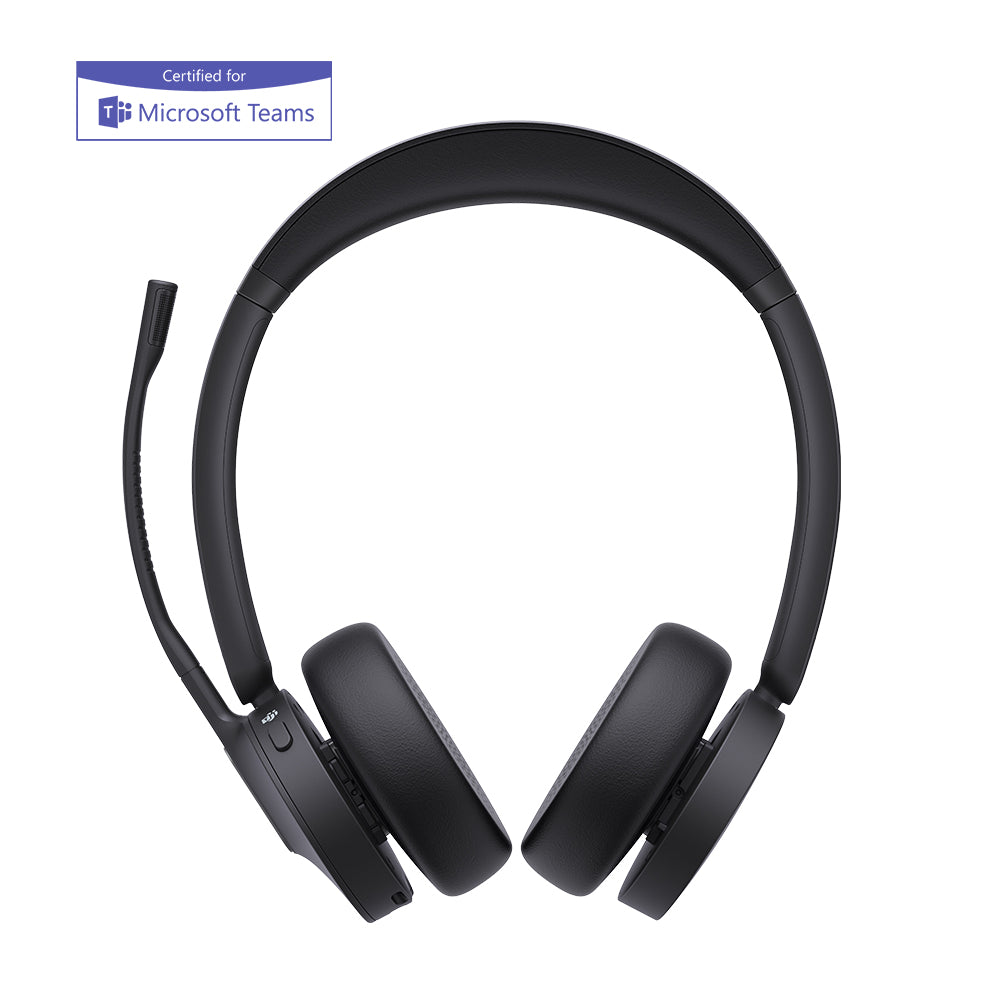
It's the mono model in Poly's EncorePro 500 Digital series, a step up from the entry-tier EncorePro 300 series in one specific way: this headset is digital, meaning it actively calibrates its own audio output rather than just passing sound through, and it can receive firmware updates over the same cable. It's Microsoft Teams certified, weighs 52 grams, and carries SoundGuard Digital hearing protection and Telecoil Hearing Aid Compatibility.
Does the EncorePro EP515-M work with both USB-A and USB-C?
Yes — the Poly EncorePro EP515-M has both connectors built into a single cable, so there's no separate USB-A or USB-C version to choose between. Plug it into a USB-A port on an office desktop today, hand it to someone on a USB-C laptop tomorrow, and it's the same headset either way.
One headset, every desk
This matters more than it sounds like on paper. A call center replacing 40 headsets across a mix of desktop towers and laptops normally has to track which SKU goes where. The EncorePro EP515-M removes that step entirely — order one part number, and it works at every desk in the building, regardless of what's plugged into the tower under it.Is the EncorePro EP515-M Microsoft Teams certified?
Yes. The Poly EncorePro EP515-M carries full Microsoft Teams certification, with a dedicated Teams button on the inline controls that launches the app, answers calls, and surfaces notifications without touching the keyboard. Per IP Phone Warehouse's listing, the headset is automatically identified by Teams the moment it's plugged in — no manual device selection in the Teams settings menu.
Digital, and what that actually means
"Digital" isn't a marketing word here — it's the actual difference from the analog EncorePro 300 series. The EncorePro EP515-M dynamically adjusts its own audio output to match call conditions rather than running a fixed profile, and Poly can push firmware updates to the headset over USB, the same way a phone gets a software update. That's why Poly positions the EncorePro 500 Digital series as the first call center headsets built to stay current with everything Teams adds, rather than shipping once and staying static for its whole service life.
Built to last, and built to protect hearing
At 52 grams, the EncorePro EP515-M is light enough to disappear on a long shift, built from composite materials rather than metal to keep weight down without turning fragile. SoundGuard Digital limits sudden loud spikes coming through the line, and the headset is Telecoil Hearing Aid Compatible, which matters for any call center required to accommodate that under ADA guidelines. It carries a 2-year manufacturer warranty.
Mono, or the stereo EP525-M
52 grams, one ear covered. For agents who need to stay aware of the room.
74 grams, both ears covered. Same digital platform, same dual USB-A/USB-C cable, same Teams certification — for floors where blocking the room matters more.
The Poly EncorePro EP515-M is the headset for an IT department that's tired of managing two SKUs for one job — one cable that plugs into anything, a Teams experience that stays current without a hardware swap, and a mono design light enough to forget by hour six. Order it once, and it works at whichever desk it lands on, backed by HeadsetPlus's lifetime support.
- Poly EncorePro EP515-M mono digital headset
- Attached cable with built-in USB-A and USB-C connectors and inline controls
- Foam ear cushion (fitted)
- Quick start guide
| Type | Monaural (single-ear), over-the-head, on-ear |
|---|---|
| Series | Poly EncorePro 500 Digital Series |
| Microphone | Noise-canceling, wideband audio |
| Connector | Built-in USB-A and USB-C on a single cable — no separate version needed |
| Controls | Inline answer/end, mute, volume, dedicated Microsoft Teams button, single hold button for audio/video |
| Certification | Microsoft Teams certified; Skype for Business certified |
| Audio processing | Dynamic audio adjustment calibrated to call conditions; remote firmware updates over USB |
| Hearing protection | SoundGuard Digital — protects against loud sudden spikes and extended exposure |
| Hearing aid compatibility | Telecoil Hearing Aid Compatible (HAC) |
| Build | Composite materials, lightweight |
| Weight | 52 g |
| Software | Plantronics Hub / Poly Lens |
| Stereo alternative | EncorePro EP525-M (binaural, 74 g, same series) |
| Part number | 783R1AA (old 218272-01) |
| Warranty | 2-year manufacturer warranty, plus HeadsetPlus lifetime technical support |
Software. The EncorePro EP515-M is Microsoft Teams certified and auto-identified by Teams on connection, with a dedicated Teams button for one-press app access. It also works with other UC applications and softphones, including Avaya and Cisco platforms. Plantronics Hub (Poly Lens) manages settings and pushes firmware updates.
Hardware. The headset connects to a computer through its built-in cable, which carries both USB-A and USB-C connectors — no adapter or separate SKU needed regardless of which port the computer has.
Platforms. The EncorePro EP515-M is built for call centers and contact centers running Microsoft Teams, and for hybrid teams splitting time between office desktops and home laptops on different port standards.
FAQ
Frequently Asked Questions
Yes. The Poly EncorePro EP515-M has both a USB-A and a USB-C connector built into the same cable, so it's a single SKU that works on any computer regardless of which port it has — no separate version to order.
Yes. The Poly EncorePro EP515-M is Microsoft Teams certified with a dedicated Teams button, and it's automatically identified by Teams the moment it's plugged in, with no manual device selection required.
The EncorePro EP515-M is mono, covering one ear at 52 grams. The EncorePro EP525-M is the binaural sibling in the same digital series, covering both ears at 74 grams. Both share the same dual USB-A/USB-C cable and Teams certification.
It means the Poly EncorePro EP515-M actively calibrates its own audio output to call conditions rather than running a fixed profile, and it can receive firmware updates over USB. That distinguishes it from Poly's analog EncorePro 300 series, which doesn't update or self-calibrate the same way.
Yes. The EncorePro EP515-M is Telecoil Hearing Aid Compatible (HAC), which matters for any call center or office required to accommodate hearing aid users under accessibility guidelines.