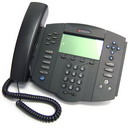
See our Polycom Soundpoint IP Phone Headsets page for complete list of compatible headsets
If you have Polycom Soundpoint IP phones like the Polycom IP300, IP301, IP335, IP430, IP450, IP500, IP501, IP550, IP560, IP600, IP601, IP650, IP670 (Rev E or later) and ALL VVX models with a dedicated headset jack, it has been tested by Plantronics Engineers that it will ONLY work properly with the Plantronics H-Series SupraPlusline (HW251, HW251N, HW261, HW261N), EncorePro (HW291N,HW301N), and the TriStar” line (H81, H81N) headsets along with a Plantronics Polaris Cable (part# 27190-01). The other H-Series models may not work properly and it causes a terrible “buzzing” sound from the headset. Do not use other Plantronics models not listed here.
For Jabra compatible headsets, use any Jabra/GN direct connect headsets (includes the GN1200 smart cable) Also see our GN Netcom – Polycom Compatbility Guide
If you’re looking for wireless for your Polycom Soundpoint desk phones, we recommend Plantronics CS540 Wireless Headset ,or the Plantronics CS530 , however, these wireless headsets must be plugged in through your phone’s receiver port, not the built-in headset jack. If you’re using the Plantronics HL10 lifter remote answering option with your IP phone, you will need the Plantronics Lifter Accessory for Polycom IP Phones, because the phone has no “bottom lip” to hold up the receiver.
If you have the model SoundPoint IP 320/321, 330/331, 335, 430, 550, 560, 650, 670, you can use the Plantronics APP-5* or Plantronics APP-51* (hook switch) cable with any of the Plantronics wireless headsets without the use of the HL10 lifter.
- APP-5* is designed for the older models Plantronics CS50, CS55 , CS70, CS70N , CS351, CS351N, CS361, CS361N , 510S,510SL
- APP-51* is designed for Plantronics WO100, WO200, WO300,WO350, W710, W720, W730, W740, W745. Also the new CS540,CS510, CS520, CS530
*Note: Polycom IP 320/321, IP 330/331 requires Polycom 2.5mm to RJ9 Female Adapter for EHS setup.
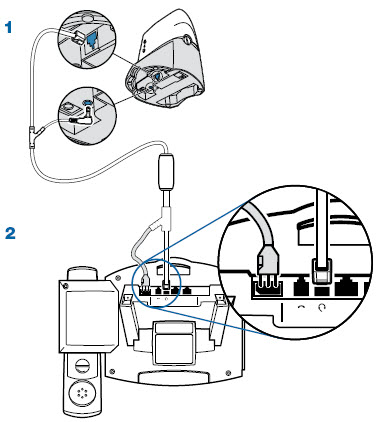
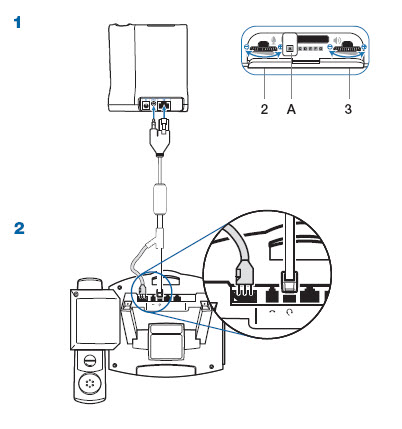
Notes
- The Polycom Soundpoint IP phone software must be SIP 3.1 release of higher to support the Plantronics APP-50 EHS.
- You must set the headset mode on your Polcyom IP phone to select Plantronics Mode before connecting your Plantronics headset system to your phone. To do so,
- Press Menu.
- Select Settings > Basic > Preferences > Headset > Analog Headset
- Select Plantronics Mode using the or keys then press the Select softkey
If your caller reports an echo, the phone’s echo cancellation feature can be enabled by:
- Press Menu.
- Select Settings > Basic > Preferences > Headset > Echo Cancellation > Enabled.
Or contact your IT support team to change the phone sig.ctg configuration file as follows:
- voice . aec . hd . enable = 1