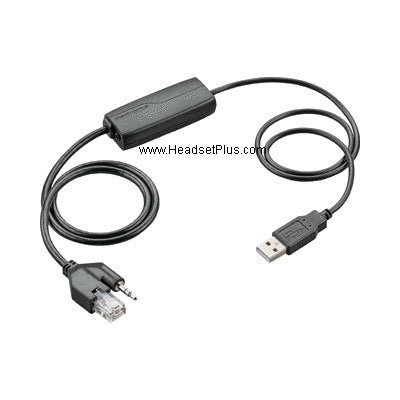
Plantronics APU-70 Cisco 8961 9951 9971 Hook Switch *DISCONTINUED*
$0.00
Skip to product information
Plantronics APU-70 Cisco 8961 9951 9971 Hook Switch *DISCONTINUED*

Plantronics APU-70 Cisco 8961 9951 9971 Hook Switch *DISCONTINUED*

$0.00

Description

*Discontinued*  Replaced by Plantronics APU-71 

Plantronics APU-70 EHS Adapter enables remote Headset Hookswitch Control (HHC). Compatible with Plantronics Savi WO100, Savi WO200, Savi WO300, Savi WO350 and the latest Cisco 8961, 9951, 9971 IP phones and Nortel 1100 series phones . This means that users can answer and end calls up to 300 ft. away from their desks. The seamless integration of handset and headset allows users to benefit from enhanced mobility and the ability to multitask while on a call. The wireless freedom improves work efficiency and ergonomics throughout the day. The Plantronics APU-70 Adapter is a plug-and-play solution that converts from the HHC standard used in Cisco phones – and vice versa. Handset-Headset compatibility

It's also compatible with the new CS540, CS510, CS520 wireless headsets.

Key Features:

  • Compatible with Cisco IP 8961, 9951, 9971 models
  • Also compatible with Avaya/Nortel IP Phones 1120E, 1140E, 1150E, 1165E
Supports Plantronics Savi WO100, Savi WO200, Savi WO300, Savi WO350 wireless headsets systems
  • Enables remote ring alert and call answer/end capability on your Plantronics wireless headset, allowing you to move freely throughout the office without missing a call
  • Eliminates the need for Plantronics HL10 handset lifter
  • The Cisco server must be running Cisco CallManager System Version 4.1(3)SR5x or higher. This must be verified by your telephone administrator.
  • The Cisco phone must be running firmware 8.3(3)x or higher.
    Press the settings button on the phone (Checkbox icon). Select “Model information”. The firmware revision is listed under “Load File”
  • HHC software functionality must be enabled though Cisco Unified Communication Manager Administration application
  • Nortel firmware 3.1 has enabled USB support on Nortel 1120E and USB and Bluetooth support for 1140E and 1150E. The firmware revision needs to be at least rev 0624C6J (1120E), 0625C6J (1140E), 0627C6J (1150E) and up.
  • Cisco Phone setup
    The phone must be set for “Wireless Headset Hookswitch Control” = Enabled
    Press the settings button on the phone (Checkbox Icon). Select “Device Configuration” >> Select “Media Configuration”
    If “Wireless Headset Hookswitch Control” is “Disabled”, contact your telephone administrator.

    note:

    Do not order this adapter if your phone is not listed
    You May Also Like

    STAY CONNECTED

    Stay in the Know

    Get exclusive deals, new arrivals, and expert headset tips delivered to your inbox.

    • Early access to deals
    • New product alerts
    • Expert buying guides

    Join 10,000+ business professionals

    No spam. Unsubscribe anytime.