










































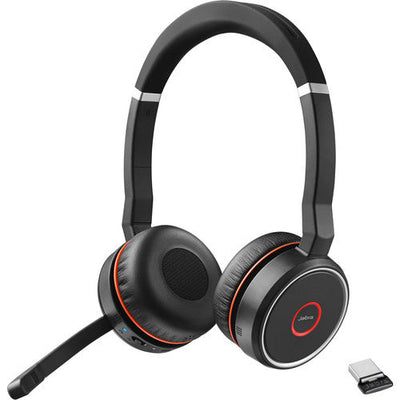
Most headset reviews obsess over audio quality. For a call-center headset, that's the wrong lens. What matters on a busy floor is whether the thing survives being rolled over by a chair, yanked off a hundred times a day, and worn for eight-hour shifts, for years — at a price you can buy forty of. That's exactly the brief the Jabra Biz 2300 was built to answer, and it's why it's one of the most-deployed corded headsets in call centers.
Here's what makes it call-center tough, and — since it comes in six variants — how to pick the right one.
Quick answer
Last updated July 2026
What makes the Jabra Biz 2300 a call-center headset?
The Biz 2300's whole design is about surviving abuse, not winning audio awards — and that's the right priority for a high-volume floor. Three features carry it.
The Kevlar-reinforced cord is the headline: the same material used in body armor, chosen because the single most common way a call-center headset dies is a chair rolling over the cable. The unbreakable free-spin boom arm rotates a full 360 degrees, so an agent can position the mic anywhere without the snap-point that kills cheaper booms. And the air-shock microphone is aerodynamically perforated and foam-lined to stop the "pops" of breath hitting the mic — the thing that makes a caller sound like they're breathing down the line. Add PeakStop hearing protection against sudden loud tones, and it's a headset engineered around the realities of the job.
Audio is wideband HD Voice — clear for calls, but tuned for voice, not music. That's the honest trade: this is a workhorse, not an entertainment headset.
Jabra Biz 2300 variants: which one do you need?
The Biz 2300 comes in a matrix of two choices — how it connects, and how many ears it covers. Find your row:
| Variant | Connects to | Ears | Best for |
|---|---|---|---|
| Biz 2300 QD Mono | Desk phone (+ bottom cable) | One | The call-center default |
| Biz 2300 QD Duo | Desk phone (+ bottom cable) | Two | Noisier floors, more focus |
| Biz 2300 USB UC Mono | Computer (USB) | One | Softphone on Zoom, etc. |
| Biz 2300 USB UC Duo | Computer (USB) | Two | Softphone, noisy room |
| Biz 2300 USB MS Mono/Duo | Computer (USB) | One / Two | Microsoft Teams environments |
| Biz 2300 Direct Connect | Specific desk phones | One / Two | Cisco, Avaya certified setups |
All variants are available on the Jabra Biz 2300 product page, where you select the exact version. For Cisco or Avaya desk phones, Direct Connect bundles ship pre-configured for the right voltage and mic gain — the same brand-matching that our Cisco compatible headsets guide covers in detail.
Connection: QD, USB, or Direct Connect?
The connection is the first fork, because it depends entirely on what you're plugging into.
QD vs USB vs Direct Connect — QD (Quick Disconnect) splits the headset from a bottom cable, so you can unplug and walk away without removing the headset — it needs a matching bottom cable to reach a desk phone. USB plugs straight into a computer for softphones. Direct Connect is a pre-configured cable bundle for a specific desk phone brand, like Cisco or Avaya.
- QD — for a desk phone. Remember you also need a Jabra bottom cable (like the GN1200) to connect it; the headset alone won't reach the phone.
- USB — for a computer softphone. Pick the MS version for Microsoft Teams, or the UC version for Zoom, Webex, and everything else. Works on Windows and macOS.
- Direct Connect — a bundle certified for Cisco IP (7800/8800), Cisco SPA, or Avaya (J100/9600) phones, configured to work out of the box.
Which connector your desk phone actually uses is worth confirming first — our guide to headset connector types maps every plug to its hardware.
Mono or duo: one ear or two?
The other choice is ear coverage, and it's not about which is better — it's about your floor. Mono (one ear) keeps you aware of the room, which suits collaborative teams and supervisors. Duo (two ears) seals out more of a noisy room for focus-heavy work, since that second earcup adds passive isolation. We break the decision down fully in monaural vs binaural headsets.
The good and the not-so-good
Pros
What we likedCons
What could be betterOn the plus side: genuine call-center durability with the Kevlar cord and unbreakable boom, a strong noise-cancelling air-shock mic, PeakStop hearing protection, a wide variant range covering nearly any setup, low per-unit cost for bulk deployment, and a 2-year Jabra manufacturer's warranty.
The honest trade-offs: it's corded, so there's no wireless freedom to leave the desk; foam cushions are standard, with leatherette a separate purchase; the audio is tuned for voice, so it's unremarkable for music; the QD version needs a separate bottom cable to reach a desk phone, which adds to the cost; and a mono headset offers little passive isolation in a loud room, where the duo is the better call.
What's the difference between the Jabra Biz 2300 variants?
The Jabra Biz 2300 comes in mono (one ear) or duo (two ears), and in three connection types: QD for desk phones (with a bottom cable), USB for computers, and Direct Connect bundles for specific phone brands. USB versions are further split into Microsoft Teams-certified and generic UC versions. Choose the connection for your device, then mono or duo for your noise level.
Is the Jabra Biz 2300 good for a call center?
Yes, the Jabra Biz 2300 is designed specifically for call centers. Its Kevlar-reinforced cord withstands being rolled over by chairs, the 360-degree boom arm is unbreakable, and the noise-cancelling air-shock microphone filters out most background office noise. Combined with a low per-unit cost, it's built for durability and bulk deployment on busy floors.
Does the Jabra Biz 2300 work with Microsoft Teams?
Yes. The Jabra Biz 2300 USB MS variants are certified for Microsoft Teams, with call controls that work natively in the app. The USB UC variants work with Zoom, Webex, and other softphone platforms. Both connect to a computer over USB and are compatible with Windows and macOS.
Do I need a cable to connect the Jabra Biz 2300 QD to my desk phone?
Yes. The QD (Quick Disconnect) versions of the Jabra Biz 2300 require a matching Jabra bottom cable, such as the GN1200, to connect to a desk phone — the headset alone won't reach it. The USB and Direct Connect versions don't need a separate cable. Confirm your phone's connector before ordering the bottom cable.
Is the Jabra Biz 2300 durable enough for heavy daily use?
Yes, durability is the Jabra Biz 2300's main design focus. The Kevlar-reinforced cord resists breakage from chair rollovers and daily tension, the boom arm is built to rotate 360 degrees without snapping, and it carries a 2-year Jabra manufacturer's warranty. It's engineered to reduce headset replacements in high-volume environments.
If you're kitting out a floor, the Biz 2300 is an easy recommendation for the same reason it's everywhere: it's built to survive the job and priced to buy in quantity. Decide connection first, then mono or duo, and you've picked your variant. Configure the exact version on the Jabra Biz 2300 page, or call our team at 877-999-3838 for bulk and PO orders. If you're weighing it against the Poly equivalent, our Plantronics EncorePro review covers the other side.


Comments (0)