

















































900MHz, 1.9GHz (DECT), 2.4GHz — the frequency printed on a wireless headset's spec sheet looks like a minor technical detail, but it quietly decides three things that matter a lot in practice: how far you can walk from your desk, how many headsets can run in one office without interfering, and whether your headset will fight with the office Wi-Fi. None of the three frequencies is "better" outright — they trade off against each other, and the right one depends on your building and your headset count.
Key takeaways
- Lower frequency (900MHz) = longer range and better battery life, but lower headset density per location.
- Higher frequency (1.9GHz, 2.4GHz) = more channels and higher density, with somewhat shorter range.
- DECT 1.9GHz is dedicated exclusively to cordless voice — no shared spectrum, no Wi-Fi/Bluetooth interference.
- 2.4GHz is shared with Wi-Fi (802.11) and Bluetooth — in a device-dense office, this can cause real interference.
- Frequency doesn't determine audio quality, comfort, or durability — those come from the headset's engineering, not its radio band.
What frequency actually controls
Frequency is how many times per second the radio signal cycles — and that number, not the headset's other features, is what governs three specific things: range, battery efficiency, and how many headsets can share one space.
Frequency vs modulation: Frequency is the radio band a wireless signal travels on (900MHz, 1.9GHz, 2.4GHz); modulation is how data is encoded onto that signal. They're independent — the frequency sets the physical characteristics (range, density), while good engineering elsewhere (audio processing, encryption, build quality) is what actually makes a headset sound and feel good. A headset isn't better because of its frequency; it's better because of everything built on top of it.
The three frequencies, compared
| 900MHz | 1.9GHz (DECT 6.0) | 2.4GHz | |
|---|---|---|---|
| Range | Longest | Long | Shortest |
| Battery efficiency | Best | Good | Lower |
| Headset density per location | Lowest | High | Highest |
| Shared with other devices? | No | No — dedicated to voice | Yes — Wi-Fi, Bluetooth |
| Interference risk | Low | Very low | Higher in device-dense offices |
| Common in | Legacy headsets, "Extra Density" variants | Most current professional headsets | Wi-Fi (802.11), Bluetooth |
The physical reason behind the range and battery trend: lower-frequency radio waves need a longer antenna, and a longer antenna is generally more power-efficient — which is why 900MHz systems historically delivered the longest range and battery life. The trade-off is fewer available channels, which caps how many headsets can operate in one location before they start interfering with each other.
Myth
A higher frequency number means a better, more advanced headset.Reality
Frequency isn't a quality ranking — it's a trade-off. Higher frequencies (1.9GHz, 2.4GHz) support more channels and more headsets in one location, but typically at somewhat shorter range than lower frequencies. Lower frequencies (900MHz) reach further and sip less battery, but support fewer headsets per location. Neither is "better" in the abstract — the right frequency depends entirely on your headset count and building layout. This exact trade-off is why the Plantronics CS540 comes in a standard 1.9GHz version and a separate 900MHz "Extra Density" (XD) variant for high-density offices.Why DECT 1.9GHz is the standard for professional headsets today
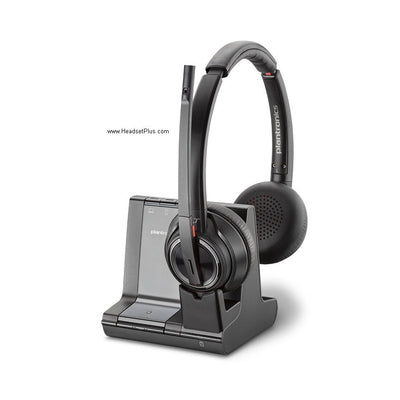
DECT (Digital Enhanced Cordless Telecommunications) operates on 1.9GHz in North America, and its defining advantage is that this band is reserved exclusively for cordless voice communication — no Wi-Fi router, no Bluetooth device, no microwave shares it. That's why DECT headsets are remarkably resistant to interference even in offices packed with wireless devices, and it's the reason nearly every modern professional wireless headset — the Poly CS540, the Jabra Engage 65 SE — uses it as the default.
Why 2.4GHz can cause interference
2.4GHz is a different story — it's the same band used by 802.11 Wi-Fi and Bluetooth, two of the most common wireless technologies in any modern office. As the number of Wi-Fi routers, laptops, phones, and Bluetooth accessories in a building grows, a 2.4GHz wireless headset increasingly shares that spectrum with all of them, which raises the odds of interference — dropped audio, static, or reduced range. This is one reason DECT-based professional headsets have remained the standard for office use even as Bluetooth has taken over consumer headphones and earbuds.
Why 900MHz still exists: the density trade-off
900MHz's main advantage — longer range and better battery — comes at the cost of fewer available channels, which caps how many headsets can run in one location before they interfere. That's a real constraint in a very high-density office (dozens of headsets in one area), which is why some headset lines offer a separate "Extra Density" variant on a 900MHz band specifically for that scenario, alongside their standard higher-frequency model.
Which frequency should you choose?
For the vast majority of offices, this decision has already been made for you: current professional wireless headsets default to DECT 1.9GHz, and it's the right choice for standard-density offices thanks to its dedicated spectrum and strong range. The only time frequency becomes a genuine decision point is in a very high-density deployment — dozens of headsets in one open area — where a 900MHz Extra Density variant may be worth considering for the added channel headroom. For nearly everyone else, a standard DECT headset like the Poly CS540 is the right, uncomplicated choice.
What is the difference between 900MHz and 1.9GHz DECT wireless headsets?
900MHz headsets generally offer longer range and better battery efficiency but support fewer headsets in one location before interference occurs. 1.9GHz DECT headsets support more headsets per location and use a frequency dedicated exclusively to voice, avoiding interference with Wi-Fi and Bluetooth. Most current professional headsets use DECT 1.9GHz as the standard choice.
Does 2.4GHz wireless headset interfere with Wi-Fi?
It can. 2.4GHz is the same band used by 802.11 Wi-Fi and Bluetooth, so a 2.4GHz wireless headset shares spectrum with routers, laptops, and other Bluetooth devices in the office. In a device-dense environment, this raises the risk of interference. DECT headsets on 1.9GHz avoid this entirely, since that band is reserved for cordless voice only.
Is a higher frequency wireless headset better?
Not inherently — frequency is a trade-off, not a quality ranking. Higher frequencies support more headsets per location (higher density) but typically have somewhat shorter range than lower frequencies. Lower frequencies reach further and use less battery, but support fewer headsets in one area. The right choice depends on your headset count and building, not which number is bigger.
What frequency do professional wireless headsets use today?
Most current professional wireless headsets, including the Poly CS540 and Jabra Engage 65 SE, use DECT at 1.9GHz. It's dedicated exclusively to cordless voice, avoids interference with Wi-Fi and Bluetooth, and offers a strong balance of range and headset density for typical office use. 900MHz variants still exist for very high-density deployments.
Why do some headsets have a 900MHz "Extra Density" version?
A 900MHz Extra Density (XD) variant exists for offices running very high numbers of wireless headsets in one location, since 900MHz's longer range comes with a channel trade-off that actually helps in specific high-density scenarios when paired with a separate frequency band. The Plantronics CS540-XD was one such example. For most offices, the standard 1.9GHz DECT version is the right and simpler choice.
Frequency isn't where a wireless headset's quality comes from — that's down to the engineering built on top of it: audio processing, encryption, comfort, durability. What frequency does determine is range, battery, and how many headsets can share a space, and for nearly every office, DECT 1.9GHz already gets that balance right. Browse the current DECT range on the DECT wireless headsets collection, or call our team at 877-999-3838 if you're planning a high-density deployment and want to talk through frequency planning.

Comments (0)