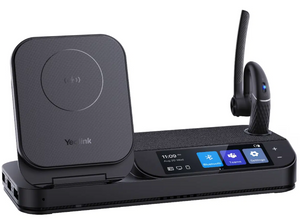
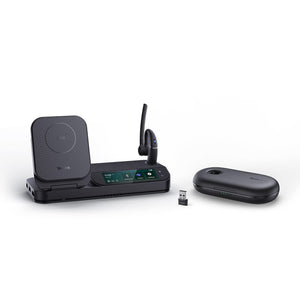
Yealink BH70 Bluetooth Headset - Teams Certified
The Yealink BH70 Wireless Headset
A headset with a Teams button that only works half the time isn't really a Teams headset — it's a regular Bluetooth headset with a button that sometimes does something. The Yealink BH70 wireless headset has genuine one-touch Teams call control, but it only works when you're connected through the included BT51 dongle. Pair it directly to your laptop's Bluetooth instead, and that button stops doing anything Teams-specific.
Get the setup right, though, and this is a genuinely comfortable, long-battery headset — 20% lighter than Yealink's previous generation, with a 3-microphone array built specifically to keep background noise out of what your caller hears.
Build the exact BH70 you need
One choice: which ear coverage fits your day.
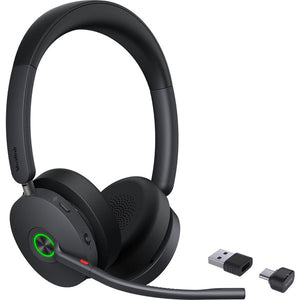
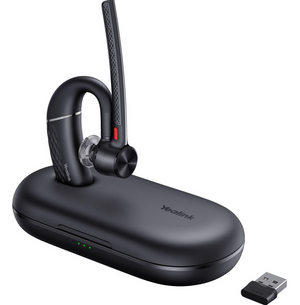
- Mono. Single ear, 91g. Right if you want to stay aware of the room while on a call.
- Dual (Stereo). Both ears, 147g. Right for a louder space where blocking more of the room matters.
Why the Teams button needs the dongle
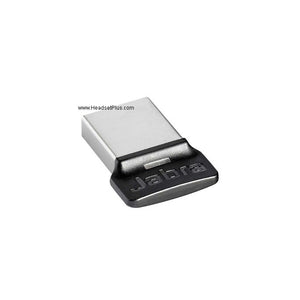
The Yealink BH70 wireless headset's dedicated Teams button — the feature that lets you answer, mute, and manage calls with one press — only functions when the headset is connected via the included BT51 dongle. Native Bluetooth pairing directly to a laptop still works for basic audio, but the Teams-specific call controls don't carry over. If you've set this up and the button isn't behaving the way the spec sheet describes, this is almost always why.
Keep the dongle connected
The one-touch Teams button on the Yealink BH70 wireless headset only works through the included BT51 dongle. Pairing directly via your computer's Bluetooth loses Teams-specific call control — plug in the dongle if that button matters to you.Range: rated spec vs. real-world testing
Yealink's official rating for the BH70 is up to 164 ft (50m) through the BT51 dongle. In HeadsetPlus's own hands-on testing of this exact headset, real-world range through walls and around obstacles landed closer to 150 ft — still enough to walk to a printer or step into another room without dropping the call, just worth knowing the difference between a rated maximum and what you'll actually get in a real office.
What the busylight actually costs you
The 35-hour talk time figure on the box applies with the busylight switched off. Turn it on — which most people will, since it's the feature that tells coworkers not to interrupt you — and talk time drops to up to 28 hours. Yealink doesn't feature that reduced number prominently in its marketing, so it's worth planning around the lower figure if the busylight is staying on through your workday.
Three microphones, and what they're actually for
Two microphones on the boom arm capture your voice; a third, positioned separately, subtracts ambient noise like HVAC hum or nearby chatter. This is Yealink's Acoustic Shield Technology 2.0, and it's worth being precise about what it does: it cleans up what your caller hears, not what you hear. There's no active noise cancellation blocking sound from reaching your own ears — if you need that, this isn't the headset for it.
91g, one ear covered. Stay aware of your surroundings while on calls.
147g, both ears covered. Better for blocking more of a noisy room.
Comfort, sound modes, and everyday use
A microphone boom that slides up to mute and down to unmute makes muting a physical, unmistakable action rather than a button you have to locate by feel. Three configurable sound modes — Office, Relax, and My Moment — are adjustable through the free Yealink USB Connect software, letting you tune the listening experience differently for calls versus casual audio. Ear cushions are easily replaceable, and the headset supports voice-over-USB, meaning it works as a corded headset if the BT51 dongle isn't handy or the battery runs out mid-call.
This is a headset built around comfort and call clarity for a full workday — not a headphone for critical music listening, and one independent review specifically noted media playback sounds thin compared to dedicated audio headphones. If clear calls and all-day wear are the job, it does that well; if rich music playback matters too, look elsewhere.
- Yealink BH70 headset (Mono or Dual)
- BT51 dongle
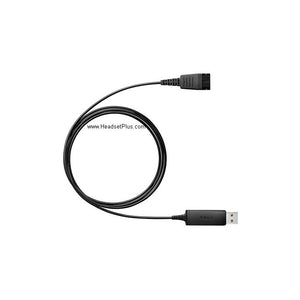
- USB-C to USB-A adapter
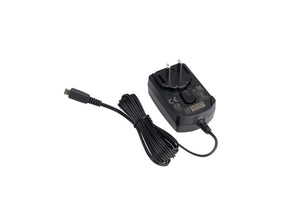
- USB-A to USB-C charging cable
- Drawstring bag
- Quick start guide
| Spec | Detail |
|---|---|
| Wearing style | Mono (single ear) or Dual (stereo, both ears) |
| Weight | Mono: 91g / 3.2 oz; Dual: 147g / 5.19 oz |
| Wireless technology | Bluetooth 5.2, via BT51 USB-A/USB-C dongle |
| Range | Up to 164 ft / 50m rated; approx. 150 ft in real-world office testing |
| Talk time | Up to 35 hrs (busylight off), up to 28 hrs (busylight on) |
| Music/media time | Up to 43 hours |
| Standby time | Up to 22 days |
| Charge time | Up to 90 minutes |
| Microphone | 3 MEMS mics, Acoustic Shield Technology 2.0 (mic-side noise cancellation, no ANC) |
| Speaker | 35mm, 20Hz–20kHz frequency response |
| Multipoint | 2 simultaneous connections, up to 8 devices paired |
| Sound modes | Office, Relax, My Moment (via Yealink USB Connect) |
| Certification | Microsoft Teams certified (one-touch button requires BT51 dongle) |
| Wired fallback | Voice-over-USB corded mode supported |
| Optional accessories | BHC70 charging stand, replacement ear cushions |
| Warranty | 2 years |
Software: Yealink USB Connect for busylight customization, sound mode selection, and firmware updates.
Hardware: Connects via the included BT51 dongle (USB-A or USB-C) for full feature access, including the Teams button. Native Bluetooth pairing is also supported but loses Teams-specific call controls. Supports wired use via USB while charging.
Platforms: Microsoft Teams certified. Compatible with other major UC platforms via standard Bluetooth audio and call controls.
FAQ
Frequently Asked Questions
The Teams button only functions when the headset is connected via the included BT51 dongle. If you paired it directly through your computer's native Bluetooth instead, Teams-specific call controls won't be available.
Up to 35 hours of talk time with the busylight off, dropping to up to 28 hours with the busylight on. Plan around the lower figure if you'll be using the busylight regularly.
Yealink rates it at up to 164 ft (50m) through the BT51 dongle. Real-world testing through walls and obstacles typically lands closer to 150 ft.
No. Its 3-microphone Acoustic Shield system filters background noise from your outgoing voice so your caller hears you clearly, but it doesn't block ambient sound from reaching your own ears.
The Mono covers one ear at 91g, keeping you aware of your surroundings. The Dual covers both ears at 147g, better for blocking more noise in a louder space.
Yes. It supports voice-over-USB, working as a corded headset if the BT51 dongle isn't available or the battery runs low.
Goes With It
You May Also Like