

















































Most consumer cordless phones — the AT&T, Panasonic, and VTech sets that live on home and small-office desks — have a 2.5mm headset jack, not the 3.5mm you'd find on a smartphone. The plug is smaller, and the phones themselves often output lower audio than a proper office phone system. Two problems, both solvable — here's how.
Key takeaways
- The 2.5mm jack is the headset port on most consumer cordless phones — smaller than 3.5mm.
- The Jabra 8800-00-46 adapter converts 2.5mm to QD so any Jabra Biz-series headset plugs in.
- Volume problems on cordless phones are common because consumer phones output less power than office systems.
- For maximum volume boost, pair the QD headset with the Jabra GN1210 cable, which adds microphone amplification.
- A 6-foot version of the adapter (8800-01-46) is available if the standard 5-inch cord is too short for your setup.
Why volume is low on 2.5mm cordless phones
Consumer cordless phones put out less audio power through the headset jack than dedicated office phone systems do — it's a cost and design decision that wasn't a problem when people used the phones' built-in speaker, but becomes noticeable with a headset. The 2.5mm adapter by itself doesn't boost the signal; it just connects the headset. If volume is the primary issue, the right fix is a QD cable with built-in amplification — the Jabra GN1210 adds microphone gain that compensates for the weak output.
2.5mm vs 3.5mm headset jack: The 2.5mm is the smaller headset connector found on most consumer and residential cordless phones; the 3.5mm is the standard headphone jack on smartphones and laptops. They're not interchangeable — you need an adapter to use a QD headset on a 2.5mm port.
The complete setup: adapter + QD headset
Two parts, and the adapter is the key one most people don't know they need:
- Jabra 2.5mm QD adapter (8800-00-46) — a 5-inch cable with a 2.5mm plug on one end and a QD connector on the other. Plugs into the phone's headset jack; your Jabra QD headset plugs into the other end. Compatible with most cordless phones. $34.95.
-
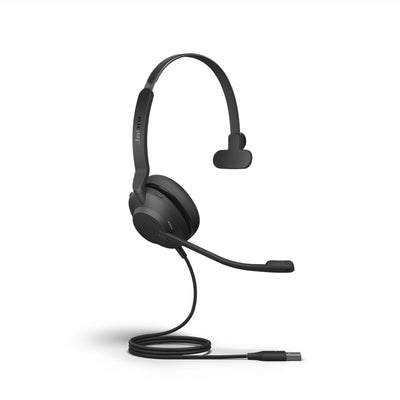
A Jabra Biz-series QD headset:
- Jabra Biz 1500 QD Mono — one ear, noise-cancelling mic, the budget choice. $63.95.
- Jabra Biz 2300 QD Mono or Duo — the step up: Kevlar-reinforced cord, Air Shock noise-cancelling boom, and Duo version covers both ears for a noisier room.
- Jabra Biz 2400 II QD Mono — convertible wearing style (over-head, over-ear, or behind-neck) with Ultra Noise Canceling. The top corded pick.
If the standard 5-inch adapter cord is too short for your setup, the 6-foot version (8800-01-46) gives more reach — useful when the base sits further from the handset.
For a significant volume boost: the GN1210 cable
If the adapter-plus-headset combination still doesn't give enough volume, or callers can't hear you clearly, the Jabra GN1210 QD to RJ-9 cable with microphone amplification is the better approach. It adds genuine in-line amplification — boosting both receive volume (what you hear) and transmit gain (what callers hear). Note: the GN1210 uses an RJ-9 connector for the phone end, so confirm your phone has an RJ-9 headset port (most cordless phones that carry both a handset and headset jack do).
What is a 2.5mm headset jack and which phones have one?
The 2.5mm is a smaller headset connector found on most consumer cordless phones — AT&T, Panasonic, VTech, and similar brands. It's separate from the 3.5mm headphone jack on smartphones. To use a professional QD headset on a 2.5mm phone, you need a 2.5mm-to-QD adapter cable such as the Jabra 8800-00-46.
Why is the volume low on my cordless phone headset?
Consumer cordless phones typically output less audio power through the headset jack than dedicated office phone systems. The 2.5mm adapter doesn't add amplification — it just converts the connector. For a meaningful volume boost, the Jabra GN1210 QD cable adds in-line microphone amplification for both receive volume and transmit gain.
Which Jabra headset works with a 2.5mm cordless phone?
Any Jabra Biz-series QD headset works — the Biz 1500 (budget), Biz 2300 (durable Kevlar cord), or Biz 2400 II (convertible, Ultra Noise Canceling) — paired with the Jabra 8800-00-46 2.5mm adapter. The adapter is required; the headset alone won't plug into a 2.5mm jack.
Do I need the 5-inch or 6-foot adapter?
The standard Jabra 2.5mm adapter (8800-00-46) is 5 inches long — it sits between the phone's headset jack and the QD headset. If your phone base is positioned further from where you sit, the 6-foot version (8800-01-46) gives more reach. Most desk setups work fine with the 5-inch version.
The 2.5mm setup is two quick parts: the adapter and a QD headset. Start with the Jabra 2.5mm adapter and a Biz 1500 for the budget path, or step up to the Biz 2300 if you need more durability. If volume is still a problem after that, the GN1210 with amplification is the next step. Call our team at 877-999-3838 if you're not sure which combination suits your phone.
Comments (0)