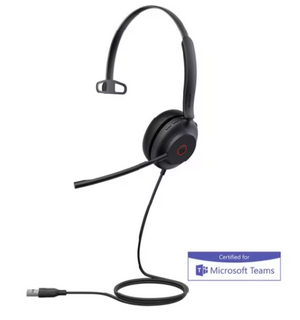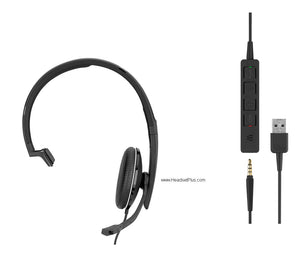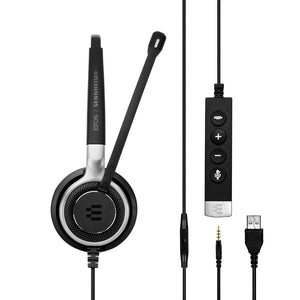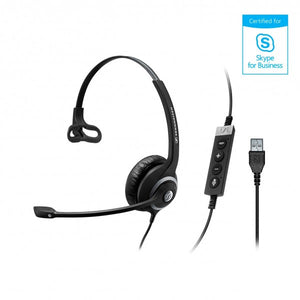













































The Yealink UH34 skips the second cable
Compare a few budget dual-ear USB headsets side by side and you'll find an annoying detail on more of them than you'd expect: two separate cables, one running to each ear cup, doubling the tangle on your desk. The Yealink UH34 doesn't do that — both ear cups share a single cable back to the inline control unit, which is a small thing until you're the one untangling cords every morning.
It's an entry-level, plug-and-play USB headset built for straightforward office and call center use — no drivers, no setup, connect it and it works. It comes in mono or stereo wearing styles, each available as a standard UC model or a Microsoft Teams certified version, and it connects directly to a matching list of Yealink IP phones in addition to any Windows or Mac computer. At roughly half the price of premium $100-plus headsets, the Yealink UH34 is built for volume deployments where the budget matters as much as the features.
Build the exact Yealink UH34 you need
Four versions, split across two choices: how many ears you want covered, and which certification button sits on the controller.
- Mono UC. One ear covered, standard UC certification with an answer/end button on the controller. Works with Teams and every other major softphone, just without the dedicated button.
- Mono Teams. One ear covered, with a dedicated Microsoft Teams button in place of the answer/end button. For teams standardized specifically on Teams.
- Dual UC. Both ears covered, standard UC certification with an answer/end button. The pick for open offices that don't need the Teams button.
- Dual Teams. Both ears covered, with the dedicated Microsoft Teams button. Also doubles well as a music and video headset given the stereo speakers.
What's the difference between the Yealink UH34 UC and Teams versions?
Exactly one button. Per HeadsetAdvisor's hands-on review, the Teams version of the Yealink UH34 has a dedicated Teams button on the inline controller for one-touch meeting access; the UC version has an answer/end button in that same physical spot instead. Every other feature — the microphone, the speakers, the cushions, the boom arm — is identical between the two.
One button, that's the whole difference
It's worth knowing exactly what you're paying for when you choose the Teams-certified Yealink UH34 over the UC version: a single button that launches a Teams meeting with one touch. If your team already knows how to click into Teams from the taskbar, the UC version delivers the same audio and call quality for less. If that one-touch button genuinely saves time across dozens of desks a day, it earns its keep.Mono or Dual — the real weight difference
Per Yealink's own lab testing, the UH34 runs 10–30% lighter than comparable headsets in its class — 82.5 grams for the mono version, 118 grams for the dual. That's the number that actually matters for an 8-hour shift: less weight on the head means less fatigue by hour six, regardless of which wearing style you pick.
Yealink IP phone compatibility, and the one firmware catch
The Yealink UH34 connects directly over USB to a specific list of Yealink IP phones — the SIP-T41S, T42S, T46S, T48S, T42U, T43U, T46U, T48U, T53, T53W, T54W, T57W, T58A, and VP59. One catch worth knowing before you order for an existing phone fleet: the T41S, T42S, T46S, and T48S need firmware version 82 or higher before the headset works with them — check that before assuming plug-and-play on older desk phones.
- Microsoft Teams
- Zoom
- Google Meet
- 3CX
- Unify
- NICE
- Avaya
- GoTo
Built for entry-level, priced like it
The Yealink UH34 is the headset for a deployment where the budget has to stretch across a lot of desks — passive noise isolation on the dual version, a noise-canceling mic that keeps background sound out of the caller's ear, a single cable that doesn't double the clutter, and direct compatibility with the Yealink phones already on the floor. Pick the wearing style and certification that match your team, and it's plug-and-play from the box, backed by HeadsetPlus's lifetime support.
- Yealink UH34 USB headset (mono or dual, per variant)
- Inline call control unit with LED indicator
- Leatherette ear cushion(s), fitted
- Quick start guide
| Type | Monaural (single-ear) or binaural (stereo, both-ear), over-the-head, on-ear — per variant |
|---|---|
| Microphone | Noise-canceling, bendable boom, rotates 330° |
| Noise handling | Passive noise isolation from ear cushions (not active noise cancellation); noise-canceling microphone for outgoing voice |
| Connector | USB-A, plug-and-play, no drivers required |
| Controls | Inline answer/end, volume, mute; dedicated Microsoft Teams button on Teams-certified versions |
| Certification | UC versions work with all major softphones; Teams versions are Microsoft Teams certified with dedicated button (both work with Teams) |
| Audio | HD wideband audio; high signal-to-noise ratio speaker with independent cavity design |
| Hearing protection | ActiveProtection technology — guards against sudden noise spikes and acoustic injury |
| Comfort | Leatherette ear cushions (replaceable), ultra-lightweight build |
| Weight | Mono: 82.5 g; Dual: 118 g — 10–30% lighter than comparable headsets per Yealink Lab testing |
| Cable | Single cable to both ear cups (Dual version); approx. 6 ft total length |
| Indicator | Integrated LED busy light on the control unit |
| Yealink IP phone compatibility | SIP-T41S/T42S/T46S/T48S (firmware v82+ required), T42U/T43U/T46U/T48U, T53/T53W/T54W/T57W/T58A, VP59 |
| Platform | Windows and macOS compatible |
| Warranty | 1-year manufacturer warranty, plus HeadsetPlus lifetime technical support |
Software. The Yealink UH34 works with Microsoft Teams, Zoom, Google Meet, 3CX, Unify, NICE, Avaya, GoTo, and most other major softphone and UC platforms. Teams-certified versions add a dedicated one-touch Teams button.
Hardware. The headset connects over USB-A with no drivers required, and also plugs directly into a specific list of Yealink IP phones — older T41S/T42S/T46S/T48S models need firmware version 82 or higher first.
Platforms. The Yealink UH34 is built for entry-level office and call center deployments where per-unit cost matters across a large fleet, and for anyone pairing it directly with an existing Yealink desk phone.
All 4 models
Yealink UH34 USB Headset (Mono or Dual) — every configuration, part number and price.
| Style | Platform | Part number | Price |
|---|---|---|---|
| Mono | UC | UH34-MONO-UC | $59.95 |
| Mono | MS Teams | UH34-MONO-TEAMS | $59.95 |
| Dual | UC | UH34-DUAL-UC | $64.95 |
| Dual | MS Teams | UH34-DUAL-Teams | $64.95 |
FAQ
Frequently Asked Questions
The Yealink UH34 Teams version has a dedicated Microsoft Teams button on the inline controller for one-touch meeting access; the UC version has an answer/end button in that spot instead. Every other feature is identical, and the UC version still works with Microsoft Teams.
Both are available. The Yealink UH34 Mono covers one ear at 82.5 grams; the Yealink UH34 Dual covers both ears at 118 grams. The mono version keeps one ear aware of the room; the dual version blocks more ambient noise.
Yes. The Yealink UH34 connects directly over USB to a specific list of Yealink IP phones, including the T41S, T42S, T46S, T48S, T53, T53W, T54W, T57W, T58A, and VP59. The T41S, T42S, T46S, and T48S require firmware version 82 or higher first.
The Yealink UH34 carries a 1-year manufacturer warranty, standard for its entry-level price tier and shorter than the 2- to 3-year warranties on premium business headsets.
No. The Yealink UH34 is plug-and-play over USB-A — connect it to a Windows or Mac computer and it's recognized immediately, with no driver download or software configuration required.
The Yealink UH34 Mono weighs 82.5 grams and the Dual weighs 118 grams — per Yealink's own lab testing, 10 to 30% lighter than comparable headsets in the same category.
Goes With It
You May Also Like