

















































Avaya phone headset setup, model by model
Avaya phone headset setup comes down to three things: a quick disconnect headset, the short cable that matches your exact Avaya model, and the jack meant for a headset rather than the handset. Avaya digital sets, among them the 2410, 2420, 5410, 5420, 9404 and 9408, take the HIC cable. The IP sets in the 1600 and 9600 families take the HIS cable, and so does every J100 phone that supports a headset at all. The J129 is the exception worth knowing before you order, because Avaya's own documentation says a headset is not supported on it and lists no headset jack among its connections. The early 4606, 4612 and 4624 IP phones have an integrated RJ-11 headset jack and are the ones sold against the HIC-10. Once the right cable is in the headset jack, the Headset button moves the call off the handset and its lamp shows it worked.
Check these before you order
- The model number picks the part, not the family name: the 9408 is a digital set on a HIC and the 9608 is an IP set on a HIS.
- Business Telecom Products says the HIS is not interchangeable with other Poly or Avaya cords, so the cable that works on the desk next to you is not evidence.
- Avaya does not support a headset on the J129, and no cable changes that.
- The 6416D+M headset button is administered on the phone system, so there is no keypad sequence to hunt for.
The headset is rarely the hard part. Almost any quick disconnect model works across an Avaya estate, and the piece that changes from desk to desk is the short cable underneath it. Avaya has shipped digital sets, early IP sets, the 9600 series, the J100 series and a rebadged Nortel line, so two phones on the same floor can need two different parts, and the phone gives you no warning when you have the wrong one.
Read the model number off the faceplate before anything else. Everything below is keyed to that number rather than to the family name.
Which cable goes between the headset and the phone
Four parts cover almost the entire Avaya range: the HIC cable for the digital sets, the HIS cable for the 1600, 9600 and J100 IP sets, the HIC-10 for the early 46xx IP phones, and an amplifier for the Call Master consoles and the Avaya badged Norstar.
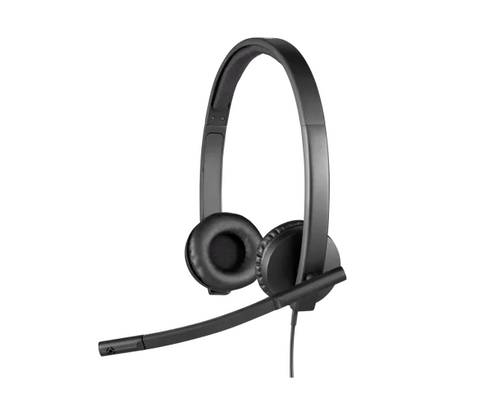
bottom cable: The short cable between a quick disconnect headset and the phone: it carries the headset coupler at one end and a modular plug at the other, and it is the only part of a corded setup that is specific to your phone model.
Business Telecom Products lists the HIC cord for the 2410, 2420, 4610, 4610SW, 4620SW, 4621SW, 4622SW, 4625SW, 5410, 5420, 5610, 5620, 9404, 9406 and 9408, and lists the 4406D+, 4412D+, 4424D+, 4424LD+, 6416D+M and 6424D+M separately with a note asking buyers to call and confirm those before ordering. The HIS side is narrower. The same supplier lists it for the 9608, 9620, 9630, 9640 and 9650 plus the 1608 and 1616, and says in as many words that it is not interchangeable with other Poly or Avaya cords.
| Avaya phone | What it takes |
|---|---|
| 2410, 2420, 4610, 4610SW, 4620SW, 4621SW, 4622SW, 4625SW, 5410, 5420, 5610, 5620, 9404, 9406, 9408 | HIC cable |
| 4406D+, 4412D+, 4424D+, 4424LD+, 6416D+M, 6424D+M | HIC cable, confirmed against the part number first |
| 1608, 1616, 9608, 9620, 9630, 9640, 9650 | HIS cable |
| J139, J159, J169, J179, J189 | HIS cable |
| J129 | Nothing. Avaya does not support a headset on this phone |
| 4606, 4612, 4624 | HIC-10, into the integrated RJ-11 headset jack |
| Call Master I, II, III, IV | P10 plug-prong amplifier |
| Call Master V, VI | Plantronics 26716-01, into one of the built-in headset jacks |
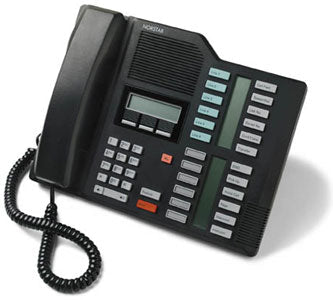
| Norstar T7316E, Nortel badged | A10 cable, no amplifier |
| Norstar T7316E, Avaya badged | MDA524 amplifier |
The Call Master row is two answers wearing one name. Avaya describes the Call Master V as having two built-in headset jacks and the Call Master VI as having two headset input jacks that are usable at the same time, which is why a supervisor can sit in on a call there and cannot on the earlier consoles. Generation matters more than the badge: I through IV take the P10 plug-prong amplifier, and V and VI take a different part again.
The part number tells you more than the cable's name
Order by part number and most of the confusion goes away, because the nicknames overlap in the catalogs in a way the model charts never show. HP now sells the HIC-10 as 783S2AA and the HIS as 783S3AA. Lexair lists the HIC-10 as Poly 49323-46 and notes that 49323-44 and 49323-46 are functionally equivalent to the older 49323-01 with a RoHS update, while Business Telecom Products lists its HIC cord as 49323-04 or 49323-44 and gives the same 783S2AA HP number. That is why two suppliers can quote you different-looking parts for the same desk and both be right, and why a HIC-10 listing and a HIC listing can carry nearly identical Avaya model lists. The HIS is the one that genuinely stands apart, and it is the one part where a wrong order is a wasted order.
The J129 has no headset jack, whatever the J100 guide says
The Avaya J129 does not take a headset at all. Avaya's page on its connection jacks lists a 5V DC jack, the network port, the PC port, the handset jack and the WLAN module panel, and states that a headset is not supported on the J129. This one is worth checking before an order goes in, because the J100 series is usually sold as a single family, and Avaya's own documents disagree with each other about it: the IP Office J100 user guide says HIS telephony headsets are supported by all J100 Series phones, while Avaya's J100 hardware specification puts wired headset support at No for the J129 and Yes for the J139, J159, J169, J179 and J189. The model-specific page is the one to trust. If a HIS cable has already arrived for a J129, the cable is not the fault and no other cable will fix it.
Two more rows of that specification are worth having in front of you. USB ports appear only on the J159 and J189, so a USB headset is not an option on a J139, J169 or J179. Bluetooth is supported on the J159, J179 and J189, and only with the optional wireless module installed.
Avaya 2420 headset setup
Avaya 2420 headset setup is a HIC cable into the headset jack, then the Headset button, and nothing else. Avaya's description of the 2420 lists a headset jack that is separate from the handset jack, a Headset button carrying its own lamp, and volume up and down settings held separately for handset, headset, speakerphone and ringer. Those three details are the whole procedure: use the correct one of the two jacks, press Headset and watch for the lamp, then set the level on your first real call, because the headset does not inherit whatever the handset was set to.
A corded headset needs nothing else on that phone. Answering and hanging up from the other side of the room is a different job and needs an avaya ehs cable, chosen by the same model number that picked the bottom cable.
Programming the 6416D+M headset button
The 6416D+M headset button is administered on the phone system rather than programmed at the phone, which is why no keypad sequence for it turns up. Avaya lists the 6416D+M with a headset jack for direct connection of a headset and names the HIC-1 headset interface cord as an option for it. On the 6424D+M the headset jack sits under the telephone next to the handset jack, which is the pair of jacks people most often mix up in the dark under a desk.
Administered is the operative word. The feature is assigned on the switch by whoever runs your phone system, so the fix for a missing 6416D+M headset button is a ticket rather than a code typed into the dialpad. The listen only behavior is worth knowing too: with the headset feature on, a handset left off the cradle monitors the call instead of joining it, which sounds like a fault and is not one.
Norstar T7316E, where the badge decides the answer
A Nortel badged T7316E takes an H-series headset on an A10 cable with no amplifier, and the Avaya badged version of the same phone needs an MDA524 amplifier, because the internal microphone amplifier came out when the phone was rebranded. Our own T7316E guide lists the numbers to look for on the Avaya units: NT8B27 with an AABA, AAAA, AABB, JAAA or JAAB suffix, and NTAB3198, NTAB3615, NTAB3618, NTAB3619, NTAB3620, NTAB4208, NTAB9696 or NTAB9748. The symptom is specific enough to diagnose without touching the phone, since the headset works, you hear the caller perfectly, and the caller cannot hear you. The MDA524 sits between the headset and the phone and takes the place of the discontinued Plantronics M22 that older compatibility charts still name.
Connecting it, and proving it works
The connection is one plug and one button, and the jack is the only place it usually goes wrong. Avaya puts the two modular jacks close together and they accept the same plug, so go by the icon molded beside the jack rather than by the feel of it: on the 6424D+M the headset jack is under the telephone next to the handset jack, and on the 2420 the headset jack is simply described as separate from the handset one. Clip the headset onto the quick disconnect coupler until it clicks, since a coupler that has not clicked looks connected and is not.
Then press Headset and call a colleague rather than listening to a dial tone. A wrong cable or a missing amplifier shows up as a transmit problem, which sounds completely normal from your side of the call and only the person on the other end can hear.
If the Avaya in front of you is one-X running on a computer rather than a desk set, none of this applies. That is a separate avaya headset setup, where the headset connects over USB, call control comes from the softphone, and there is no bottom cable anywhere in it.
Once the cable is settled the headset is the easy half of the decision, and any quick disconnect avaya headset will sit on the end of whichever part your phone takes. Read the number on the faceplate, match the part number rather than the nickname, and the rest is one plug and one button.
How do I set up a headset on an Avaya 2420?
Avaya 2420 headset setup is a HIC cable into the headset jack on the phone, then the Headset button. Avaya's description of the 2420 lists a headset jack separate from the handset jack, a Headset button with its own lamp, and a headset volume held separately from the handset, speakerphone and ringer, so set the level on the first real call rather than assuming it follows the handset.
How do you program the headset button on an Avaya 6416D+M?
The Avaya 6416D+M headset button is administered on the phone system rather than programmed from the phone. Avaya's description of these digital sets says that when the headset feature is administered it is no longer necessary to take the handset off hook to answer, which puts the change in the hands of whoever runs the switch. Nothing typed on the dialpad will create the button.
Can I use a headset with an Avaya J129?
No. Avaya's documentation for the J129 lists a power jack, network port, PC port, handset jack and WLAN module panel with no headset jack, and states that a headset is not supported on the J129. The J139, J159, J169, J179 and J189 all support a wired HIS headset, so the J129 is the one J100 phone where the answer is to move the user to a different set.
Comments (0)