

















































Jabra's Engage SE line looks like a modest refresh — a new colour and a new charging port. But one change has real consequences if you're expanding an existing deployment: the SE bases and the older Engage headsets don't work with each other, in either direction. For what's available now, see today's Jabra lineup.
Key takeaways
- Engage SE bases and older Engage headsets are not cross-compatible — check before expanding an existing deployment.
- USB-C replaces micro USB, charging up to 40% faster: a full charge from flat in around 90 minutes.
- Existing Jabra mechanical lifters and EHS adapters still work with SE headsets.
- Voice over USB means the headset works corded on a computer without losing microphone or speaker performance.
- Available across the 45 SE, 55 SE, and 65 SE in mono, stereo, and convertible styles, in UC and Teams versions.
The compatibility break worth knowing first
The USB-C change extends to the Engage SE desk phone bases, and that creates a hard division between generations.
Myth
I can add an Engage SE headset to the Engage base we already have, or use our older headsets with a new SE base.Reality
Neither works. Engage SE bases are not compatible with previous-generation Engage headsets, including the first generation, and SE headsets won't pair with older bases. If you're adding headsets to an existing deployment, you need to match the generation — or replace base and headset together. This is the single most expensive mistake to make with this line, so confirm which generation your bases are before ordering.The good news for existing setups: your remote answering hardware still works. Jabra mechanical lifters and EHS adapters from previous generations remain compatible with SE headsets, so a generation change doesn't mean replacing those too.
USB-C: faster charging, and a practical reason
The SE generation moves from micro USB to USB-C, following the EU mandate standardising charging across electronics from phones to laptops.
Two benefits beyond tidiness:
- Up to 40% faster charging — a full charge from a completely flat battery in around 90 minutes.
- Cable availability — micro USB cables and adapters are getting harder to find as USB-C becomes standard. On a headset you'll own for years, that matters.
Voice over USB means the cable isn't just for charging: connect the headset to a computer and use it corded with no loss of microphone or speaker performance. Useful if the battery runs low mid-day, or if you'd rather not carry the DECT base when travelling.
Design and packaging
The SE headsets use a Titanium Black colour scheme across the headset and its metallic parts — more discreet than the previous generation, which is worth something on camera or at a front desk.
The packaging changed too: less colouring so it recycles properly rather than being discarded, and less overall material to reduce unnecessary plastic waste. That's a small thing per unit and a meaningful one across a bulk order.
Audio is unchanged in approach — Jabra's Advanced noise-cancelling microphone and enhanced speakers, aimed at keeping calls clear in a noisy office.
The Engage SE range
Engage 45 SE Mono
Works with virtually any desk phone and is fully compatible with previous Jabra remote answering hardware — mechanical lifters and EHS adapters. Over-the-head headband, one ear, with a replaceable battery.
Engage 55 SE Mono
One ear, over-the-head headband, with leatherette ear cushions for all-day comfort and a replaceable battery. Available in UC and Microsoft Teams versions — the Teams version launches Teams when the headset and computer power on, and signals Teams notifications through a dedicated LED colour.
A stand version is also available, charging the headset while it rests on the desk. Depending on the application, lifting the headset off the stand answers an incoming call.
Engage 65 SE Mono
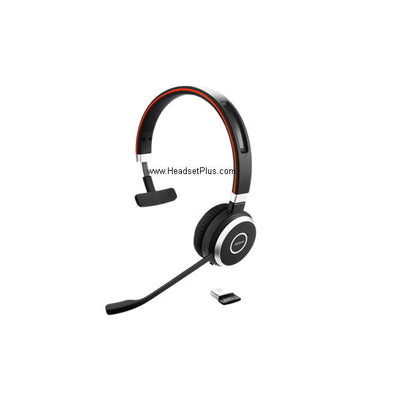
A longer microphone boom arm than the 55 SE, which makes the mute button easier to find by feel — a small thing that matters when you're muting mid-conversation. Over-the-head headband, one ear, replaceable battery.
Engage 65 SE Stereo
Binaural, covering both ears for true stereo and better isolation on a noisy floor. Over-the-head headband, lightweight build, replaceable battery.
Engage 65 SE Convertible
Designed for using one headset with a desk phone and computer simultaneously. Wearing style and battery arrangement differ from the headband models, so it's worth confirming the exact configuration for your needs before ordering.
Which one to choose
Three questions narrow it quickly:
- One ear or two? Mono keeps you aware of the room; stereo blocks more of it.
- Desk phone only, or desk phone and computer? The 65 SE range covers both simultaneously.
- Do you run Microsoft Teams? The Teams versions add a dedicated button and native notifications.
For a wider comparison against Poly's equivalent range, see our Savi 8400 series vs Jabra Engage 65 SE comparison.
Are Engage SE headsets compatible with older Engage bases?
No. Engage SE bases don't work with previous-generation Engage headsets, and SE headsets won't pair with older bases. If you're adding to an existing deployment, match the generation or replace base and headset together.
Do my existing Jabra lifters and EHS adapters work with Engage SE?
Yes. Previous-generation Jabra mechanical lifters and EHS adapters remain compatible with Engage SE headsets, so a generation change doesn't mean replacing your remote answering hardware.
What changed between Engage and Engage SE?
The main changes are USB-C replacing micro USB (charging up to 40% faster, full charge from flat in around 90 minutes), a Titanium Black finish, and reduced-plastic recyclable packaging. The significant one is that SE bases and older Engage headsets are no longer cross-compatible.
Can I use an Engage SE headset corded on a computer?
Yes, through Voice over USB. Connect the USB-C cable to a computer and the headset works corded with no loss of microphone or speaker performance — useful if the battery is low or you're away from the base.
What's the difference between the UC and Teams versions?
The Teams version adds native Microsoft Teams integration: Teams launches when the headset and computer power on, and Teams notifications are signalled through a dedicated LED colour. Both versions work across major UC platforms.
If you're buying Engage SE for the first time, the choice is straightforward. If you're adding to an existing Engage deployment, check your base generation first — that's the one thing that'll cost you a return. Call our team at 877-999-3838 with what you already have and we'll confirm what's compatible.
Comments (0)