

















































Headset compatibility guide: the three things that have to match
Any headset compatibility guide for Poly and Jabra comes down to three checks. First, the socket: a desk phone with a dedicated headset jack takes a quick-disconnect headset plus a bottom cable, a phone with only a handset jack needs an amplifier such as the Poly MDA524, and a computer softphone takes a USB headset and nothing else. Second, the brand: Poly quick-disconnect plugs and Jabra quick-disconnect plugs look alike and are wired differently, so a Poly headset needs a Poly cable or amplifier and a Jabra headset needs a Jabra one. Third, roaming: a DECT wireless headset carries call audio on its own, but answering and ending calls away from the desk needs an EHS cable matched to your exact phone model, or a mechanical handset lifter. Confirm those three and almost any business headset will work on almost any business phone.
What actually has to match
- The four-pin jack on a desk phone handset was never standardized, which is why brand-matched cords carry a wiring switch instead of one fixed pinout.
- Poly QD and Jabra QD are separate systems. Match the cable and the amplifier to the headset brand rather than to the shape of the plug.
- The Jabra GN1200 smart cord holds eight wiring positions, three of them amplified, and you flick through them until a dial tone appears.
- Wireless answers calls remotely only with an EHS cable matched to your phone, and DECT base stations are tied to a frequency band that changes by region.
Most compatibility trouble comes from the short cord between the headset and the phone rather than from the headset itself. Two separate things make that cord specific: the phone maker's own wiring, and the headset maker's own plug. Neither is an industry standard, so a cord that brings up a dial tone on one desk phone can produce silence on the next one along the row.
Start at the socket on your desk phone
The socket the headset ends up in decides everything else you buy, so look at the back and the side of the phone before you look at a single headset.
A dedicated headset jack is a four-pin socket marked with a small headset icon, separate from the one your curly handset cord uses, and the phone usually has a headset button next to the keypad to go with it. If your phone has that, a quick-disconnect headset and a brand-matched bottom cable is the whole order. If the only four-pin socket is the handset one, the headset goes through an amplifier, the handset cord plugs into the amplifier instead, and you switch between handset and headset there. If your calls run through a computer, none of this applies. Our guide to headset connector types covers every plug on the back of the phone if you are not sure what you are looking at.
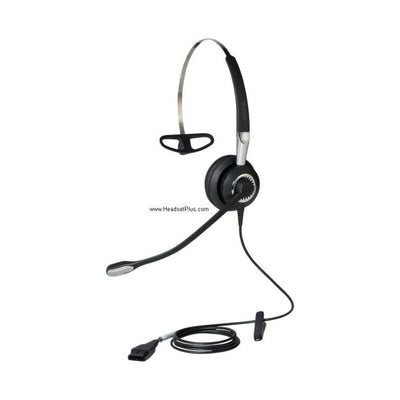
Quick disconnect: A quick disconnect, usually shortened to QD: the two-piece plug partway down a corded headset's cable, which lets you unclip the headset and walk away while the bottom half stays in the phone. Poly and Jabra each make their own version, and the two halves only mate with the same brand.
Why a headset cord needs a switch on it
The four-pin plug on a telephone handset cord was never covered by a wiring standard, so each phone manufacturer was free to put earpiece and microphone on whichever pins it preferred.
The labels RJ9, RJ10 and RJ22 all get used for those four-position plugs, and none of them is an official jack type. Registered jacks are defined for equipment that attaches to the public telephone network, and a handset attaches to the phone rather than to the network, so handset connectors never received a designation at all. Responsibility for those definitions has sat with the Administrative Council for Terminal Attachments since the FCC delegated it in 2001, and handset cordage sits outside that scope.
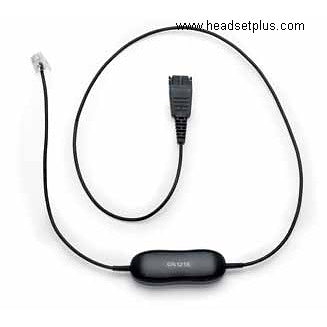
That is the reason a smart cord carries a slider. The Jabra GN1200 holds eight separate wiring schemes, and positions six, seven and eight add built-in microphone amplification for phones with a weak mic input. There is no chart to look up: you connect the Jabra GN1200 smart cord to the headset through the QD plug and move the slider one position at a time until you hear a dial tone. Poly does the same job with a lettered switch on the underside of its amplifier. The MDA524 runs A through F, mapped to six Poly direct-connect cable types: U10, A-10, U10P, HIS, U10P-S and HIC. Set the letter that matches the cable your phone takes.
Poly QD and Jabra QD are two different systems
A Poly quick-disconnect plug and a Jabra quick-disconnect plug are close enough in size and shape to fool anyone holding one of each, and they will not work together.
The MDA524 is built for Poly standard QD headsets, Poly digital QD headsets and Poly Y-training cables, and it works with any Poly H-Series headset. The GN1200 goes the other way, connecting Jabra headsets to business phones with a standard RJ9 headset port. Mixing the two leaves you with two parts that each work on their own and no working setup. That bites hardest on a second order months later, when someone replaces a frayed cord by matching the shape of the plug instead of the part number on the old one. If the Jabra side is the one you are building out, our guide to how to choose a jabra headset covers which models take which cord.
What each kind of phone needs
Four setups cover almost every desk in a US office, and the parts list for each is short.
| What the phone has | What sits between phone and headset | Poly | Jabra |
|---|---|---|---|
| Dedicated headset jack | Bottom cable, no amplifier | Poly QD bottom cable for that phone | Jabra GN1200 smart cord |
| Handset jack only | Amplifier, through the handset port | Poly MDA524 | Call to confirm the current Jabra amplifier |
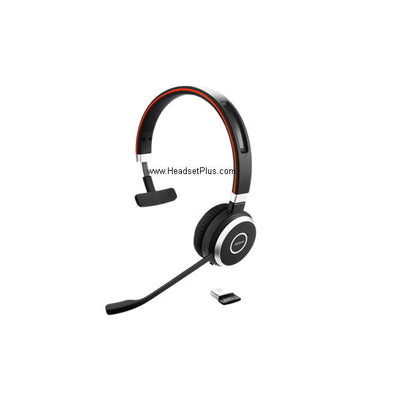
| Headset jack, and you leave the desk | Wireless base plus an EHS cable | Poly CS540 | Jabra Engage 65 SE |
| Computer softphone only | Nothing | Poly USB headset | Jabra USB headset |
Wireless adds one part, and that part is phone-specific
A DECT wireless headset carries call audio from almost any desk phone through its base, and answering or ending a call from across the office needs an EHS cable matched to your exact phone model.
Without one the headset still works, and you walk back to the phone to press answer, which removes most of the reason people buy wireless. Phones with no EHS support take a mechanical handset lifter instead, a small motor that physically lifts the handset off the cradle. The Poly CS540 is still the default on the Poly side, and the Jabra Engage 65 SE is the current Jabra DECT model, replacing the Pro 920 and 9450 that older guides still recommend. Our EHS cable guide explains what a given phone expects on that line.
Region is the other thing to settle before a wireless order crosses a border. DECT in North America and DECT in Europe run on bands that do not overlap, so a base bought for a US office is not a base you can ship to a European one.
1920-1930 MHz for DECT in the US against 1880-1900 MHz in Europe, ten channels on eachSoftphone calls skip almost all of this
If your calls run through Microsoft Teams, Zoom, Webex or Cisco Jabber, any USB or Bluetooth headset will work, with no bottom cable, no amplifier and no EHS cable.
What certification buys you is the buttons on the headset. Microsoft awards Certified for Microsoft Teams only to devices that pass every requirement of a test program covering audio and video quality, user interface, device management and security. Buy a model certified for the platform your team actually calls on, and the answer and mute keys act inside the app rather than only on system volume. An uncertified headset still carries the call. You just reach for the mouse to mute.
Check these three before you order
Confirm the exact model number on the front of the phone, the headset brand already in the building, and whether the person wearing it stays at the desk.
Some phone families add their own rules on top of the three checks. Cisco wires its handset port its own way and uses Cisco-specific EHS cables, covered in our guide to Cisco IP phones. Polycom VVX and Poly Edge phones vary by port type, and each takes a different EHS cable, laid out on our Polycom VVX headsets page. If the room is the problem rather than the phone, our piece on how to reduce background noise on calls is the better starting point. Once the connection is settled, what is left is comfort, microphone type and one ear or two, which our wired headset buying guide works through.
Browse the compatible wired headset range once you know which connection you need, or call 877-999-3838 with the make and model on the front of the phone and we will match the headset, the cord and the EHS cable in one go.
Can I use a Poly headset with a Jabra cord or amplifier?
No. Poly and Jabra each use their own quick-disconnect design, and although the two plugs are similar in size and shape they are not interchangeable. A Poly headset needs a Poly bottom cable or a Poly amplifier such as the MDA524, and a Jabra headset needs a Jabra cord such as the GN1200. Match every part in the chain to the brand printed on the headset.
Why does my headset cord have a switch on it?
The switch exists because the four-pin handset jack on a desk phone was never given a wiring standard, so different phone makers use different pin assignments. The Jabra GN1200 smart cord carries eight wiring positions, three of which add microphone amplification, and you move the slider until you hear a dial tone. The Poly MDA524 uses a lettered switch running A to F that maps to six Poly direct-connect cable types.
Do I need an amplifier or just a bottom cable?
An amplifier is needed only when the desk phone has no dedicated headset jack, because the amplifier connects through the handset port instead. A phone with a headset jack and a headset button takes a bottom cable on its own, which costs less and has fewer parts to go wrong. Wireless headsets need neither, since the base station does that job.
Will a wireless headset bought in the US work in a European office?
No. DECT wireless headsets run on 1920 to 1930 MHz in the United States and on 1880 to 1900 MHz in Europe, and the two bands do not overlap. A base station built for one region cannot reach a headset built for the other, so order the regional version for the office the headset will live in.
Comments (0)