

















































101voice provides VoIP desk phones — the IP862G, IP860G, IP960G, IP962G, IP982G, and IP1060G — and like most SIP phones, they have a dedicated headset port that accepts a standard RJ9 QD headset. That covers the wired side. For wireless, the phones support EHS for remote answering, with a specific menu step to enable it. Here's the full compatibility picture, by brand and connection type.
Key takeaways
- 101voice phones have a headset port — Jabra Direct Connect and Poly QD headsets plug in with the right cord.
- Poly corded headsets connect through the MDA524 amplifier (replacing the discontinued M22) for better volume control.
- For wireless remote answering, use the Poly APD-80 EHS cable and enable ring detection in the 101voice phone menu.
- Jabra wireless headsets need the GN1000 RHL handset lifter for remote answer on 101voice phones.
- The original Jabra Engage 65/75 and Poly Voyager 4245 are discontinued — the Engage 65 SE and Voyager Focus 2 are the current replacements.
Corded headsets for 101voice phones
From Jabra
Jabra's Direct Connect headsets include a pre-configured smart cord that plugs straight into the 101voice headset port — no separate bottom cable needed. Switch the cord's adjustment switch to find the clearest sound for your specific phone model.
- Jabra Biz 1500 Mono Direct Connect — the entry-level pick, covering one ear with a noise-cancelling mic that blocks up to 60% of background noise. Light, durable, and simple to set up.
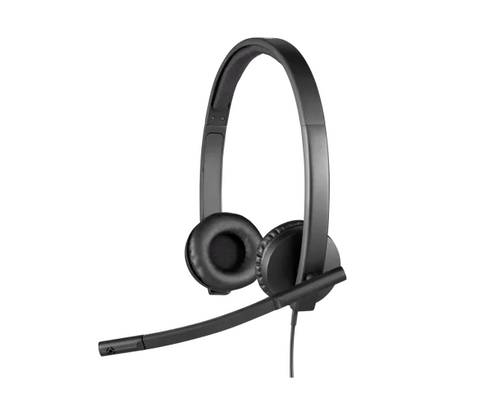
- Jabra Biz 2300 Duo Binaural Direct Connect — both ears covered for louder environments. Kevlar-reinforced wiring, a 360-degree Air Shock boom arm, and a Quick Disconnect so agents can step away without removing the headset. The step up when background noise is a real problem.
- Jabra Biz 2400 II Direct Connect — the flagship Jabra corded option, with Ultra Noise Canceling and a convertible wearing style (over-head, over-ear, or behind-neck). Leatherette cushions for all-day comfort. The smart cord's adjustment switch handles 101voice phone tuning the same way.
From Poly
Poly (Plantronics) QD headsets connect to a 101voice phone through the Poly MDA524 amplifier — it sits between the headset and the phone, giving you independent volume and mute control. Note: the older M22 Vista amplifier has been discontinued and is replaced by the MDA524 for all new setups.
- Poly EncorePro HW540 — a convertible QD headset (over-head, over-ear, or behind-neck) with a noise-cancelling boom and SoundGuard hearing protection. Foam or leatherette cushions, designed for call-center volume use.
- Poly EncorePro HW720 — the premium binaural step up, with a retractable microphone that positions precisely, leatherette cushions, and 78g lightweight design. Ideal for agents on calls all day in a noisy environment.
Wireless headsets for 101voice phones
From Jabra
Jabra wireless headsets connect to 101voice phones through the GN1000 RHL handset lifter for remote answer — the lifter physically raises the handset when a call comes in. The EHS cable approach (below) doesn't apply to Jabra on 101voice.
- Jabra Engage 65 SE — the current DECT wireless headset for 101voice desks, replacing the discontinued original Engage 65. Up to 490 feet of DECT range, 13 hours of talk time, simultaneous desk phone and computer connectivity, and a built-in busylight. Handles up to 3× more headsets per location than standard DECT.
Note: the original Jabra Engage 65 Mono and the Jabra Engage 75 Stereo are discontinued — the Engage 65 SE covers both use cases (mono and stereo variants available).
From Poly
Poly wireless headsets connect via the APD-80 EHS cable for electronic remote answer — no lifter required. The APD-80 plugs directly into the 101voice phone's EHS port and the wireless base.
- Poly CS540 — the best-selling DECT wireless desk-phone headset, 21 grams, three wearing styles, 7 hours of talk time and 350 feet of range. The default wireless pick for most 101voice desks.
- Poly Voyager Focus 2 — three-level ANC, Acoustic Fence boom mic, and Class 1 Bluetooth for desk phone + computer + mobile phone. The choice when you need noise cancellation for a louder environment. (Note: the Poly Voyager 4245 is discontinued — the Focus 2 is the current replacement.)
For a stereo DECT wireless option, the Poly Savi 7320 covers both desk phone and computer simultaneously — it replaced the Savi 7220 with improved range and encryption.
Enabling remote answer on 101voice phones
For Poly wireless headsets using the APD-80 EHS cable, the EHS function is enabled on 101voice phones by default — but ring detection in the headset requires one menu change:
- Navigate to Menu on the phone.
- Select Features.
- Select General.
- Set Ring from Headset to either Enable or Group Ring.
Enable vs Group Ring: Enable rings only in the headset — you won't hear the phone ringing from the speaker. Group Ring rings in both the headset and the phone. Group Ring is the recommended setting, since it ensures you hear the call whether or not the headset is on your head.
For Jabra wireless headsets using the GN1000 lifter, no phone-menu step is needed — the lifter's ring sensor picks up the phone's ringer directly. See our GN1000 setup guide for calibrating the ring sensor.
What headset works with a 101voice IP desk phone?
101voice phones (IP862G, IP860G, IP960G, IP962G, IP982G, IP1060G) work with corded QD headsets through the headset port — Jabra Direct Connect models connect directly, while Poly QD headsets need the MDA524 amplifier. For wireless, the Poly CS540 and Jabra Engage 65 SE are the go-to DECT picks, with the Poly APD-80 EHS cable enabling remote answer on Poly headsets.
How do I enable remote headset answering on a 101voice phone?
For Poly wireless headsets, plug in the APD-80 EHS cable, then go to Menu → Features → General on the phone and set Ring from Headset to "Group Ring" — this rings in both the headset and the phone speaker. For Jabra wireless headsets, use the GN1000 RHL handset lifter instead; no phone menu step is required.
Do I need an amplifier for a Poly headset on a 101voice phone?
Yes, for corded Poly QD headsets. The Poly MDA524 amplifier connects between the headset and the phone's headset port, providing independent volume and mute control. The older M22 Vista amplifier that older guides recommend has been discontinued — the MDA524 is its current replacement.
What replaced the Jabra Engage 65 and Engage 75 for 101voice phones?
Both the original Jabra Engage 65 (Mono and Stereo) and the Jabra Engage 75 have been discontinued and replaced by the Jabra Engage 65 SE, which improves on both with extended battery life, USB-C, and higher headset density per location. The Engage 65 SE is the current DECT wireless recommendation for 101voice desk phones.
What is the APD-80 EHS cable for 101voice phones?
The Poly APD-80 is an EHS (electronic hook switch) cable that connects a Poly wireless headset base to a compatible desk phone, allowing the headset to answer and end calls remotely without a handset lifter. It works with 101voice SIP phones as well as Grandstream, ShoreTel, Allworx, and NEC phones — after plugging it in, enable Group Ring in the phone's menu for the headset to ring on incoming calls.
101voice phones are standard SIP devices, so the compatibility logic is straightforward once you know the right cable. For corded setups, match the connection to your headset brand; for wireless, pair any Poly headset with the APD-80 EHS cable and the phone menu step. Browse current options on the wired office headsets and wireless headsets collections, or call our team at 877-999-3838 and we'll confirm the right setup for your 101voice model.
Comments (0)