

















































Whether you can run more than one Plantronics wireless headset off a single base depends entirely on which generation you own — current CS500-series and Savi models handle it differently than legacy CS50/CS55/CS351/CS361 and the Voyager 510S. Here's how each actually works.
Key takeaways
- Current CS500-series and Savi models support pairing extra headsets for conference/training use, but only the last-paired headset stays active at a time.
- Legacy models (CS50, CS55, CS351, CS361, Voyager 510S) support only one active headset per base at any moment.
- Placing an inactive headset on the base to charge (legacy models) temporarily disconnects the active headset — press Call Control to reconnect it.
- Adding a second headset to a legacy base always requires a full re-subscription (pairing) process.
- For true multi-shift use with two people sharing a desk, a separate charging base is generally the cleaner setup rather than relying on the swap-and-reconnect behavior.
Current CS500 series and Savi: pairing an extra headset
On current Plantronics CS500-series headsets (CS510, CS520, CS540) and Savi wireless models, you can pair an additional headset to the same base for a conference call or to let a supervisor listen in on training. For example, a spare CS540 replacement/extra headset can be paired to an existing CS540 base so two people can talk and listen on the same call — genuinely useful for training a new hire by listening in on their calls.
Myth
Pairing extra headsets to a Plantronics base always means only the last one stays active.Reality
It depends on the system. On the CS540, pairing works sequentially — the most recently paired headset is the live one, so it suits handoffs rather than simultaneous conferencing. The older Savi Office WO series worked differently, supporting a master headset plus up to three guests all live on the same call. Because this varies by generation, confirm the behavior for your specific model rather than assuming either pattern.Savi Office (WO series): true guest conferencing
The legacy Savi Office line — WO100, WO200, WO300, and WO350 — worked differently from the CS540's last-paired behavior. It supported genuine simultaneous conferencing: one master headset plus up to three "guest" headsets, all live on the same call at once.
Guest headsets had deliberately limited control. They could adjust their own receive volume and mute their own microphone, but had no call control — a guest could only join after the master headset had already picked up a live call, and every guest lost its connection the moment the master disconnected.
Adding a guest headset to a live call
- With the master headset already on a call, either place the guest headset into the master's charging cradle (if it's the same style), or put it into over-the-air subscription mode by holding its volume-up button for three seconds until the indicator light turns solid green.
- Short-press (under one second) the subscription button on the base. The subscription light flashes yellow and green.
- The subscription light turns solid yellow and a tone plays in the master headset, signalling that a guest wants to join.
- Press the call control button on the master headset within five seconds. Miss that window and the request is rejected, with an error tone playing in the guest headset.
To leave, a guest presses the call control button on their own headset — a single tone plays in the master headset as each guest drops off.
The Savi Office WO series is long discontinued, superseded first by the Savi 700 series and now by the Savi 8400 series. If you need multi-person listen-in on a current system, call our team to confirm which of today's models supports the configuration you need, since guest-conferencing behavior varies between generations.
Multi-shift use: a separate headset per shift
If your setup is more about multiple people sharing one desk phone across shifts — a 24/7 dispatch desk, for instance — rather than conferencing on the same call, each user having their own headset (for hygiene as much as convenience) is the more practical route. Historically this required a specific charging accessory tied to the older W440/W740 base ecosystem; if you're setting this up today, confirm the current compatible charging accessory with our team rather than assuming a specific older part is still available.
Legacy models: CS50, CS55, and Voyager 510S
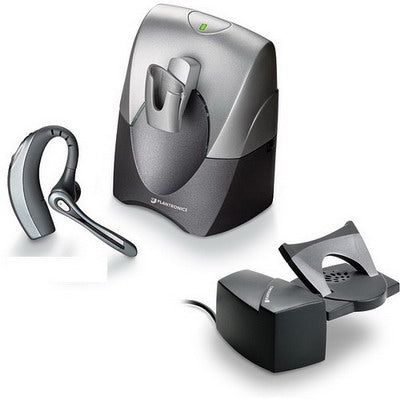
On older Plantronics wireless headsets — CS50, CS70, CS351, and CS361 — only one headset can be actively connected to a base at any given time. You can, however, have the active headset in use while a second, inactive headset charges on the same base simultaneously.
One important behavior to know: placing the inactive headset on the base for charging temporarily disconnects the active headset from its pairing. Press the Call Control button on the active headset to reconnect it. Once the second headset finishes charging and you want to swap to it, a full re-subscription (pairing) process is required — the base doesn't automatically recognize a new headset without it.
For the CS50/CS55, see our CS50/CS55 re-sync guide for the exact steps. For the CS351/CS361 SupraPlus Wireless models, the same general re-subscription principle applies — charge the extra headset on the same base, then re-pair when swapping. The Voyager 510S follows a similar pattern and has its own dedicated charger available for individual charging.
Can I use more than one wireless headset with the same Plantronics base?
Yes, but how it works depends on your model. Current CS500-series and Savi headsets support pairing an extra headset for conference or training use, though only the most recently paired one stays active. Legacy models (CS50, CS55, CS351, CS361) only allow one active headset at a time, with the second charging inactively on the same base.
Can all 3 extra headsets be live on a call at once with a CS540?
No — only the last-paired headset stays active. The "up to 3" capability refers to being able to pair different extra headsets in sequence, not having three simultaneous live microphones on one call.
Why did my active headset disconnect when I put a second one on the charging base?
On legacy models like the CS50 or CS55, placing a second headset on the base to charge temporarily disconnects the active headset's pairing. Press the Call Control button on the active headset to reconnect it.
What's the best setup for multiple people sharing one desk phone across shifts?
A separate headset per person, each with their own charging accessory, is generally the more practical and hygienic setup than relying on the base's charging-swap behavior. Confirm the current compatible charging accessory for your exact headset model with our team.
Whether you need a conference-listen-in setup or a genuine multi-shift arrangement, the right approach depends heavily on your exact headset model. Call our team at 877-999-3838 and we'll help you set up the right multi-user configuration.
Comments (0)