














































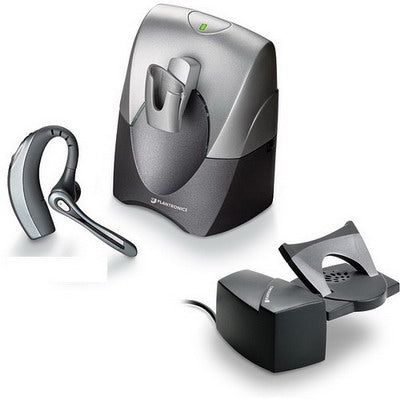
The Plantronics CS70 and CS70N are long discontinued, but the setup, troubleshooting, and reset procedures below still apply if you're running one. This covers installation, fixing echo, remote answering, and the two different reset procedures — a basic system reset versus adding a second headset for shift work.
Key takeaways
- Install through the handset port, not the headset port — plugging into the wrong port causes echo, noise, and distortion.
- Echo is fixed by lowering transmit volume via the ABCD switch, fine-tuned with the base's + and − buttons.
- Remote answering needs an HL10 lifter for most phones, or an HL1 for phones with a curved left edge or an extreme angle.
- A system reset and a multi-shift re-subscribe are two different procedures using different button sequences — covered separately below.
- For battery replacement and discontinued-parts guidance, see our dedicated CS70/CS70N battery post.
Installing the CS70/CS70N
- Locate the two ports on the bottom of the charging base — one marked with a full telephone icon, one with a hand receiver icon.
- Unplug the hand receiver cord from your existing telephone and plug it into the base's hand receiver port.
- Take the short cable included with the CS70/CS70N and plug one end into the base's full telephone port, and the other end into where the hand receiver was on your phone.
- Plug in the AC power, then adjust the configuration settings for the clearest audio.
Fixing echo or side tone
Echo is usually caused by the transmit (speak) level being set too high. First, lower the telephone's own volume. If echo persists, adjust the headset's master transmit control — the ABCD switch on the bottom of the base (A is lowest, D is highest), fine-tuned with the + and − buttons on the back of the base. If that doesn't resolve it, try a different position on the configuration dial on the left side of the base — position 1 works for most phones.
Myth
If my handset lifter moves on its own when I remove the headset from the base, something's wrong with the lifter.Reality
Not necessarily — this is usually the IntelliStand feature working as intended. When enabled via the switch on the right side of the base, IntelliStand senses when the headset is removed from or returned to the base and automatically activates a connected HL10 lifter to answer or end the call. If you don't want this automatic behavior, switch IntelliStand off.Remote answering: HL10 vs. HL1
To answer calls remotely (away from your desk), you'll need a Plantronics HL10 handset lifter. The HL10 only lifts the handset — if your phone requires pressing a button to receive a call, you'll still need to do that separately. Also confirm the wireless base (not the lifter) is connected via the handset port, not a headset port, since installing it incorrectly there is a common issue.
Depending on your phone's shape, you may need an HL1 instead of the HL10. If the phone has a curved edge on the left side, or sits at an extreme angle, the HL10's flat-edge design won't seat properly and you'll need the older HL1. Call our team at 877-999-3838 and we can confirm which lifter fits your exact phone.
Performing a system reset
If you're experiencing acoustic or power problems, a system reset often resolves them:
- Check the switch on the right side of the charging base — set it to "−", not "=".
- Take the headset out of the charging base.
- On the headset, simultaneously press and hold the call control button and both the volume + and − buttons for 5 seconds.
- When the yellow light on the headset blinks, release all buttons.
- Press and hold the call control button alone again — the yellow light will blink a second time.
- Release the call control button.
- Unplug the AC power from the bottom of the charging base for 5 seconds.
- Plug the AC power back into the base.
The headset and base ship pre-subscribed to each other. If you're setting up a replacement headset instead of resetting an existing one, use the re-subscribe procedure below instead.
Adding a second headset for multi-shift use
If multiple people share one CS70/CS70N system across different shifts, you can buy additional headsets and pair each one to the same base using this re-subscribe (multi-pair) procedure:
- Check the switch on the right side of the charging base — set it to "−", not "=".
- Take the headset out of the charging base.
- Press the + button on the back of the base until the red light on the front of the base flashes.
- Return the headset to the charging cradle.
- Press and hold the + button on the headset until a yellow light appears on the headset.
- Pairing is complete when the headset's yellow light goes out and the base's red light is solid.
Battery replacement and discontinued parts
The CS70 and CS70N have no user-replaceable battery, and genuine replacement parts are increasingly hard to find for a headset this old — see our dedicated CS70/CS70N battery guide for what to do when the battery finally wears out, including the current Plantronics CS540 as the modern replacement.
How do I install a Plantronics CS70 or CS70N?
Plug the hand receiver cord from your phone into the base's "hand receiver" port, then connect the included short cable between the base's "full telephone" port and where the hand receiver was on your phone. Plug in the AC power and adjust the configuration settings for clear audio.
Why does my CS70/CS70N have an echo?
Usually the transmit volume is set too high. Lower the phone's own volume first, then adjust the ABCD switch on the base (A lowest, D highest) and fine-tune with the + and − buttons. If it persists, try a different configuration dial position — 1 works for most phones.
Do I need the HL10 or HL1 lifter for my CS70?
Most phones use the standard HL10. You need the older HL1 instead if your phone has a curved edge on the left side or sits at an extreme angle, since the HL10 requires a flat edge to seat properly.
How do I reset a Plantronics CS70/CS70N experiencing acoustic or power issues?
Set the base's right-side switch to "−", remove the headset from the base, then simultaneously hold the call control button and both volume buttons for 5 seconds until the yellow light blinks. Release, press the call control button alone until it blinks again, release, then unplug the base's AC power for 5 seconds and reconnect it.
Can I add a second headset to my CS70/CS70N base for shift work?
Yes, using the re-subscribe (multi-pair) procedure: set the right-side switch to "−", press the base's + button until its red light flashes, return the headset to the cradle, then hold the headset's + button until its yellow light appears. Pairing completes when the yellow light goes out and the base's red light is solid.
Most CS70/CS70N issues come down to port placement, transmit volume, or one of the two pairing procedures above. If you've worked through these and it's still not resolved — or the battery is the actual issue — call our team at 877-999-3838.

Comments (0)