


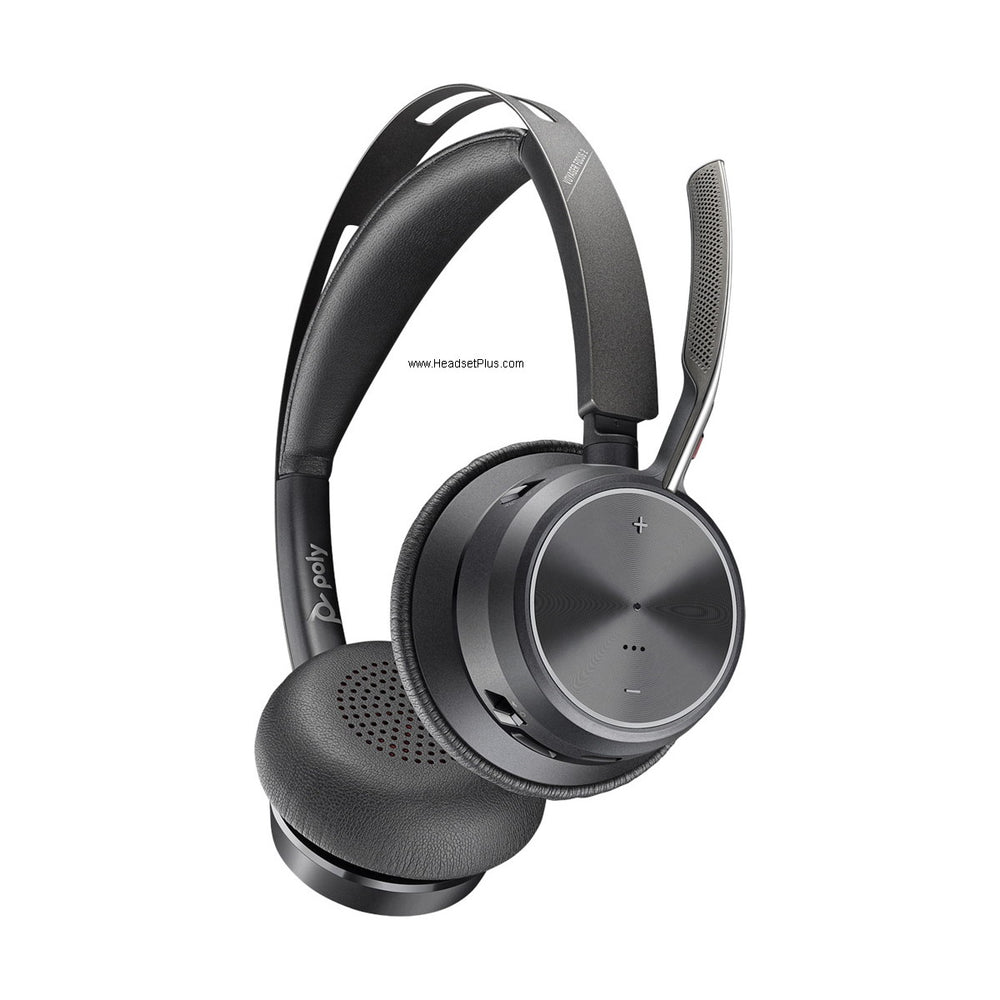












































The Plantronics Voyager Pro UC (B230 and B230-M) was the headset that introduced smart sensors to Poly's Bluetooth line — put it on, the call answers itself. It's long discontinued, but if you're still running one, here's how its features actually work and what replaced it.
Key takeaways
- The Voyager Pro UC B230/B230-M is discontinued; the Poly Voyager Focus 2 is the current equivalent.
- Smart sensors auto-answer calls when you put the headset on — but they never auto-end a call.
- Removing the headset mid-call transfers mobile audio back to the handset; the call stays active.
- Class 2 Bluetooth with about 33 feet of range — current Poly headsets use Class 1 dongles reaching far further.
- The B230 could not switch between an active PC call and an active mobile call; current models can.
How Smart Sensor technology works
The sensors work on the same principle as the capacitive touch sensors in phone and tablet screens. When the headset comes close to your ear, the sensor detects conductive skin and signals that change of state to the headset's processor. Poly designed in extra processing specifically so that handling the headset, or dropping it in a pocket or bag, is less likely to trigger a false detection.
What that enables in practice:
- Putting the headset on answers an incoming call automatically.
- An in-progress mobile call transfers to the headset when you put it on, and back when you take it off.
- When you're not wearing it, the call button locks — which is what stops it dialing from inside a bag.
Myth
If putting the headset on answers a call, taking it off should end the call.Reality
It doesn't, and that's deliberate. The Voyager Pro UC has auto-answer but no auto-end. Remove it during a mobile call and the audio transfers back to your phone's handset with the call still live — that's the smart transfer feature working as designed. Remove it during a PC call and the call simply continues as though you were still wearing it. If you want the call ended, you have to end it.Do the sensors cost you battery life?
No measurable impact from the sensors themselves. Streaming audio has a far greater effect, and varies significantly depending on the phone and volume level. PC wideband calls reduce talk time by roughly 30 minutes.
Range and Bluetooth class
The B230 uses Class 2 Bluetooth with up to about 33 feet of range. This is worth flagging if you're comparing it to anything current: modern Poly headsets ship with a Class 1 USB dongle reaching roughly 160 feet to a computer. If your B230's range feels limiting, that's not a fault — it's the generation.
The PC and mobile call limitation
One genuine constraint worth knowing: the Voyager Pro UC cannot switch between an active PC call and an active mobile call. To answer an incoming PC call while on a mobile call, or the reverse, you have to end the current call first.
This is the clearest functional gap versus current hardware. The Poly Voyager Focus 2 maintains simultaneous connections to a computer and a mobile device and switches between them, which is precisely the workflow the B230 couldn't support.
What the B230 added over earlier Voyager Pro models
Against the older Voyager Pro WG200B, the UC B230 added A2DP audio streaming, spoken voice alerts for connection status and talk time, an iPhone battery meter, Smart Sensor technology, and a smaller USB adapter. Against the Voyager PRO+ mobile version, it added wideband support, Smart Sensors, and the Bluetooth USB adapter.
Worth noting how far these have travelled: A2DP streaming and smart sensors were differentiators in the B230's era and are now standard across the Poly range. Our Poly Bluetooth headset FAQ covers how they work on current models.
Software and firmware
The B230 era used Plantronics PURE software, which has been superseded several times over — first by Plantronics Hub, then Poly Lens, and now the HP Poly Studio App. If you're maintaining a B230 today, support for hardware this old is limited, and any advice pointing you to Plantronics' old software download pages predates at least two rebrands.
One thing firmware could never fix on this model: features built into the hardware, like the sensors and A2DP, were never addable to earlier Voyager Pro units by software update.
The B230 is discontinued — what to use now
The Poly Voyager Focus 2 is the current successor: Class 1 Bluetooth with substantially more range, Digital Hybrid active noise cancelling the B230 didn't have, simultaneous desk phone, computer, and mobile connectivity, and the same smart-sensor auto-answer behavior in a current, supported product.
Is the Plantronics Voyager Pro UC B230 still available?
No, it's long discontinued. The Poly Voyager Focus 2 is the current equivalent, adding Class 1 range, active noise cancelling, and simultaneous PC and mobile connectivity.
Does taking off my Voyager Pro UC end the call?
No. The headset has auto-answer but not auto-end. Removing it during a mobile call transfers the audio back to your phone with the call still active; removing it during a PC call leaves the call running as if you were still wearing it.
How does Smart Sensor technology detect that I'm wearing the headset?
Through capacitive sensing, the same principle as a phone touchscreen. The sensor detects conductive skin when the headset comes near your ear and signals that to the headset's processor. Additional processing reduces false triggers from simply handling the headset or putting it in a pocket.
Can I take a PC call while on a mobile call with the B230?
No — the Voyager Pro UC can't switch between two active calls. You have to end the current call before answering the other. Current models like the Poly Voyager Focus 2 maintain both connections and switch between them.
What's the range of the Voyager Pro UC B230?
About 33 feet, using Class 2 Bluetooth. Current Poly headsets ship with a Class 1 USB dongle reaching roughly 160 feet to a computer, so noticeably shorter range on a B230 is the generation rather than a fault.
If your Voyager Pro UC is still working, the sensor behaviour above explains most of what people find confusing about it. When it's time to replace it, the Voyager Focus 2 carries the same smart-sensor idea into a headset with far more range and no PC-versus-mobile call restriction. Call our team at 877-999-3838 with any questions.

Comments (0)